
De'Longhi ECAM 350.75S
Contents
De'Longhi Dinamica Super Automatic Espresso Machine
User Manual - Model ECAM 350.75S
Your guide to mastering the art of coffee at home.
Introduction
The De'Longhi Dinamica ECAM 350.75S is a super-automatic espresso machine designed for coffee enthusiasts seeking convenience and quality. This machine allows you to prepare a wide variety of coffee and milk-based beverages, from rich espresso to creamy cappuccinos, with ease. Its intuitive design and advanced features ensure a premium coffee experience in your home.

Figure 1: De'Longhi Dinamica ECAM 350.75S Espresso Machine.
1. Setup and First Use
Before operating your De'Longhi Dinamica machine, please follow these initial setup steps carefully.
1.1 Unpacking and Placement
- Remove all packaging materials from the machine and its accessories.
- Place the machine on a stable, flat surface, away from water sources and heat. Ensure adequate ventilation around the unit.
- The machine operates on 220-240V~50/60Hz. A power adapter (8.2x6.5x3.8 inches) is included for use in the United States.
1.2 Filling the Water Reservoir
The machine features a convenient front-loading 47-ounce (approx. 1.4-liter) water reservoir.
- Pull out the water reservoir from the front of the machine.
- Fill the reservoir with fresh, cold water up to the MAX line.
- Insert the water filter into the reservoir as per the filter instructions (a filter is included to reduce descaling frequency).
- Slide the reservoir back into its position until it clicks securely.
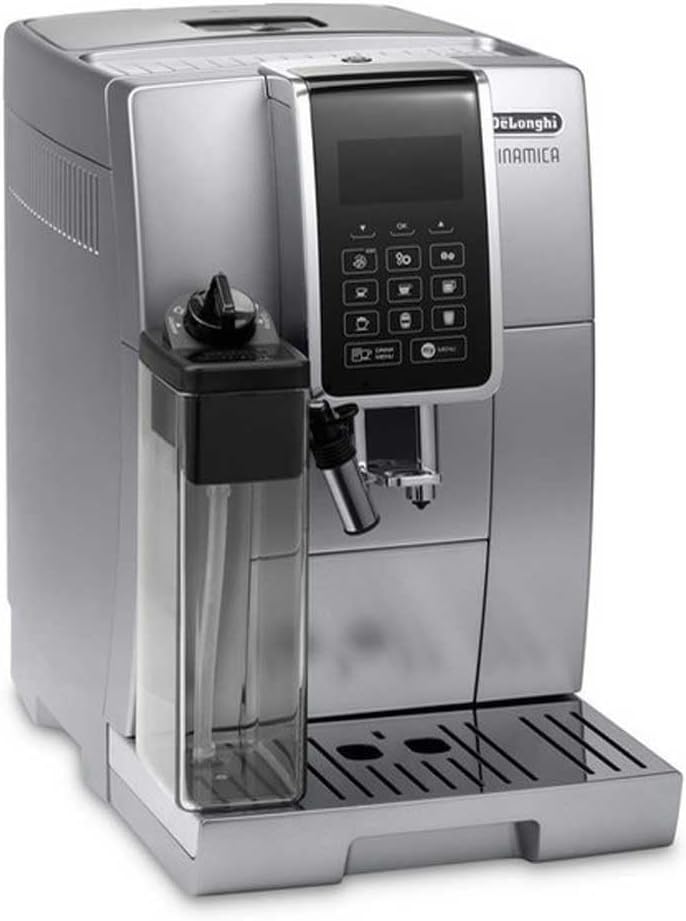
Figure 2: Front-loading water reservoir for easy refilling.
1.3 Filling the Bean Hopper
The bean hopper holds approximately half a pound of whole coffee beans.
- Open the lid of the bean hopper located on top of the machine.
- Pour fresh whole coffee beans into the hopper.
- Close the lid securely.
1.4 Initial Rinse Cycle
Upon first use or after a long period of inactivity, the machine will perform an automatic rinse cycle to clean the internal circuits.
- Place a container under the coffee spouts.
- Follow the on-screen prompts to initiate the rinse cycle.
- The machine will dispense hot water and then be ready for use.
2. Operating Your Machine
The De'Longhi Dinamica features a touch control panel for intuitive operation and customization.

Figure 3: Intuitive touch control panel for beverage selection.
2.1 Coffee Preparation
Your machine can brew coffee from whole beans or pre-ground coffee.
- Using Whole Beans: Select your desired coffee beverage from the touch screen. The integrated 13-setting conical burr grinder will grind fresh beans for each cup. You can adjust the grind setting for different coffee strengths.
- Using Pre-Ground Coffee: For pre-ground coffee, use the bypass doser. Add one scoop of pre-ground coffee to the dedicated compartment before selecting your drink.
- Adjustable Spout: The coffee spout can be adjusted vertically to accommodate various cup sizes, preventing splashes and maintaining crema.
- Double Boiler System: This exclusive feature allows for simultaneous coffee brewing and milk steaming, saving time and ensuring optimal temperature for both processes.

Figure 4: The machine dispenses freshly brewed espresso.
2.2 Milk-Based Beverages (LatteCremma System)
The LatteCremma System provides perfectly frothed milk for your favorite specialty drinks.
- Attach the thermal milk jug to the machine.
- Fill the jug with cold milk.
- Select a milk-based beverage such as Cappuccino, Caffelatte, Latte Macchiato, or Flat White from the menu.
- The machine will automatically froth and dispense milk directly into your cup.

Figure 5: Preparing a layered milk-based coffee beverage.
2.3 User Profiles and Customization
The Dinamica allows for up to six user profiles, enabling personalized drink settings for each user.
- Each profile can save preferred settings for coffee strength, temperature, and milk quantity for various drinks.
- Profiles can also be configured with custom auto start and shut-off times.
- Manage and customize profiles through the machine's menu or a connected mobile application.

Figure 6: The De'Longhi Dinamica can create a wide range of coffee beverages.
3. Maintenance and Cleaning
Regular maintenance ensures optimal performance and longevity of your machine.
3.1 Daily Cleaning
- Drip Tray and Grounds Container: Empty and clean the drip tray and coffee grounds container daily. The machine provides indicators when these need attention.
- Removable Brewing Unit: The brewing unit has a variable capacity and is removable for easy cleaning. Rinse it under running water regularly.
- Milk Jug and Frother: After each use, clean the thermal milk jug and the automatic frother. The machine has a Cappuccino System cleaning indicator. Many components are dishwasher safe.
3.2 Descaling
Descaling is crucial for maintaining machine performance and coffee quality. The machine features automatic descaling programs.
- The machine will indicate when descaling is required.
- Follow the on-screen instructions and use a suitable descaling solution (a descaling bottle is included with the product).
- Regular descaling, especially with the water filter in use, will prolong the life of your machine.
3.3 Water Hardness Programming
Program the water hardness level according to your local water supply to optimize descaling intervals.
4. Troubleshooting
This section provides general guidance for common issues. For detailed troubleshooting, please refer to the complete user manual.
| Problem | Possible Cause | Solution |
|---|---|---|
| Machine not turning on. | Not plugged in, power outlet issue. | Check power cord connection and wall outlet. |
| "Empty water" indicator on. | Water reservoir is empty or not correctly inserted. | Refill water reservoir and ensure it is pushed in completely. |
| "Empty grounds" indicator on. | Coffee grounds container is full. | Remove, empty, and reinsert the coffee grounds container. |
| Coffee is too weak/diluted. | Grind setting too coarse, insufficient coffee dose, or water hardness setting. | Adjust grinder to a finer setting, increase coffee strength via menu, check water hardness setting. |
5. Specifications
Key technical specifications for the De'Longhi Dinamica ECAM 350.75S.
| Feature | Detail |
|---|---|
| Brand | De'Longhi |
| Model Number | ECAM 350.75S |
| Color | Silver |
| Dimensions (L x W x H) | 9.29 x 19.49 x 19.49 inches |
| Item Weight | 20.9 pounds |
| Voltage | 230 Volts (with included adapter for US) |
| Water Reservoir Capacity | 47 Ounces |
| Grinder Settings | 13-setting conical burr grinder |
| Pump Pressure | Up to 15 bars |
| Operation Mode | Fully Automatic |
| Included Components | Filter, Milk Frother (Thermal Milk Jug) |
6. Warranty and Support
Your De'Longhi Dinamica Super Automatic Espresso Machine comes with a 12-month Warranty. De'Longhi also offers an Unconditional Satisfaction Guarantee.
For any questions, technical assistance, or warranty claims, please contact De'Longhi customer support. Refer to the product packaging or the official De'Longhi website for the most current contact information.
Ask a question about this manual
Ask about setup, troubleshooting, compatibility, parts, safety, or missing instructions. Manuals+ will review the question and use this page’s manual context to help answer it.