
1. Safety Information
Read all instructions carefully before operating the XPOWER X-2480A Air Scrubber. Failure to follow these instructions may result in electric shock, fire, or serious injury.
- Electrical Safety: Always connect the unit to a properly grounded outlet. Do not operate with a damaged cord or plug. Do not immerse the unit in water or use it in standing water. Ensure hands are dry before handling the plug or controls.
- Thermal Protection: The unit is equipped with dual thermal protection. If the unit overheats, it will automatically shut off. Unplug the unit, allow it to cool, and check for obstructions before restarting.
- GFCI Outlets: The built-in GFCI power outlets provide additional protection against electrical hazards. Test the GFCI outlets regularly as per manufacturer instructions.
- Filter Maintenance: Regularly inspect and replace filters to maintain optimal performance and prevent motor strain. Operating with clogged filters can lead to overheating and reduced efficiency.
- Placement: Place the unit on a stable, level surface. Ensure adequate clearance around the air intake and exhaust to allow for proper airflow.
- Supervision: Do not allow children or untrained individuals to operate the unit.

Image 1.1: Side view of the XPOWER X-2480A Air Scrubber, showing important warning labels regarding electrical safety and proper usage.
2. Product Overview
The XPOWER X-2480A is a compact and powerful air scrubber designed for professional use in various environments, including construction, water damage restoration, and mold remediation. It features a 3-stage filtration system to effectively remove airborne particulates.
Key Features:
- 1/3 HP motor with 550 CFM airflow.
- 3-Stage Filtration System: Nylon Mesh, Pleated Media, and HEPA filters.
- Built-in GFCI protected auxiliary power outlets for daisy-chaining.
- Variable speed control.
- Stackable design for easy storage and transport.
- Filter Clean/Change indicator light.

Image 2.1: Front view of the XPOWER X-2480A Air Scrubber, showcasing its compact design and handle.
Components:
- Control Panel: Includes power switch, variable speed dial, and filter indicator light.
- Auxiliary Outlets: Two GFCI-protected 115V AC outlets for connecting additional units or tools.
- Air Intake/Exhaust: Grilles for air entry and exit.
- Filters: Pre-filter (Nylon Mesh), Pleated Media filter, and HEPA filter.
- Power Cord: Integrated power cord with cord wrap.

Image 2.2: Close-up of the control panel, showing the variable speed dial and filter indicator light.
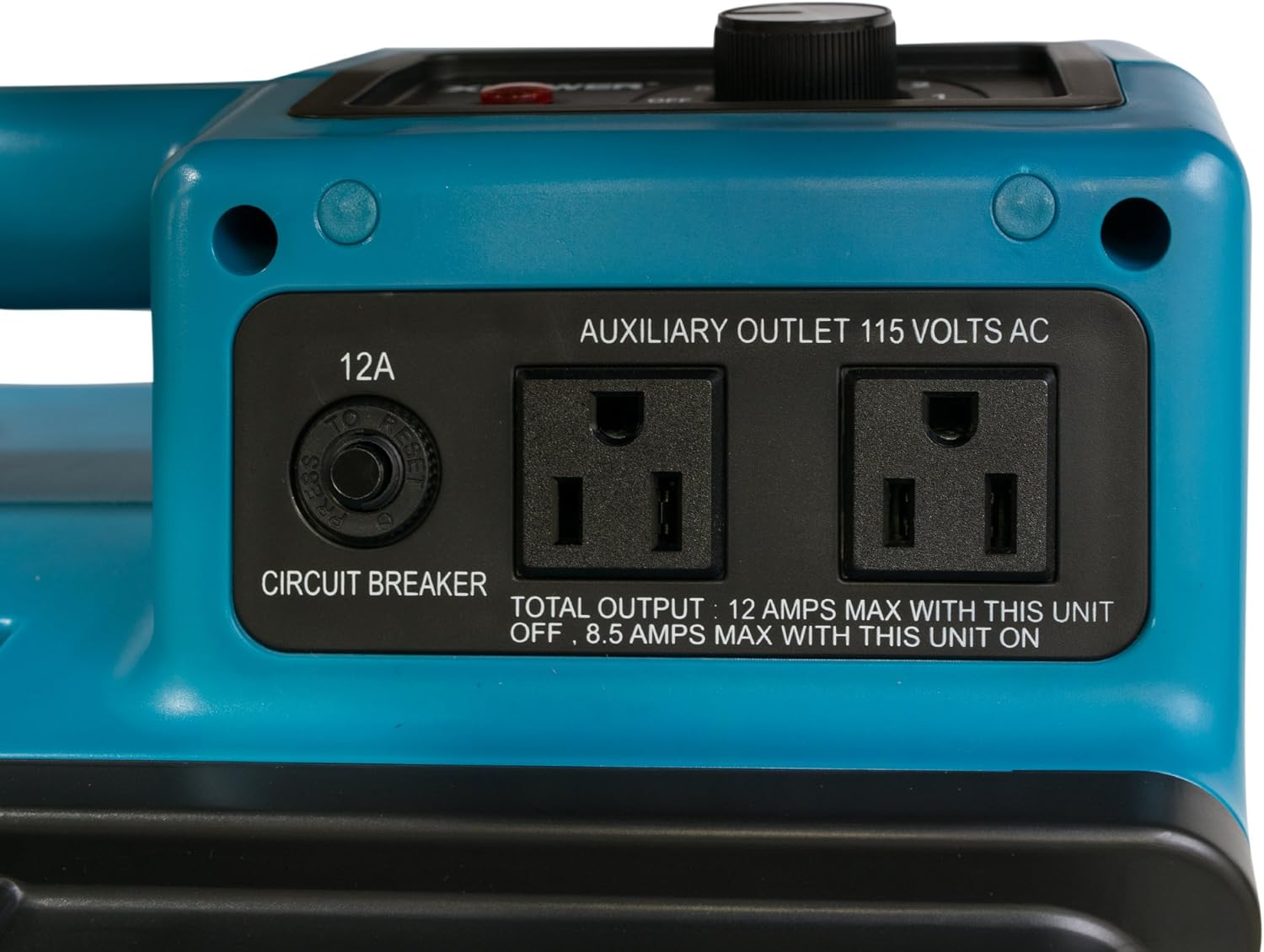
Image 2.3: Close-up of the auxiliary power outlets and circuit breaker on the XPOWER X-2480A.
3. Setup Instructions
- Unpack the Unit: Carefully remove the air scrubber from its packaging. Inspect for any shipping damage.
- Position the Unit: Place the X-2480A on a firm, level surface. Ensure there is at least 1 foot (30 cm) of clear space around the air intake and exhaust grilles for unrestricted airflow.
- Check Filters: Before first use, ensure all three filters (Nylon Mesh, Pleated Media, HEPA) are correctly installed. Refer to the Maintenance section for filter installation details.
- Connect Power: Plug the unit's power cord into a standard, grounded 115V AC electrical outlet.

Image 3.1: The XPOWER X-2480A is designed for easy portability and setup.
4. Operating Instructions
- Power On: Turn the variable speed dial on the control panel from the "OFF" position to the desired fan speed (1-5). The unit will begin operating.
- Adjust Fan Speed: Rotate the dial clockwise to increase airflow (higher number) and counter-clockwise to decrease airflow (lower number).
- Using Auxiliary Outlets: The two built-in GFCI outlets can be used to power other equipment or to daisy-chain multiple X-2480A units. The total output for these outlets is 12 Amps maximum when the X-2480A unit is OFF, and 8.5 Amps maximum when the X-2480A unit is ON. Do not exceed these limits.
- Circuit Breaker: If the auxiliary outlets or the unit itself stops working due to an overload, check the circuit breaker button next to the outlets. Press to reset if tripped.
- Filter Indicator Light: The "Filter Clean/Change Light" will illuminate when the filters are becoming clogged and require cleaning or replacement.
- Power Off: Turn the variable speed dial to the "OFF" position to shut down the unit.

Image 4.1: Demonstrating the daisy-chaining capability of the XPOWER X-2480A with another unit.
5. Maintenance
Regular maintenance, especially filter replacement, is crucial for the efficient operation and longevity of your XPOWER X-2480A Air Scrubber.
Filter Replacement:
The X-2480A uses a 3-stage filtration system. The filter indicator light will signal when filters need attention.
- Power Off and Unplug: Always turn off and unplug the unit before performing any maintenance.
- Access Filters: Remove the foam cover and unlatch the front panel to access the filters.
- Remove Filters: Carefully remove the filters in reverse order of installation: HEPA filter, then Pleated Media filter, and finally the Nylon Mesh pre-filter.
- Clean/Replace:
- Nylon Mesh Pre-filter: This filter is washable and reusable. Clean with water and mild detergent, then allow to air dry completely before reinstallation. Replace if damaged.
- Pleated Media Filter: This filter is disposable. Replace with a new filter when dirty or when the indicator light illuminates.
- HEPA Filter: This filter is disposable and critical for fine particle removal. Replace with a new HEPA filter when dirty or when the indicator light illuminates.
- Install New Filters: Insert new or cleaned filters in the correct order: Nylon Mesh pre-filter first, then the Pleated Media filter, and finally the HEPA filter. Ensure they fit snugly.
- Secure Panel: Reattach the front panel and secure the latches. Replace the foam cover.

Image 5.1: Demonstrating the process of replacing the multi-stage filters in the XPOWER X-2480A.

Image 5.2: Diagram illustrating the 3-stage filtration system: Nylon Mesh, Pleated Media, and HEPA filters.
Cleaning the Unit:
Wipe the exterior of the unit with a damp cloth. Do not use harsh chemicals or abrasive cleaners. Ensure no moisture enters the motor or electrical components.
Storage:
When not in use, store the unit in a clean, dry place. The X-2480A is designed to be stackable (up to 5 units) for efficient storage and transport.

Image 5.3: Multiple XPOWER X-2480A units stacked, demonstrating the space-saving design for storage and transport.
6. Troubleshooting
| Problem | Possible Cause | Solution |
|---|---|---|
| Unit does not turn on. | No power, tripped circuit breaker, damaged cord/plug. | Check power outlet. Reset the unit's circuit breaker. Inspect power cord for damage. |
| Reduced airflow. | Clogged filters, obstructed intake/exhaust. | Check and clean/replace filters. Ensure clear path for airflow. |
| Filter Clean/Change light is on. | Filters are dirty or clogged. | Clean or replace the filters as described in the Maintenance section. |
| Unit shuts off unexpectedly. | Overheating (thermal protection activated), electrical overload. | Unplug, allow to cool. Check for clogged filters or obstructions. Reset circuit breaker if applicable. |
| Auxiliary outlets not working. | Tripped GFCI or circuit breaker, overloaded outlets. | Press the GFCI reset button. Check the unit's circuit breaker. Reduce load on outlets. |
7. Specifications
| Feature | Detail |
|---|---|
| Model Number | X-2480A |
| Power Source | Corded Electric |
| Wattage | 375 watts |
| Motor | 1/3 HP |
| Airflow (CFM) | 550 CFM |
| Dimensions (D x W x H) | 16.6" x 10.4" x 18.9" (42.16 cm x 26.42 cm x 48.01 cm) |
| Item Weight | 23.6 Pounds (10.7 kg) |
| Filter Type | 3-Stage Filtration (Nylon Mesh, Pleated Media, HEPA) |
| Contaminant Filtration Capability | Dust, odors, pet dander, pollen, smoke |
| Auxiliary Outlets | 2 x 115 Volts AC, GFCI Protected |
| Auxiliary Outlet Total Output (Unit OFF) | 12 Amps Max |
| Auxiliary Outlet Total Output (Unit ON) | 8.5 Amps Max |
| Control Method | Touch (Button Control for circuit breaker, Dial for speed) |
| Special Features | Lightweight, Stackable Design, Filter Change Indicator |
8. Warranty Information
The XPOWER X-2480A Air Scrubber comes with a Manufacturer's 1-year Limited Warranty. Please refer to the warranty documentation included with your product for specific terms and conditions. Keep your purchase receipt as proof of purchase for warranty claims.
9. Customer Support
For technical assistance, replacement parts, or warranty inquiries, please contact XPOWER customer support. Contact information can typically be found on the manufacturer's official website or in the packaging materials.


