
Drive Medical RTL10266CF
Drive Medical Nitro Elite CF Foldable Rollator Walker with Seat
Model: RTL10266CF | Brand: Drive Medical
Introduction
Experience the ultra-lightweight elegance of Drive Medical's Nitro Carbon Fiber portable rollator walker with a seat. This exceptional rollator features hand craftsmanship, thoughtful features, and the finest materials, designed for ease of use and stability across various terrains.
Setup Instructions
Unpacking and Initial Setup:
- Carefully remove the Nitro Elite CF Rollator from its packaging. The unit comes fully assembled, requiring no tools for initial setup.
- Unfold the rollator by gently pulling the seat grip up and allowing the frame to expand. Ensure the cross-brace design is fully extended for added stability.
- Verify that the plastic clip holds the frame securely in the open position.

Figure 1: The rollator easily folds for transport and storage.
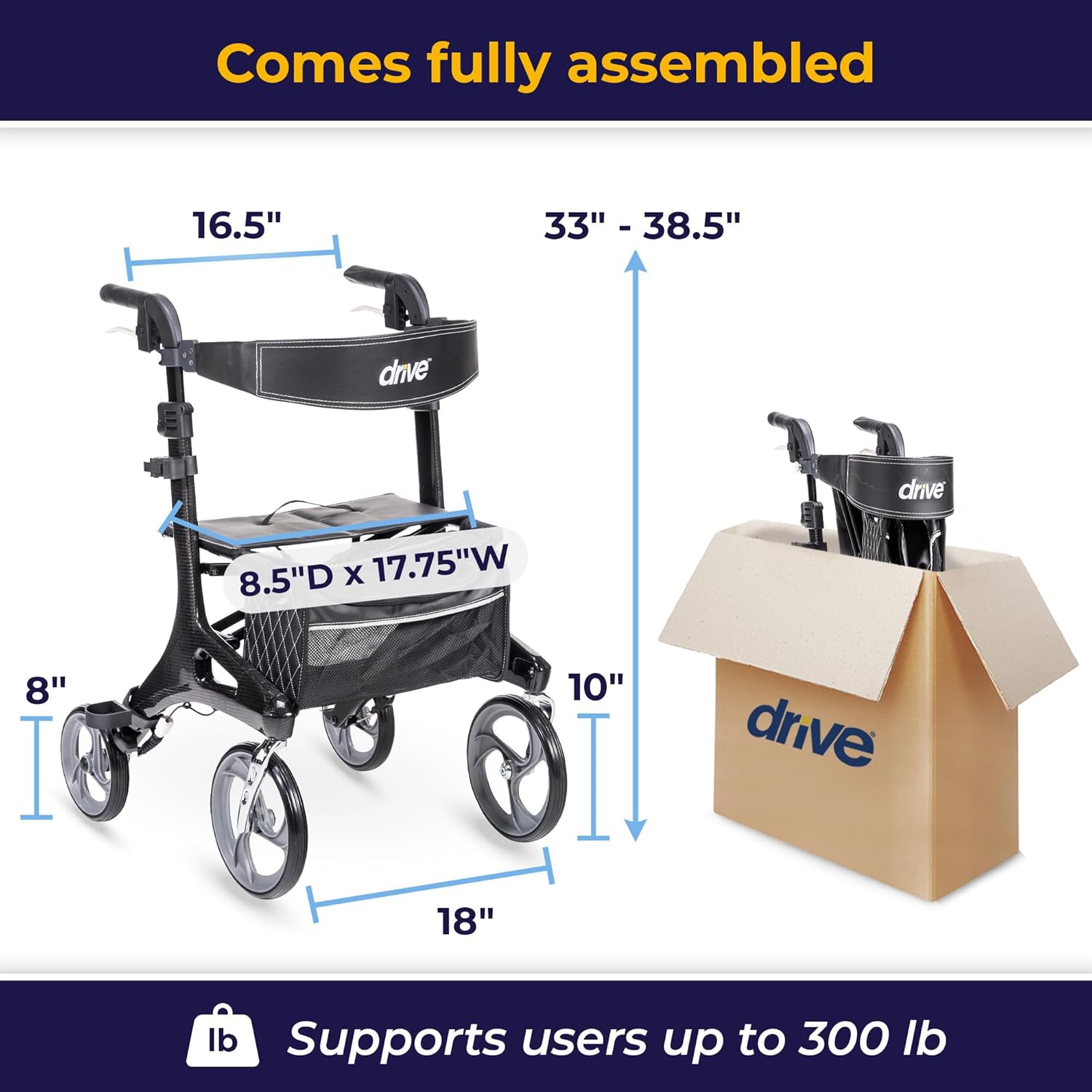
Figure 2: Key dimensions of the assembled rollator.
Handle Height Adjustment:
- Locate the push-button height adjustment mechanism on each handle.
- Press the button and slide the handle up or down to your desired height. Ensure both handles are adjusted to the same height for balanced support.
- Release the button and ensure the handle locks securely into place.

Figure 3: Adjusting the handle height for personalized comfort.
Operating Instructions
Walking with the Rollator:
- Stand upright with the rollator in front of you, holding both handles firmly.
- Push the rollator forward a comfortable distance, then step forward with one foot, followed by the other. Maintain a steady pace.
- The large 10-inch front casters provide optimal steering and smooth navigation over various terrains, both indoors and outdoors.
Figure 4: The rollator provides steady support for indoor and outdoor use.
Video 1: Overview of the Drive Medical Nitro Elite CF Carbon Fiber Walker Rollator, demonstrating key features and ease of use.
Video 2: Detailed demonstration of the Drive Medical Nitro Elite Carbon Fiber Rollator Walker's functionality.
Using the Brakes:
- To slow down or stop, gently pull the brake levers located on the handles towards you.
- To engage the parking brake (for sitting or stability), push the brake levers down until they lock into place. This will prevent the rollator from moving.
- To release the parking brake, pull the levers back up.
- The hidden brake cable ensures maximum safety and a sleek appearance.
Using the Seat:
- Ensure the parking brakes are engaged before attempting to sit.
- The luxury seat is made of easy-to-clean nylon and provides a comfortable resting spot.
- The removable back is also height-adjustable for added comfort.

Figure 5: The padded seat and backrest provide supportive and comfortable resting.
Storage Bag:
- The rollator includes a spacious, removable zippered storage bag, highlighted with attractive contrast diamond stitching.
- A unique attachment keeps the storage bag securely in place when the rollator is open or folded.
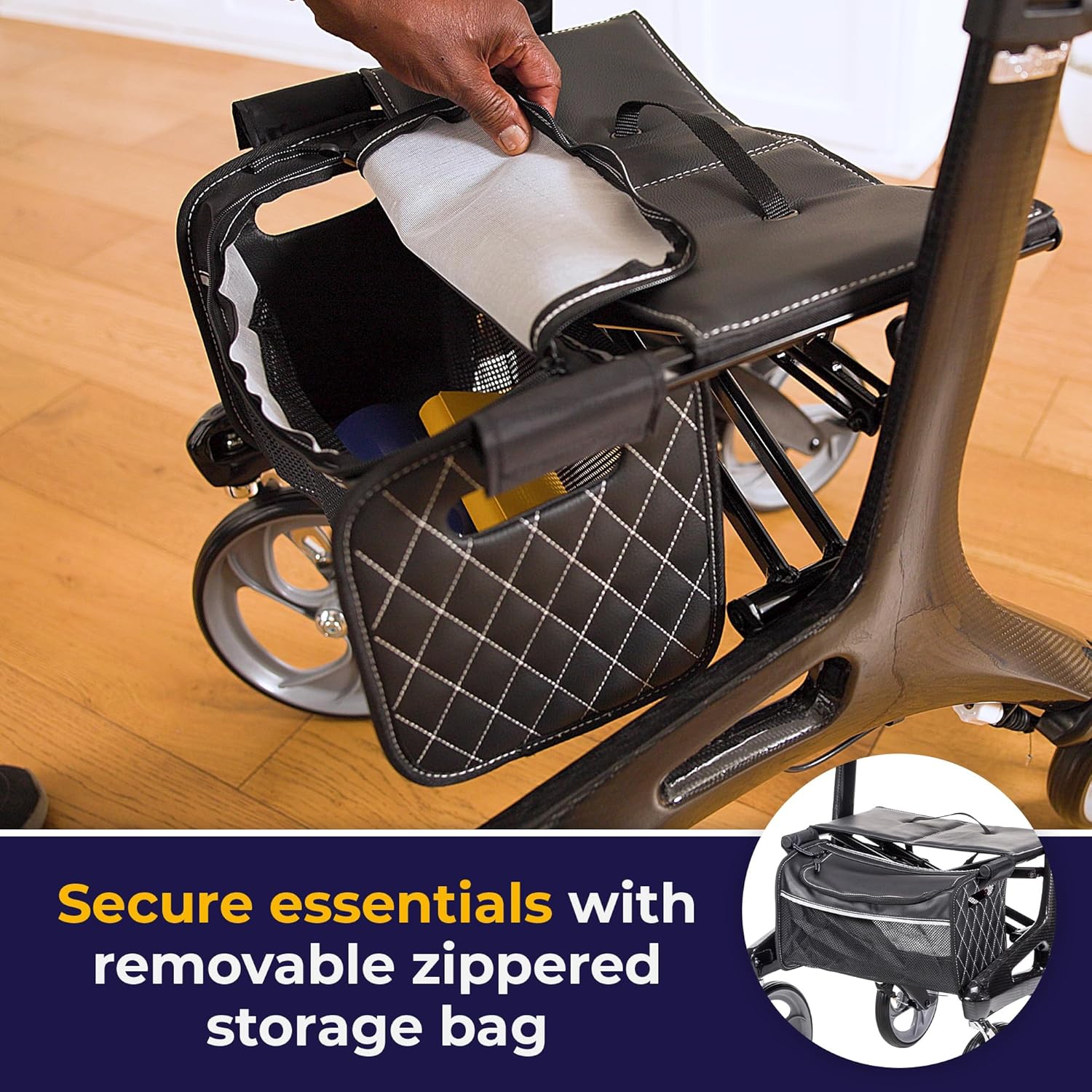
Figure 6: Securely store essentials in the removable zippered bag.
Maintenance
Cleaning:
- Clean the frame with a damp cloth and mild detergent. Avoid abrasive cleaners.
- The nylon seat can be wiped clean with a damp cloth.
- Regularly clean the wheels to prevent dirt and debris buildup, which can affect rolling performance.
Inspection:
- Periodically check all screws, nuts, and bolts to ensure they are tight.
- Inspect the brake cables for any signs of wear or damage. Ensure they operate smoothly and effectively.
- Check the wheels for any cracks or excessive wear.
Troubleshooting
Rollator does not roll smoothly:
- Check wheels for debris (hair, lint, dirt) and clean thoroughly.
- Ensure all wheel axles are properly tightened.
Brakes are not engaging/disengaging properly:
- Inspect brake cables for kinks or damage.
- Ensure brake levers are not obstructed.
- If issues persist, consult a qualified technician.
Specifications
| Feature | Detail |
|---|---|
| Model Number | RTL10266CF |
| Product Dimensions | 27.75"D x 23.13"W x 38"H |
| Item Weight | 14.5 Pounds |
| Material | Plastic, Carbon Fiber |
| Color | Black |
| Manufacturer | Drive Medical |
| Weight Capacity | Up to 300 lb |
Warranty and Support
For warranty information and customer support, please refer to the official Drive Medical website or contact their customer service directly. Keep your purchase receipt for any warranty claims.
A detailed User Manual (PDF) is also available for download from the product's Amazon page for further reference.
Important Safety Warnings
WARNING:
- This product is intended to provide mobility support. Do not use it for purposes other than its intended use.
- Always engage parking brakes before sitting on the seat or when the rollator is stationary.
- Ensure all parts are securely locked and adjusted before each use.
- Do not exceed the maximum weight capacity of 300 lbs.
- Exercise caution when navigating uneven surfaces or inclines.
- Statements regarding dietary supplements have not been evaluated by the FDA and are not intended to diagnose, treat, cure, or prevent any disease or health condition.
Related documentsRTL10266CF


Ask a question about this manual
Ask about setup, troubleshooting, compatibility, parts, safety, or missing instructions. Manuals+ will review the question and use this page’s manual context to help answer it.