1. Introduction
This manual provides detailed instructions for the setup, operation, and maintenance of your Linksys EA7300 Max-Stream AC1750 Dual-Band Wi-Fi Router. The EA7300 is designed to deliver high-speed Wi-Fi connectivity, supporting multiple devices simultaneously with its dual-band capabilities and MU-MIMO technology. Please read this manual thoroughly before beginning installation.

Figure 1: Front view of the Linksys EA7300 Router, showcasing its sleek design and three external antennas.
2. Package Contents
Verify that your package contains the following items:
- Linksys EA7300 Max-Stream AC1750 Dual-Band Wi-Fi Router
- Quick Install Guide
- Power Adapter
- Ethernet Cable
3. Product Overview
3.1 Router Ports and Buttons
Familiarize yourself with the ports and buttons located on the rear panel of your router:

Figure 2: Rear panel of the Linksys EA7300 Router, displaying the USB 3.0 port, Reset button, Internet port, four Gigabit Ethernet LAN ports, and the 12VDC Power port.
- USB 3.0 Port: Connect USB storage devices for network sharing.
- Reset Button: Press and hold to restore factory default settings.
- Internet Port (Yellow): Connect your modem to this port using an Ethernet cable.
- Ethernet Ports 1-4 (Blue): Connect wired devices such as computers, gaming consoles, or network printers.
- 12VDC Power Port: Connect the included power adapter.
- Power Button: Turns the router on or off.
3.2 Key Features
- Dual-Band Wi-Fi: Operates on both 2.4 GHz and 5 GHz frequencies for optimized performance.
- AC1750 Speed: Delivers combined Wi-Fi speeds up to 1.7 Gbps (450 Mbps on 2.4 GHz + 1300 Mbps on 5 GHz).
- MU-MIMO Technology: Provides Wi-Fi to multiple devices simultaneously at the same high speed, reducing buffering.
- Beamforming Technology: Focuses Wi-Fi signals directly to connected devices for stronger, more reliable connections.
- Gigabit Ethernet Ports: Four LAN ports and one WAN port for high-speed wired connections.
- USB 3.0 Port: For connecting external storage devices.
- Linksys Smart Wi-Fi App: Enables easy setup and remote management of your home network.
4. Setup Instructions
Follow these steps to set up your Linksys EA7300 router:
- Unpack the Router: Remove the router and all accessories from the packaging.
- Position the Router: Place the router in a central location in your home, away from obstructions and other electronic devices that may cause interference.
- Connect to Modem:
- Disconnect the power from your modem.
- Connect one end of the included Ethernet cable to the yellow Internet port on the back of your EA7300 router.
- Connect the other end of the Ethernet cable to the Ethernet port on your modem.
- Reconnect the power to your modem and wait for it to fully boot up (usually indicated by stable lights).
- Power On the Router: Connect the power adapter to the 12VDC Power port on the router and plug the other end into a power outlet. Press the Power button if necessary. Wait for the router's indicator lights to stabilize.
- Connect a Device:
- Wired Connection: Connect an Ethernet cable from one of the blue Ethernet LAN ports on the router to your computer's Ethernet port.
- Wireless Connection: On your Wi-Fi enabled device (laptop, smartphone, tablet), search for available Wi-Fi networks. Select the default Linksys network name (SSID) and connect. The default Wi-Fi password can be found on the bottom of your router or in the Quick Install Guide.
- Launch Setup Wizard: Open a web browser (Internet Explorer 8+, Safari 5+, Firefox 8, Google Chrome) on the connected device. The Linksys Smart Wi-Fi setup page should automatically appear. Follow the on-screen instructions to complete the setup, including creating a new Wi-Fi name and password, and setting up an administrator password for the router.
- Linksys App Setup (Optional but Recommended): Download the Linksys Smart Wi-Fi App from your device's app store. Use the app to complete the setup and manage your network.
5. Operating Instructions
5.1 Connecting Devices
The EA7300 router provides Wi-Fi coverage up to 1,500 square feet, supporting over 10 wireless devices simultaneously.

Figure 3: Illustration of the Linksys EA7300 providing dual-band Wi-Fi coverage throughout a typical home environment.
To connect devices:
- Wireless Devices: Search for your custom Wi-Fi network name (SSID) and enter your password.
- Wired Devices: Use an Ethernet cable to connect devices to the blue LAN ports on the router.
5.2 Utilizing Dual-Band and MU-MIMO
The router's dual-band functionality allows for efficient allocation of network traffic, while MU-MIMO ensures multiple devices receive dedicated high-speed connections.
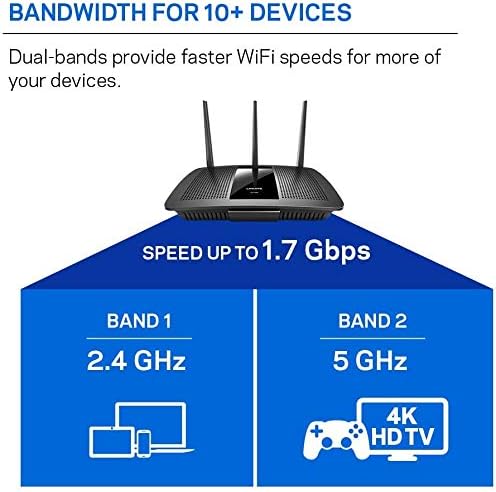
Figure 4: Visual representation of the router's dual-band capabilities, allocating 2.4 GHz for general use and 5 GHz for high-bandwidth activities like 4K HD TV.
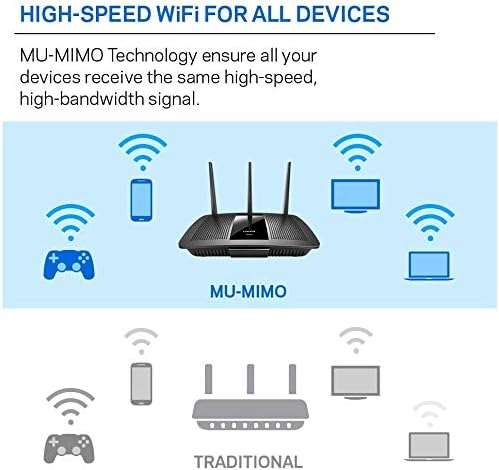
Figure 5: Comparison illustrating how MU-MIMO technology provides simultaneous, dedicated high-speed connections to multiple devices, unlike traditional Wi-Fi.
This technology is particularly beneficial for activities like 4K HD streaming and online gaming, ensuring a smooth experience without buffering.
5.3 Linksys Smart Wi-Fi App
The Linksys Smart Wi-Fi App provides a convenient way to manage your router settings from anywhere. Features include:
- Network setup and management
- Guest access control
- Device prioritization (QoS)
- Parental controls

Figure 6: A user interacting with the Linksys Smart Wi-Fi App on a smartphone, demonstrating device prioritization settings.
6. Specifications
| Feature | Specification |
|---|---|
| Model Name | EA7300 |
| Wireless Standard | 802.11ac |
| Frequency Band Class | Dual-Band (2.4 GHz & 5 GHz) |
| Wi-Fi Speed | Up to 1.7 Gbps (450 Mbps 2.4 GHz + 1300 Mbps 5 GHz) |
| Ethernet Ports | 1x Gigabit WAN, 4x Gigabit LAN |
| USB Ports | 1x USB 3.0 |
| Antennas | 3 External, Adjustable |
| Coverage Area | Up to 1,500 sq. ft. |
| Compatible Operating Systems | MacOS (10.X or higher), Windows 7, Windows 8.1, Windows 10 |
| Dimensions (LxWxH) | 10.12 x 2.2 x 7.24 inches |
| Item Weight | 2.49 pounds |
| Color | Black |
7. Maintenance
To ensure optimal performance and longevity of your router:
- Firmware Updates: Regularly check for and install firmware updates through the Linksys Smart Wi-Fi interface or app. Updates often include performance improvements and security enhancements.
- Physical Cleaning: Keep the router free from dust. Use a soft, dry cloth to clean the exterior. Ensure ventilation openings are not blocked.
- Restart Periodically: Restarting your router every few weeks can help clear its memory and resolve minor network issues. Unplug the power adapter, wait 10 seconds, then plug it back in.
- Secure Placement: Ensure the router is placed on a stable surface and is not exposed to extreme temperatures or moisture.
8. Troubleshooting
If you encounter issues with your Linksys EA7300 router, consider the following troubleshooting steps:
8.1 No Internet Connection
- Check Cables: Ensure all Ethernet cables are securely connected to the router and modem.
- Restart Devices: Power cycle your modem first, wait for it to fully boot, then power cycle your router. Wait a few minutes, then restart your computer or device.
- Modem Status: Verify that your modem is receiving an internet signal from your Internet Service Provider (ISP). Check the modem's indicator lights or contact your ISP.
- Router Lights: Check the Internet status light on your router. If it's not solid, there might be an issue with the connection to the modem or ISP.
8.2 Slow Wi-Fi Speed or Dropped Connections
- Router Placement: Ensure the router is centrally located and not obstructed. Avoid placing it near large metal objects or appliances that emit electromagnetic interference (e.g., microwaves, cordless phones).
- Interference: Other Wi-Fi networks or devices can cause interference. Try changing your Wi-Fi channel in the router settings.
- Firmware: Ensure your router's firmware is up to date.
- Device Overload: Too many devices actively streaming or downloading can impact performance. Consider using the Linksys Smart Wi-Fi App to prioritize critical devices.
- Separate Wi-Fi Bands: If you experience issues with specific devices, try separating the 2.4 GHz and 5 GHz networks into distinct SSIDs (network names) in your router settings. Connect devices to the appropriate band (5 GHz for faster, closer connections; 2.4 GHz for wider range).
8.3 Cannot Access Router Settings
- Correct IP Address: Ensure you are typing the correct router IP address (usually 192.168.1.1) into your web browser.
- Wired Connection: Try connecting your computer directly to the router with an Ethernet cable.
- Browser Issues: Try a different web browser or clear your browser's cache and cookies.
- Reset Router: As a last resort, perform a factory reset by pressing and holding the Reset button on the back of the router for 10 seconds. Note that this will erase all custom settings, and you will need to reconfigure the router.
9. Warranty and Support
The Linksys EA7300 Max-Stream AC1750 Dual-Band Wi-Fi Router comes with an 18-month warranty. For technical support, warranty claims, or additional assistance, please visit the official Linksys support website or contact their customer service. Keep your purchase receipt for warranty validation.


