
Makita MT01Z
Makita MT01Z 12V max CXT® Lithium-Ion Cordless Oscillating Multi-Tool Instruction Manual
Model: MT01Z
1. Introduction
This manual provides essential information for the safe and effective operation, maintenance, and troubleshooting of your Makita MT01Z 12V max CXT® Lithium-Ion Cordless Oscillating Multi-Tool. Please read this manual thoroughly before using the tool to ensure proper handling and to prevent injury or damage.
The Makita MT01Z is designed for various applications including cutting, sanding, scraping, and grout removal. Its compact size and ergonomic design make it suitable for work in confined spaces.

Figure 1: Makita MT01Z Oscillating Multi-Tool
This image shows the Makita MT01Z 12V max CXT Lithium-Ion Cordless Oscillating Multi-Tool from a side angle, highlighting its compact design and the oscillating head with an attached blade.
2. Safety Information
WARNING: Read all safety warnings and instructions. Failure to follow the warnings and instructions may result in electric shock, fire, and/or serious injury.
General Power Tool Safety Warnings
- Always wear appropriate personal protective equipment (PPE) such as safety glasses, hearing protection, and gloves.
- Keep the work area clean and well-lit. Cluttered or dark areas invite accidents.
- Do not operate power tools in explosive atmospheres, such as in the presence of flammable liquids, gases, or dust.
- Keep children and bystanders away while operating a power tool. Distractions can cause you to lose control.
Electrical Safety
- Avoid body contact with earthed or grounded surfaces such as pipes, radiators, ranges, and refrigerators. There is an increased risk of electric shock if your body is earthed or grounded.
- Do not expose power tools to rain or wet conditions. Water entering a power tool will increase the risk of electric shock.
Battery Tool Use and Care
- Recharge only with the charger specified by the manufacturer. A charger that is suitable for one type of battery pack may create a risk of fire when used with another battery pack.
- Use power tools only with specifically designated battery packs. Use of any other battery packs may create a risk of injury and fire.
- When battery pack is not in use, keep it away from other metal objects, like paper clips, coins, keys, nails, screws or other small metal objects, that can make a connection from one terminal to another. Shorting the battery terminals together may cause burns or a fire.
- Under abusive conditions, liquid may be ejected from the battery; avoid contact. If contact accidentally occurs, flush with water. If liquid contacts eyes, additionally seek medical help. Liquid ejected from the battery may cause irritation or burns.
- Do not use a battery pack or tool that is damaged or modified. Damaged or modified batteries may exhibit unpredictable behavior resulting in fire, explosion or risk of injury.
3. Setup and Assembly
3.1 Battery Installation
The Makita MT01Z is a tool-only unit and requires a Makita 12V max CXT Lithium-Ion battery (sold separately). Ensure the battery is fully charged before use.
- Align the battery pack with the battery port on the tool.
- Slide the battery pack into the tool until it clicks securely into place.
- To remove the battery, press the release button on the battery pack and slide it out.
3.2 Accessory Installation
The MT01Z is compatible with most competitor's accessories using the included adapters. Always ensure the tool is turned off and the battery is removed before changing accessories.

Figure 2: Hex Wrench Storage
This image shows a hand using the hex wrench to adjust the oscillating multi-tool, demonstrating where the hex wrench is stored on the tool for convenient accessory changes.
- Locate the accessory mounting bolt on the oscillating head.
- Use the hex wrench (stored on the tool) to loosen the mounting bolt.
- Place the desired accessory (e.g., plunge blade, sanding pad) onto the oscillating head, ensuring it is properly aligned with the OIS interface.
- Tighten the mounting bolt securely with the hex wrench. Do not overtighten.
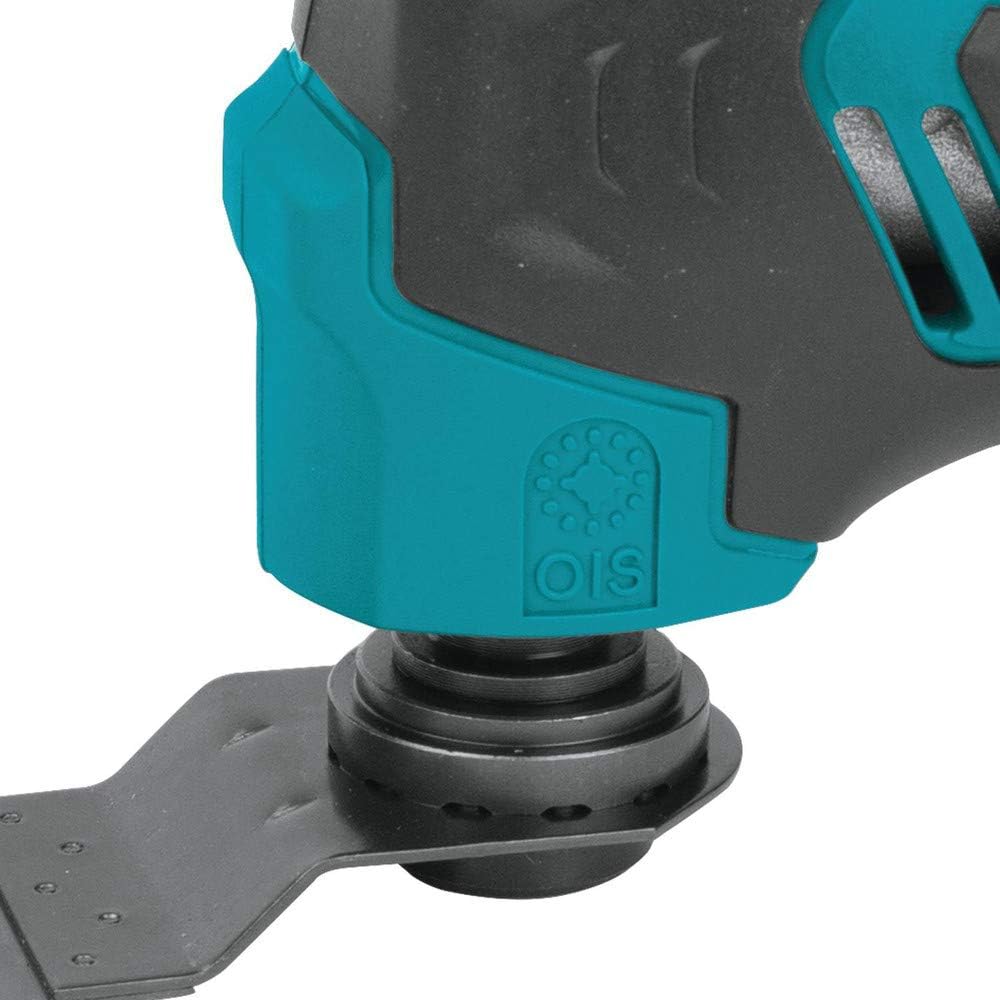
Figure 3: OIS Accessory Interface
This close-up image highlights the OIS (Oscillating Interface System) accessory mounting point on the Makita MT01Z, showing how blades and attachments connect to the tool.
4. Operating Instructions
4.1 Powering On/Off
The tool features a large on/off slide switch with a lock-on button for continuous operation.

Figure 4: On/Off Slide Switch
This image shows a hand pressing the large on/off slide switch on the top of the Makita MT01Z, indicating its position and ease of access.
- To turn on: Slide the switch forward.
- To turn off: Slide the switch backward.
- For continuous operation: Slide the switch forward and press the lock-on button. To release, slide the switch backward.
4.2 Adjusting Speed
The variable speed control dial allows you to match the oscillation speed to the specific application.

Figure 5: Variable Speed Control Dial
This image shows a thumb adjusting the variable speed control dial located near the base of the Makita MT01Z, with the dial set to '5'.
- Rotate the dial to select the desired oscillation per minute (OPM) from 6,000 to 20,000.
- Lower settings are suitable for delicate work or softer materials, while higher settings are for aggressive cutting or harder materials.
4.3 Integrated LED Light
The built-in LED light illuminates the work area for improved visibility, especially in dimly lit conditions.

Figure 6: Built-in LED Light
This close-up image shows the bright LED light located at the front tip of the Makita MT01Z, illuminating the area directly in front of the tool.
4.4 Ergonomics and Handling
The MT01Z features a small barrel grip designed for comfortable and easy handling, reducing user fatigue during extended use.

Figure 7: Ergonomic Barrel Grip
This image displays a hand comfortably gripping the Makita MT01Z, illustrating the tool's compact size and ergonomic barrel grip designed for easy handling.
5. Maintenance
Regular maintenance ensures the longevity and optimal performance of your Makita MT01Z. Always disconnect the battery before performing any maintenance.
5.1 Cleaning
- Clean the tool regularly with a soft, damp cloth. Do not use harsh chemicals or abrasive cleaners.
- Keep ventilation openings clear of dust and debris to prevent overheating.
5.2 Accessory Care
- Inspect accessories (blades, sanding pads) before each use for wear or damage. Replace worn or damaged accessories immediately.
- Store accessories in a dry place to prevent rust.
5.3 Battery Care and Storage
- Store batteries in a cool, dry place away from direct sunlight and heat sources.
- Do not store batteries in a discharged state for extended periods. Recharge them periodically if not in use.
- Refer to your Makita battery and charger manuals for specific charging and storage instructions.
6. Troubleshooting
This section addresses common issues you might encounter with your Makita MT01Z. If the problem persists after following these steps, contact a qualified service center.
| Problem | Possible Cause | Solution |
|---|---|---|
| Tool does not start | Battery not inserted correctly or discharged. | Ensure battery is fully inserted and charged. |
| Tool stops during operation | Overload protection activated or battery discharged. | Reduce load, allow tool to cool, or recharge battery. |
| Reduced performance | Worn or dull accessory. | Replace accessory. |
| Excessive vibration or noise | Accessory not properly secured or damaged. | Check accessory installation; replace if damaged. |
7. Specifications
| Feature | Detail |
|---|---|
| Model Number | MT01Z |
| Voltage | 12 Volts max CXT® Lithium-Ion |
| Oscillations Per Minute (OPM) | 6,000 - 20,000 (Variable Speed) |
| Oscillation Angle | 3.2° |
| Power Source | Cordless (Battery Powered) |
| Item Weight | 2.4 pounds |
| Product Dimensions (L x W x H) | 10.9 x 3.2 x 4.4 inches |
| Included Components | 1-1/4" Plunge Blade (Bim) (A-95255), Multi-Tool Adapter (196271-6), Multi-Tool Adapter (313249-6), Tool Only (battery and charger not included) |
| Material | Plastic |
| Color | Deep Blue |
| UPC | 088381819824 |
8. Warranty and Support
8.1 Warranty Information
Makita power tools are engineered for durability and performance. For detailed warranty information regarding your MT01Z oscillating multi-tool, please refer to the official Makita warranty statement provided with your purchase or visit the official Makita website. The standard return policy allows for returns within 30 days of purchase.
8.2 Customer Support
For technical assistance, service, or to purchase genuine Makita replacement parts and accessories, please contact Makita customer support or visit an authorized Makita service center.
You can also find additional resources, including user guides and manuals, on the Makita website or through the provided PDF links:
Related documentsMT01Z


Ask a question about this manual
Ask about setup, troubleshooting, compatibility, parts, safety, or missing instructions. Manuals+ will review the question and use this page’s manual context to help answer it.