
Hotpoint SA2540HIX
Hotpoint Electric Fan Assisted Single Oven User Manual
Model: SA2540HIX
Introduction
This manual provides essential information for the safe and efficient operation of your Hotpoint Electric Fan Assisted Single Oven. Please read these instructions carefully before installation and use, and keep them for future reference.
The Hotpoint Electric Fan Assisted Single Oven, model SA2540HIX, is designed to provide even heat distribution for optimal cooking results. It features MultiFlow technology, electronic controls, a tilting grill for easy cleaning, and a steam cleaning function.
Safety Information
Always follow basic safety precautions when using electrical appliances to reduce the risk of fire, electric shock, and injury to persons.
- Ensure the oven is properly installed by a qualified person.
- Do not touch hot surfaces. Use oven mitts or pot holders.
- Never use water to extinguish cooking oil fires. Smother the fire or use a dry chemical or foam-type extinguisher.
- Unplug the oven from the outlet when not in use and before cleaning.
- Do not operate any appliance with a damaged cord or plug, or after the appliance malfunctions or has been damaged in any manner.
- Keep children away from the oven during operation.
Unpacking and Installation
Upon receiving your oven, carefully unpack it and check for any damage. Report any damage to your retailer immediately.
What's in the Box:
- 1 x Hotpoint Electric Fan Assisted Single Oven - Stainless Steel
Installation Requirements:
The oven is designed for built-in installation. Ensure the cabinet opening meets the required dimensions for proper ventilation and fit.
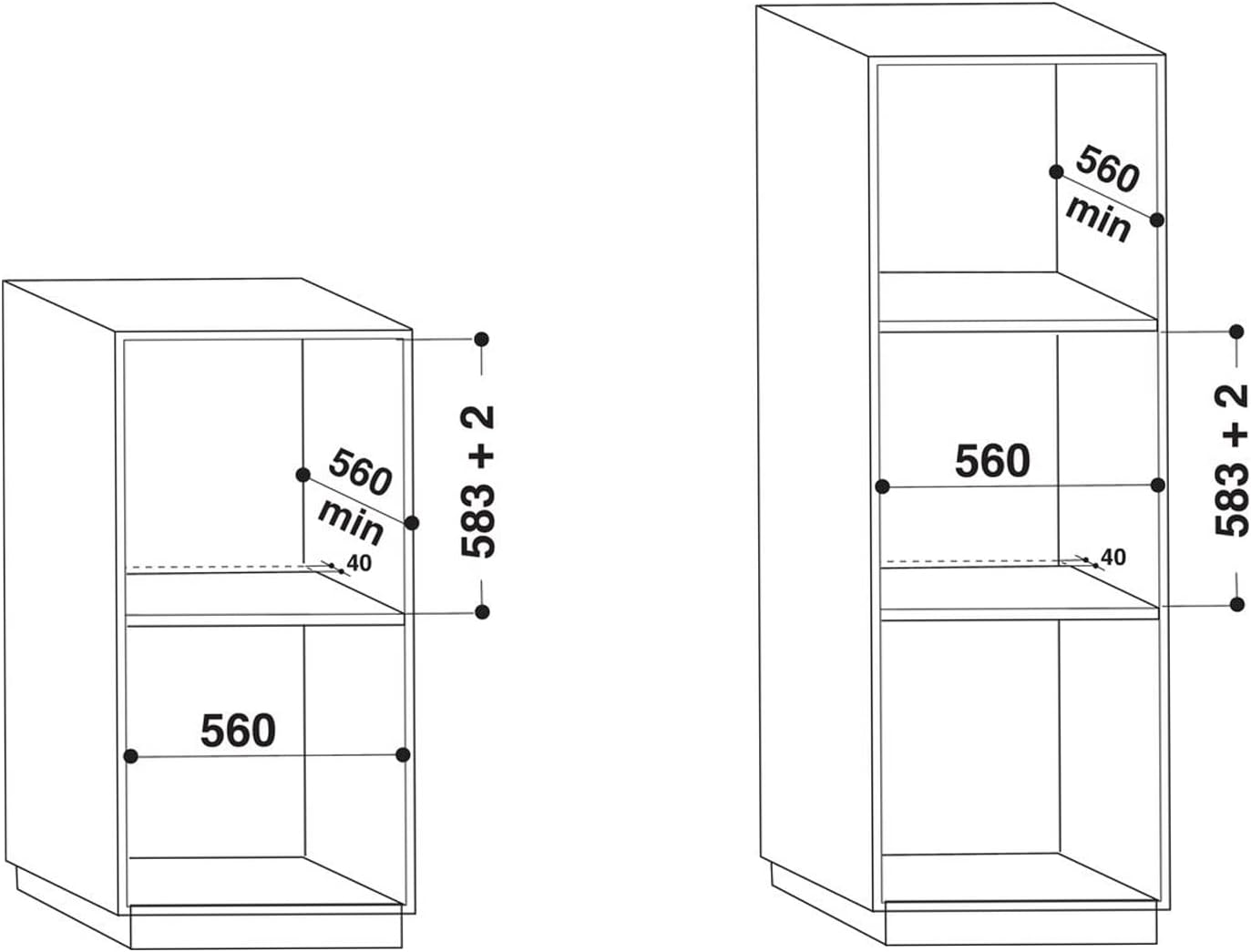
Figure 1: Installation dimensions for built-in oven. The diagram shows required cabinet dimensions for both single and tall unit installations, indicating a minimum width of 560mm and height of 583mm + 2mm for the opening.
For detailed electrical connections and specific cabinet requirements, consult a qualified electrician or installer. The appliance must be earthed.
Operating Instructions
Your Hotpoint oven features intuitive controls for various cooking functions.
Control Panel Overview:

Figure 2: Close-up view of the oven's control panel, showing the function selector knob on the left, the digital display in the center, and the temperature control knob on the right.
- Function Selector Knob (Left): Used to select the desired cooking function (e.g., Fan Assisted, Grill, Conventional).
- Digital Display (Center): Shows time, temperature, and selected settings.
- Temperature Control Knob (Right): Used to set the desired cooking temperature in degrees Celsius.
Cooking Functions:
The oven offers several cooking functions to suit different culinary needs:
- MultiFlow Heat Distribution: This fan-assisted function ensures even heat throughout the oven cavity, ideal for baking and roasting on multiple shelves.
- Electronic Control: Provides precise temperature management and quicker recovery after opening the door.
- Grill: For grilling and browning dishes.
- Other functions as indicated by the function selector symbols.

Figure 3: View of the oven interior with the door fully open, showing the fan at the back, oven racks, and the bottom tray.
To begin cooking, select the desired function using the left knob and set the temperature using the right knob. The oven will preheat to the set temperature.
Maintenance and Cleaning
Regular cleaning and maintenance will ensure the longevity and optimal performance of your oven.
Steam Cleaning (Hydro Clean):
Your oven features Hydro Clean technology, a short 35-minute cycle that uses steam to loosen fat and food residue. After the cycle, simply wipe the interior with a damp cloth to restore its cleanliness.
Tilting Grill:
The tilting grill feature allows for easy access to the oven's roof cavity for cleaning. The grill unhooks and slides downwards, providing better access to otherwise hard-to-reach areas.

Figure 4: Illustration of the oven door's smooth opening and closing mechanism, demonstrating its stability and design.
General Cleaning:
- Clean the exterior surfaces with a soft, damp cloth and mild detergent. Avoid abrasive cleaners.
- The enamel interior can be wiped down after each use once the oven has cooled.
- Remove oven racks and clean them separately in warm soapy water.
Troubleshooting
If you encounter issues with your oven, refer to the following common problems and solutions:
| Problem | Possible Cause | Solution |
|---|---|---|
| Oven not heating | No power supply; incorrect settings; faulty element. | Check power connection and circuit breaker. Ensure function and temperature are set correctly. If problem persists, contact service. |
| Uneven cooking | Improper rack placement; blocked vents; faulty fan. | Ensure food is centered and not blocking vents. Use MultiFlow function for even heat. Clean oven interior. |
| Oven light not working | Bulb needs replacement. | Refer to the full instruction manual for bulb replacement procedure. Ensure oven is unplugged before attempting. |
| Steam cleaning not effective | Insufficient water; heavy residue. | Ensure correct amount of water is used. For heavy residue, repeat cycle or pre-scrape large deposits. |
For issues not listed here or if solutions do not resolve the problem, please contact Hotpoint customer support.
Specifications
Key technical specifications for the Hotpoint Electric Fan Assisted Single Oven, Model SA2540HIX:
- Brand: Hotpoint
- Model: SA2540HIX
- Product Dimensions: 55.1 x 59.5 x 59.5 cm
- Item Weight: 26.1 kg
- Energy Efficiency: A
- Capacity: 66 litres
- Annual Energy Consumption: 1000 Watts
- Installation Type: Built-In
- Special Features: Self-Cleaning (Hydro Clean)
- Heating Method: Convection (Fan Assisted)
- Colour: Stainless Steel
- Fuel Type: Electric
- Door Orientation: Drop-Down
- Material Type: Stainless Steel
Warranty and Support
Your Hotpoint Electric Fan Assisted Single Oven comes with a manufacturer's warranty.
- Standard Warranty: 1 year manufacturer's guarantee covering parts and labour.
- Extended Parts Guarantee: An additional 10-year parts guarantee is available, provided the product has been registered with Hotpoint.
For warranty claims, technical support, or to register your product, please visit the official Hotpoint website or contact their customer service department. Keep your proof of purchase and model number readily available.
Hotpoint Customer Service: www.hotpoint.co.uk/support
Related documentsSA2540HIX


Ask a question about this manual
Ask about setup, troubleshooting, compatibility, parts, safety, or missing instructions. Manuals+ will review the question and use this page’s manual context to help answer it.