
Introduction
This manual provides essential instructions for the proper setup, operation, maintenance, and care of your Ingersoll I02801 automatic watch. Please read this guide thoroughly to ensure optimal performance and longevity of your timepiece.
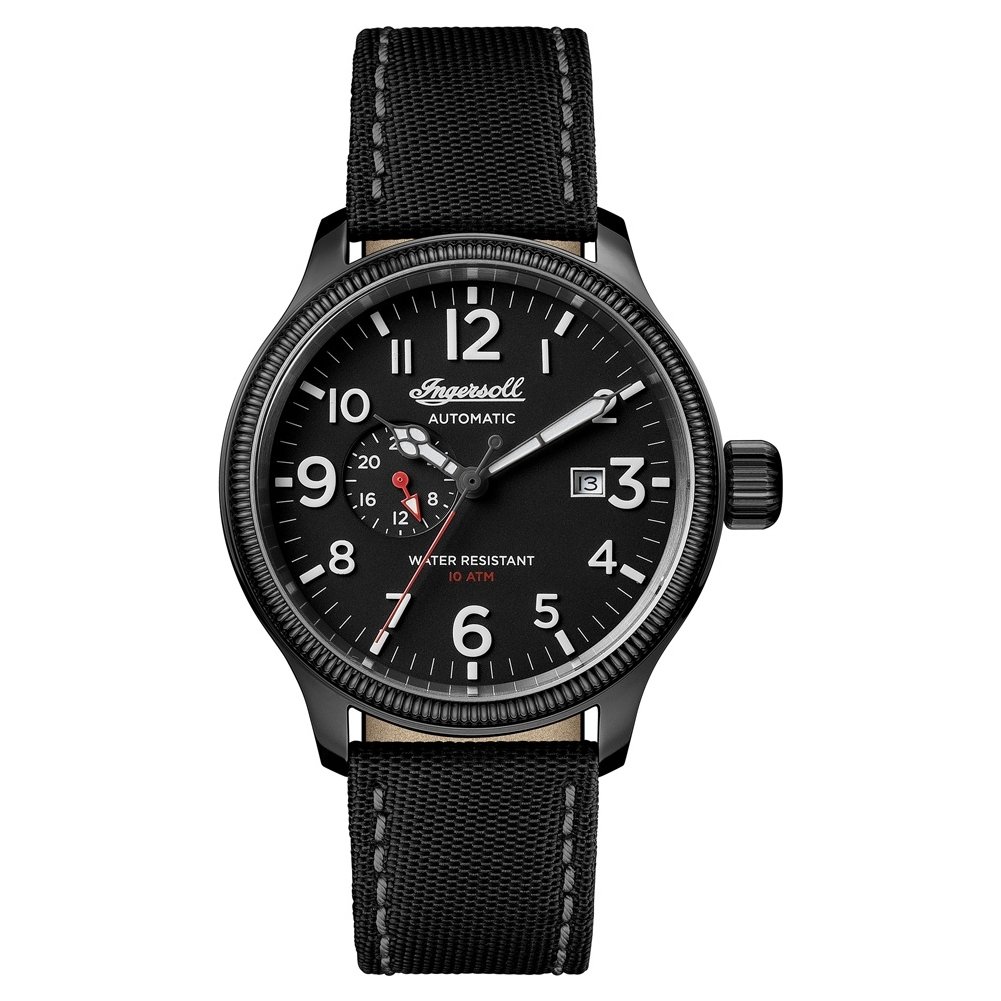
Figure 1: Ingersoll I02801 Automatic Watch, general view.
The Ingersoll I02801 is an automatic mechanical watch featuring a 24-hour sub-dial and a date display. It is designed for daily wear and is water-resistant up to 100 meters (330 feet).
Setup and Initial Winding
Your Ingersoll I02801 watch is powered by an automatic mechanical movement. It does not require a battery but relies on the motion of your wrist to wind the mainspring. If the watch has stopped or its power reserve is low, follow these steps for initial winding and setting.
1. Initial Manual Winding
If the watch has stopped, it needs to be manually wound to build up an initial power reserve. To do this:
- Ensure the crown is in position 0 (fully pushed in against the case).
- Rotate the crown clockwise approximately 30-40 times. You will feel a slight resistance as the mainspring winds. Do not overwind.
- The second hand should begin to move smoothly.

Figure 2: Crown in position 0 (pushed in).
The crown is used for winding and setting the watch. Ensure it is fully pushed in for manual winding.
2. Setting the Time
To set the correct time:
- Gently pull the crown out to position 2 (the outermost position). The second hand will stop.
- Rotate the crown clockwise or counter-clockwise to move the hour and minute hands.
- Advance the hands past 12 o'clock to ensure the date changes. If it does, you are in the AM hours. If it does not, you are in the PM hours. Continue rotating until the correct time is set, paying attention to AM/PM for the 24-hour sub-dial and date change.
- Once the time is set, push the crown back into position 0.

Figure 3: Crown in position 2 (pulled out for time setting).
Pull the crown to the outermost position to adjust the time. The second hand will halt, allowing for precise setting.
3. Setting the Date
To set the date:
- Gently pull the crown out to position 1 (the middle position).
- Rotate the crown counter-clockwise to advance the date.
- Avoid setting the date between 9 PM and 3 AM, as this is when the watch's internal mechanism is engaged in changing the date, and manual adjustment can cause damage. If the current time falls within this window, first set the time outside this period (e.g., to 6 AM), then set the date, and finally reset the correct time.
- Once the date is set, push the crown back into position 0.

Figure 4: Watch face displaying the date window and 24-hour sub-dial.
The date window is located at the 3 o'clock position, and the 24-hour sub-dial is positioned at 9 o'clock.
Operating Your Automatic Watch
The Ingersoll I02801 is an automatic watch, meaning it is powered by the natural motion of your wrist. When worn regularly (approximately 8-12 hours a day), it will maintain its power reserve. If the watch is not worn for an extended period, it may stop and require manual winding as described in the "Setup" section.
Power Reserve
A fully wound automatic watch typically has a power reserve of 36-40 hours. If you remove the watch for more than a day or two, it will likely stop. Simply manually wind it or wear it for a few hours to restart it.
Water Resistance
Your watch is water-resistant to 100 meters (330 feet). This rating makes it suitable for swimming and snorkeling. It is not suitable for scuba diving or high-impact water sports. Always ensure the crown is fully pushed in to maintain water resistance. Do not operate the crown while the watch is submerged in water.
- Suitable for: Daily use, showering, swimming, snorkeling.
- Not suitable for: Scuba diving, high-speed water sports, hot tubs, saunas (extreme temperature changes can compromise seals).
Maintenance and Care
Proper care will extend the life and maintain the appearance of your Ingersoll I02801 watch.
Cleaning
Wipe the watch case and crystal regularly with a soft, dry, lint-free cloth. For the nylon strap, a mild soap solution and a soft brush can be used, followed by thorough rinsing and air drying. Ensure the watch case is not exposed to excessive moisture during strap cleaning.

Figure 5: Black nylon strap with buckle closure.
The durable nylon strap requires occasional cleaning to remove dirt and sweat buildup.
Avoidance
- Magnetic Fields: Keep your automatic watch away from strong magnetic fields (e.g., speakers, refrigerators, certain electronic devices) as they can affect the accuracy of the movement.
- Shocks: While robust, avoid dropping the watch or subjecting it to severe impacts.
- Chemicals: Avoid contact with solvents, detergents, perfumes, and cosmetics, as these can damage the case, seals, and strap.
- Extreme Temperatures: Protect the watch from extreme heat or cold, and sudden temperature changes.
Service
Like any precision mechanical instrument, your automatic watch benefits from periodic professional servicing, typically every 3-5 years. This involves cleaning, lubricating, and regulating the movement to ensure continued accuracy and performance.
Troubleshooting
If you encounter issues with your Ingersoll I02801 watch, refer to the following common problems and solutions:
- Watch has stopped:
Solution: Manually wind the watch by rotating the crown 30-40 times in position 0. Wear the watch regularly for at least 8 hours a day to maintain its power reserve.
- Watch is running too fast or too slow:
Solution: Minor deviations are normal for mechanical watches. If the inaccuracy is significant (e.g., more than +/- 30 seconds per day), the watch may need regulation by a professional watchmaker. Ensure it has not been exposed to strong magnetic fields.
- Date does not change at midnight:
Solution: The watch's time might be set to the wrong AM/PM cycle. Pull the crown to position 2 and advance the time by 12 hours. The date should then change around midnight.
- Condensation under the crystal:
Solution: This indicates a potential breach in water resistance. Avoid further water exposure and seek professional service immediately to prevent internal damage.
Specifications
Key specifications for the Ingersoll I02801 Automatic Watch:
| Feature | Detail |
|---|---|
| Model Number | I02801 |
| Movement Type | Automatic Mechanical |
| Case Material | Stainless Steel |
| Case Diameter | 45mm |
| Case Thickness | 14mm |
| Band Material | Nylon |
| Band Width | 22mm |
| Crystal Type | Mineral |
| Water Resistance | 100 meters (330 feet) |
| Functions | Hours, Minutes, Seconds, Date, 24-hour sub-dial |
| Clasp Type | Buckle |
| Item Weight | 0.4 Kilograms (14.11 ounces) |
Warranty Information
The Ingersoll I02801 Automatic Watch comes with a Lifetime Warranty from the manufacturer. This warranty covers manufacturing defects in materials and workmanship under normal use. It does not cover damage resulting from improper handling, accidents, unauthorized repairs, or normal wear and tear (e.g., crystal scratches, strap damage). For warranty claims or service, please refer to the official Ingersoll website or contact their customer support.
For detailed warranty terms and conditions, please visit the official Ingersoll website or consult the warranty card included with your purchase.
Customer Support
If you have any questions or require further assistance with your Ingersoll I02801 watch, please contact Ingersoll customer support. You can typically find contact information, including phone numbers and email addresses, on the official Ingersoll website.
When contacting support, please have your watch model number (I02801) and purchase details readily available.