1. Introduction
This manual provides essential information for the safe and effective operation, maintenance, and troubleshooting of your Michley SS-700+ Professional Desktop Sewing Machine. Please read this manual thoroughly before using the machine to ensure proper function and to prevent damage or injury.
2. Safety Instructions
- Always unplug the sewing machine from the electrical outlet immediately after using, before cleaning, or when making any user servicing adjustments.
- Do not operate the machine with a damaged cord or plug. If the machine is not working properly, has been dropped, damaged, or dropped into water, contact customer support.
- Keep fingers away from all moving parts. Special care is required around the sewing machine needle.
- Always use the correct needle plate. The wrong plate can cause the needle to break.
- Do not pull or push fabric while stitching. This may deflect the needle, causing it to break.
- Turn the sewing machine off when making any adjustments in the needle area, such as threading the needle, changing the needle, or changing the presser foot.
- Never drop or insert any object into any opening.
- Do not use outdoors.
- Do not operate where aerosol (spray) products are being used or where oxygen is being administered.
3. Product Overview
Familiarize yourself with the components of your Michley SS-700+ sewing machine.

Figure 3.1: Front View. This image displays the front of the Michley SS-700+ sewing machine, showing the stitch selector dial, tension dial, needle assembly, presser foot, and the main body with the 'Sew & Sew SS-700+' branding. The stitch patterns are visible on the right side of the machine body.

Figure 3.2: Side/Back View. This image shows the side and back of the Michley SS-700+ sewing machine, illustrating the power input port and the foot pedal connection port. The overall compact design is also visible.
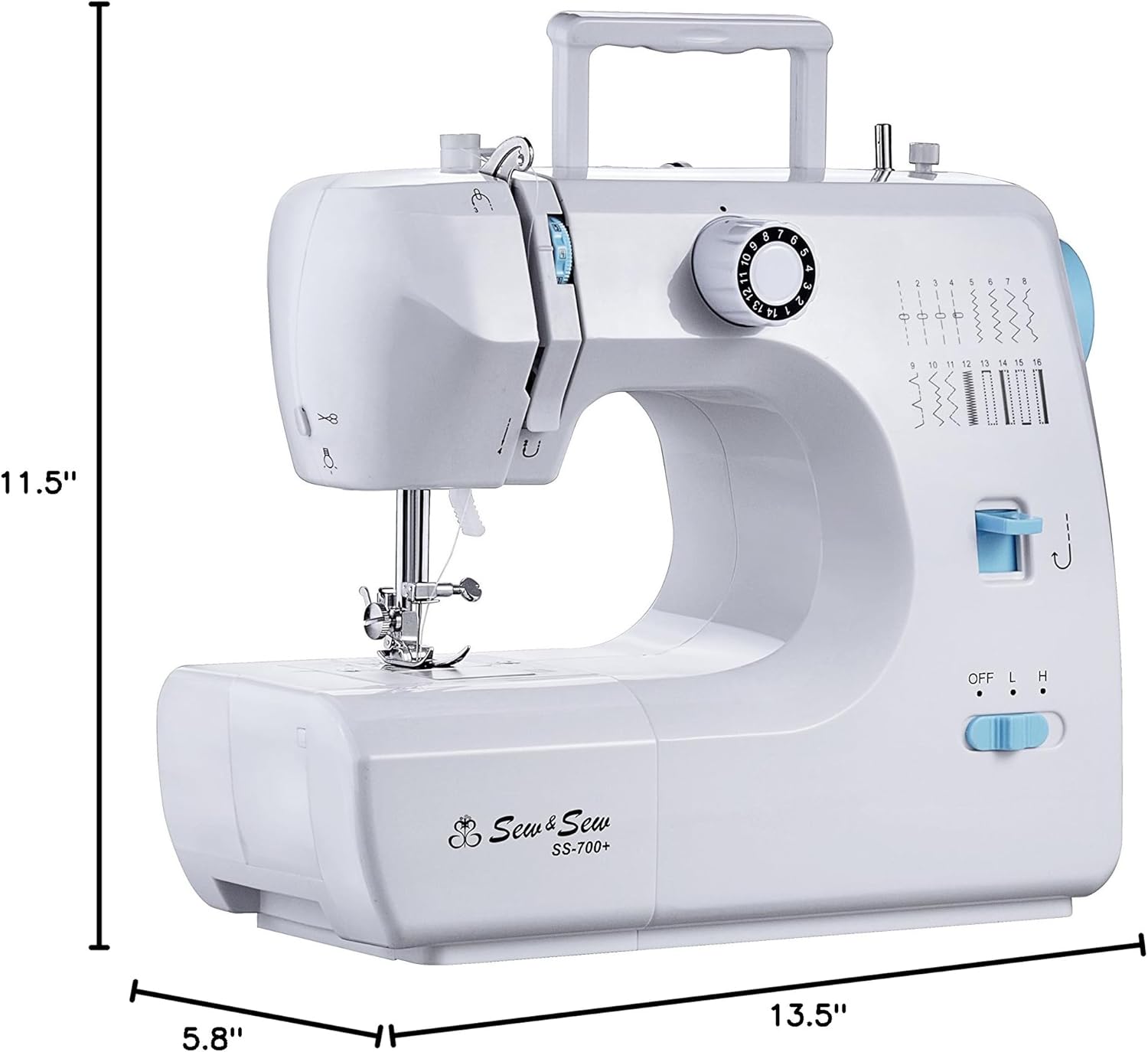
Figure 3.3: Product Dimensions. This image provides a visual representation of the Michley SS-700+ sewing machine's dimensions: 13.5 inches in width, 5.8 inches in depth, and 11.5 inches in height.
4. Setup
4.1 Unpacking
Carefully remove the sewing machine from its packaging. Retain all packaging materials for future storage or transport. Ensure all accessories are present.
4.2 Power Connection
- Ensure the machine's power switch is in the 'OFF' position.
- Insert the power adapter plug into the DC input jack on the back of the machine.
- Plug the power adapter into a standard electrical outlet.
4.3 Foot Pedal Connection
Insert the foot pedal plug into the foot pedal jack on the back of the machine. The foot pedal provides variable speed control during sewing.
4.4 Threading the Upper Thread
- Place a spool of thread on the spool pin.
- Guide the thread through the upper thread guide.
- Follow the numbered threading path indicated on the machine, ensuring the thread passes through the tension discs.
- Thread the needle from front to back.
4.5 Winding the Bobbin
- Place an empty bobbin onto the bobbin winder spindle.
- Guide the thread from the spool through the bobbin winding tension disc.
- Wrap the thread around the bobbin a few times.
- Push the bobbin winder spindle to the right.
- Turn on the machine and press the foot pedal or speed switch to wind the bobbin. Stop when the bobbin is full.
- Cut the thread and push the bobbin winder spindle back to the left.
4.6 Inserting the Bobbin
- Open the bobbin cover plate.
- Insert the wound bobbin into the bobbin case, ensuring the thread unwinds in the correct direction (usually counter-clockwise).
- Pull the bobbin thread through the tension spring and out to the side.
- Close the bobbin cover plate.
5. Operating Instructions
5.1 Stitch Selection
The Michley SS-700+ features 16 built-in stitch patterns. To select a stitch, turn the stitch selector dial to the desired pattern number. Refer to the stitch guide printed on the machine for visual reference.
5.2 Speed Control
Use the High/Low speed selector switch to adjust the sewing speed. The foot pedal provides additional variable speed control when connected.
5.3 Reverse Sewing
To reinforce seams, press and hold the reverse sewing lever. The machine will sew backward. Release the lever to resume forward sewing.
5.4 Sewing Sleeves and Small Openings
The machine's free arm design allows for easy sewing of cylindrical items such as sleeves, pant hems, and cuffs. Remove the accessory storage drawer to access the free arm.
5.5 4-Step Buttonhole Sewing
The machine supports 4-step buttonhole sewing. Consult the detailed instructions in the full manual (if available) or online resources for the specific steps to create buttonholes using the stitch selector and presser foot.
5.6 Built-in Sewing Light and Thread Cutter
The built-in sewing light illuminates your work area. Use the integrated thread cutter located on the side of the machine for quick and convenient thread trimming after sewing.
6. Maintenance
6.1 Cleaning the Machine
Regularly clean lint and dust from the bobbin area and feed dogs using a small brush. Ensure the machine is unplugged before cleaning.
6.2 Changing the Needle
- Turn off and unplug the machine.
- Loosen the needle clamp screw.
- Remove the old needle.
- Insert a new needle with the flat side facing the back of the machine, pushing it up as far as it will go.
- Tighten the needle clamp screw securely.
7. Troubleshooting
This section addresses common issues you might encounter with your sewing machine.
| Problem | Possible Cause | Solution |
|---|---|---|
| Skipped Stitches | Incorrect needle insertion, bent needle, wrong needle type for fabric, improper threading. | Re-insert needle correctly, replace bent needle, use appropriate needle, re-thread machine. |
| Thread Breaking | Incorrect tension, poor quality thread, needle bent or dull, improper threading, bobbin wound too tightly. | Adjust tension, use good quality thread, replace needle, re-thread machine, re-wind bobbin. |
| Machine Jamming | Thread tangled in bobbin area, fabric pulled too hard, incorrect stitch selection. | Clear bobbin area, do not force fabric, ensure correct stitch for fabric thickness. |
| Uneven Stitches | Incorrect tension, inconsistent fabric feeding, dull needle. | Adjust tension, guide fabric gently, replace needle. |
8. Specifications
- Model: SS-700+
- Brand: Michley
- Product Dimensions: 13.5 x 5.8 x 11.5 inches (34.3 x 14.7 x 29.2 cm)
- Item Weight: 7.25 pounds (3.29 kg)
- Stitch Patterns: 16 Built-in
- Speed Settings: High/Low selector
- Buttonhole Type: 4-step
- Features: Built-in sewing light, built-in thread cutter, reverse sewing, free arm, auto bobbin winder, top drop-in bobbin.
9. Warranty and Support
For warranty information, technical support, or to purchase accessories, please refer to the official Michley website or contact their customer service department. Keep your purchase receipt as proof of purchase.
You can visit the Michley brand store for more information: Michley Store on Amazon


