
Clear-Com RS-701
Clear-Com RS-701 Single-Channel Standard Beltpack User Manual
Model: RS-701 | Brand: Clear-Com
1. Introduction
The Clear-Com RS-701 is a robust single-channel wired beltpack engineered for professional intercom systems. Designed for durability and user comfort, it provides reliable and clear communication in demanding production environments. This manual provides essential information for setting up, operating, and maintaining your RS-701 beltpack.
Key Features:
- Single-channel wired beltpack with XLR-3 line connector and XLR-4M headset connector.
- High headroom and low-noise audio for crystal-clear "Clear-Com Sound".
- Wide dynamic range and audio contouring for intelligible voice communication across various audio levels.
- Recessed rotary volume controls and guarded Talk and Call keys to prevent accidental activation.
- Concealed DIP switches for customizable audio and key options (microphone type, headphone input/mic output levels, call with talk, latch/non-latch keying).
- Compatible with all Encore partyline products, PL-Pro line, and other partyline systems via Encore interfaces.
2. Components Overview
Familiarize yourself with the various parts of your RS-701 beltpack:
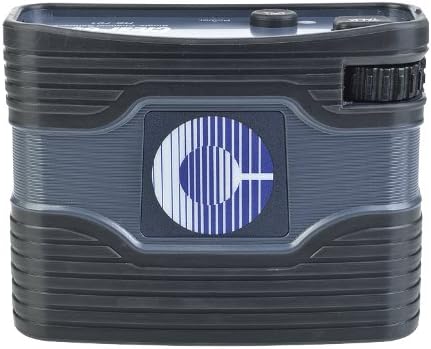
Figure 2.1: Front view of the RS-701 beltpack, showcasing its compact and rugged design.
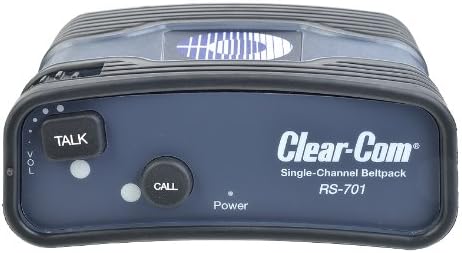
Figure 2.2: Top view of the RS-701, highlighting the 'TALK' and 'CALL' buttons, volume control, and power indicator.
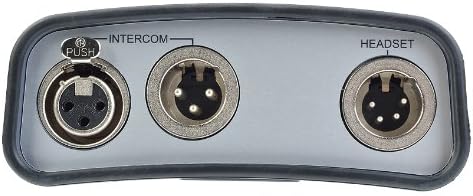
Figure 2.3: Bottom view of the RS-701, showing the XLR-3 intercom line connectors (female/male loop through) and the XLR-4M headset connector.

Figure 2.4: Rear view of the RS-701, illustrating the integrated belt clip for convenient attachment.

Figure 2.5: Rear view of the RS-701 with the belt clip removed, revealing the concealed DIP switches for advanced configuration.
3. Setup
3.1 Connecting the Headset
Connect your headset to the 4-pin male XLR connector labeled 'HEADSET' on the bottom of the beltpack (refer to Figure 2.3). Ensure the connector is fully inserted and secure.
3.2 Connecting to the Intercom Line
The RS-701 connects to the intercom system via the 3-pin XLR connectors labeled 'INTERCOM' on the bottom of the beltpack (refer to Figure 2.3). Use the female connector for input from the intercom line and the male connector for looping through to another beltpack or device. The RS-701 is compatible with all Clear-Com Encore partyline products and other standard partyline systems.
3.3 Powering On
The RS-701 receives power directly from the intercom line. Once connected, the beltpack will power on automatically. The power indicator LED on the top panel (Figure 2.2) will illuminate.
4. Operation
4.1 Volume Control
Adjust the rotary volume control knob located on the side of the beltpack (Figure 2.2) to set your desired listening level for incoming audio.
4.2 Talk Button
Press the 'TALK' button (Figure 2.2) to activate your microphone and speak on the intercom line. The button is guarded to prevent accidental activation. Depending on the DIP switch settings (see Section 4.4), this button can operate in momentary or latching mode.
4.3 Call Button
Press the 'CALL' button (Figure 2.2) to send a call signal to other users on the intercom line. This button is also guarded. The functionality of the call button can be configured via the DIP switches.
4.4 DIP Switch Configuration
The RS-701 features a concealed DIP switch panel on the rear of the unit (Figure 2.5) for advanced customization. To access, remove the belt clip. Use a small, non-conductive tool to adjust the switches. Always power off the unit before changing DIP switch settings.
| Switch No. | Function | OFF Position | ON Position |
|---|---|---|---|
| 1 | Microphone Type | Dynamic Mic | Electret Mic |
| 2 | Headphone Input Level | High Headroom | Fixed Min Level |
| 3 | Microphone Output Level | Normal | Fixed Min Level |
| 4 | Call with Talk Operation | Independent | Call with Talk |
| 5 | Talk Key Latching | Non-Latching | Latching |
| 6 | LED Off Mode | LEDs On | LEDs Off |
Note: Always refer to the markings on the beltpack's DIP switch panel for precise switch numbering and function labels.
5. Maintenance
5.1 Cleaning
To clean the exterior of the beltpack, use a soft, dry cloth. For stubborn dirt, a slightly damp cloth with mild soap can be used, ensuring no liquid enters the connectors or controls. Do not use abrasive cleaners or solvents.
5.2 Storage
Store the beltpack in a cool, dry place away from direct sunlight and extreme temperatures when not in use. Protect connectors from dust and debris.
6. Troubleshooting
If you encounter issues with your RS-701 beltpack, try the following common troubleshooting steps:
- No Audio / Low Audio:
- Check all cable connections (headset, intercom line) to ensure they are secure.
- Verify the volume control knob is turned up.
- Ensure the 'TALK' button is activated if you are trying to transmit.
- Check DIP switch settings, particularly for headphone input level (Switch 2) and microphone output level (Switch 3).
- Distorted Audio:
- Check headset microphone for damage or improper positioning.
- Verify the correct microphone type is selected via DIP switch 1 (Dynamic vs. Electret).
- Ensure the intercom line is not overloaded.
- Call Button Not Working:
- Ensure the button is fully pressed.
- Check DIP switch 4 if 'Call with Talk' operation is desired.
- Beltpack Not Powering On:
- Verify the intercom line is active and providing power.
- Check the intercom line cable for damage.
If the issue persists after attempting these steps, please contact Clear-Com customer support for further assistance.
7. Specifications
| Feature | Detail |
|---|---|
| Model Number | RS-701 |
| Product Dimensions | 2 x 5 x 3.5 inches |
| Item Weight | 13.7 ounces |
| Connectivity Technologies | XLR |
| Headset Connector | XLR-4M |
| Intercom Line Connectors | XLR-3 (Female/Male Loop Through) |
| Special Features | Durability, Ease-of-Use, Comfort, Swappable Microphone Options, Built-in Limiters, Recessed Controls, Concealed DIP Switches |
| Material | Plastic, Metal |
| Color | Black |
| Compatible Devices | Headphones (Headsets) |
| Manufacturer | Clear-Com |
8. Warranty and Support
For information regarding warranty coverage, technical support, or service for your Clear-Com RS-701 beltpack, please refer to the official Clear-Com website or contact their customer service department directly. Keep your purchase receipt as proof of purchase for any warranty claims.
Related documentsRS-701


Ask a question about this manual
Ask about setup, troubleshooting, compatibility, parts, safety, or missing instructions. Manuals+ will review the question and use this page’s manual context to help answer it.