
1. Introduction
1.1 Product Overview
The Clear-Com FSII-BP19-X4-US FreeSpeak II Digital Wireless Belt Pack is engineered for demanding large-scale operations requiring continuous, reliable communication. This five-channel, full-duplex belt pack offers an ergonomic design, intuitive controls, and a robust housing, making it suitable for extended professional use. It operates within the 1.88 - 1.93GHz frequency band.
1.2 Key Features
- Five-channel, full-duplex communication capability.
- Operates in the 1.88 - 1.93GHz frequency band.
- Ergonomic form factor for comfortable wear.
- Intuitive operation for ease of use.
- Rugged housing designed for durability in professional environments.
2. Product Components and Controls
Familiarize yourself with the various components and controls of your FreeSpeak II Digital Wireless Belt Pack.
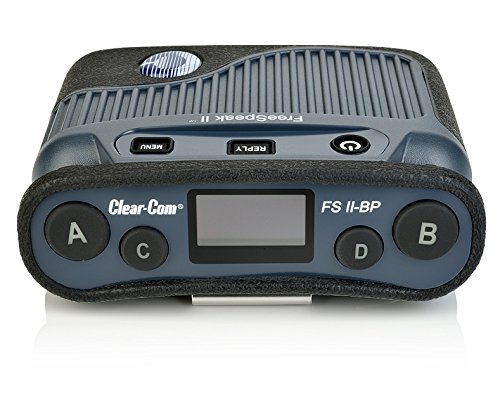
Image 1: Front view of the Clear-Com FSII-BP19-X4-US FreeSpeak II Digital Wireless Belt Pack, showing the display, channel buttons, and branding.
2.1 Front Panel
- Display Screen: A central LCD screen provides operational information, menu navigation, and status indicators.
- Buttons A, B, C, D: These circular buttons are typically used for channel selection, talk/listen functions, or group assignments, depending on system configuration.
- Clear-Com® Branding: Identifies the manufacturer.
- FS II-BP Identifier: Indicates the FreeSpeak II Belt Pack model.
2.2 Top Panel (as viewed from the top, with the display facing forward)
- MENU Button: Accesses the belt pack's configuration and settings menu.
- REPLY Button: Used for quick responses or specific communication functions within the system.
- Power Button: Controls the power on/off state of the belt pack.
- Speaker Grille: Allows for audio output from the belt pack's internal speaker.
3. Setup
Follow these steps to prepare your FreeSpeak II Digital Wireless Belt Pack for operation.
3.1 Charging the Battery
- Ensure the belt pack's battery is fully charged before initial use.
- Connect the belt pack to its designated charger. Refer to the charger's manual for specific instructions.
- The display will indicate charging status. A full charge typically takes several hours.
3.2 Connecting a Headset
- Locate the headset connector port on the belt pack.
- Carefully insert your compatible headset's connector into the port until it clicks into place.
- Ensure the headset is securely connected for optimal audio performance.
3.3 Pairing with a Base Station/Transceiver
For wireless operation, the belt pack must be paired with a FreeSpeak II base station or transceiver. Consult your FreeSpeak II system's base station manual for detailed pairing procedures, as these steps can vary based on system configuration.
- Typically, pairing involves placing the belt pack and base station/transceiver into a pairing mode.
- Follow the on-screen prompts on the belt pack's display during the pairing process.
- A successful pairing will be indicated on the belt pack's display.
4. Operating Instructions
This section outlines the basic operation of your FreeSpeak II Digital Wireless Belt Pack.
4.1 Power On/Off
- Power On: Press and hold the Power Button until the display illuminates.
- Power Off: Press and hold the Power Button until the display shuts down.
4.2 Adjusting Volume
Volume controls are typically located on the side of the belt pack. Use the designated up/down buttons or rotary control to adjust the headset and speaker volume to a comfortable listening level.
4.3 Channel/Group Selection (Buttons A, B, C, D)
The A, B, C, and D buttons are configurable and typically control access to specific communication channels or groups. Refer to your system administrator or base station configuration for the exact function of each button in your setup.
- Press: A short press usually activates or deactivates a talk/listen function for the assigned channel/group.
- Press and Hold: A longer press may activate a latching talk function or a different mode.
4.4 Menu Navigation
- Press the MENU Button to enter the belt pack's menu system.
- Use the A/B/C/D buttons or dedicated navigation buttons (if present) to scroll through menu options.
- Press a designated 'Select' or 'Enter' button (often one of the A/B/C/D buttons, or the MENU button itself) to confirm a selection.
- Press the REPLY Button or a designated 'Back' button to exit a menu or return to the previous screen.
5. Maintenance
Proper maintenance ensures the longevity and optimal performance of your belt pack.
5.1 Cleaning
- Wipe the exterior of the belt pack with a soft, dry, or slightly damp cloth.
- Do not use harsh chemicals, solvents, or abrasive cleaners.
- Ensure no moisture enters the ports or openings.
5.2 Battery Care
- Use only Clear-Com approved batteries and chargers.
- Avoid fully discharging the battery frequently to prolong its lifespan.
- If storing the belt pack for an extended period, charge the battery to approximately 50% and store in a cool, dry place.
5.3 Storage
- Store the belt pack in a protective case when not in use to prevent physical damage.
- Avoid exposing the device to extreme temperatures, humidity, or direct sunlight.
6. Troubleshooting
This section addresses common issues you might encounter with your belt pack.
6.1 No Power
- Check Battery: Ensure the battery is charged and correctly inserted.
- Power Button: Confirm the power button is pressed and held sufficiently to power on.
- Battery Condition: If the battery is old, it may need replacement.
6.2 No Audio / Poor Audio Quality
- Headset Connection: Verify the headset is securely plugged in.
- Volume Levels: Adjust the belt pack's volume controls.
- Headset Functionality: Test the headset with another device if possible.
- System Connection: Ensure the belt pack is properly paired and connected to the FreeSpeak II system.
6.3 Poor Wireless Range / Intermittent Connection
- Line of Sight: Ensure there is a clear line of sight between the belt pack and the FreeSpeak II transceiver/antenna.
- Obstructions: Metal structures, thick walls, and other electronic devices can interfere with the wireless signal.
- Distance: Operate within the recommended range of the FreeSpeak II system.
- Interference: Other wireless devices operating in the 1.88 - 1.93GHz band may cause interference.
6.4 Pairing Issues
- Refer to Base Station Manual: Pairing procedures are specific to the FreeSpeak II base station/transceiver.
- Reset: Try resetting both the belt pack and the base station/transceiver and attempt pairing again.
7. Specifications
| Brand | Clear-Com |
| Model Number | CLCM-FSIIBP19X4U (also known as FSII-BP19-X4-US) |
| Item Weight | 2 pounds |
| Frequency Band | 1.88 - 1.93GHz |
| UPC | 646635201254 |
| Color | Black |
| Belt Style | Round belt (as per manufacturer specification) |
8. Safety Information
Please read and follow these safety guidelines to ensure safe operation and prevent damage to the device or injury.
- Do not expose the belt pack to water or excessive moisture.
- Avoid dropping or subjecting the device to severe impact.
- Do not attempt to open or service the belt pack yourself. Refer all servicing to qualified personnel.
- Use only manufacturer-approved accessories, including batteries and chargers.
- Keep the device away from heat sources and direct sunlight.
- Dispose of batteries and electronic components according to local regulations.
9. Regulatory Compliance
This device complies with relevant regulatory standards for wireless communication equipment in its operating frequency band. Any modifications not expressly approved by Clear-Com could void the user's authority to operate the equipment.
10. Warranty and Support
Specific warranty information for the Clear-Com FSII-BP19-X4-US FreeSpeak II Digital Wireless Belt Pack was not provided in the product data. For detailed warranty terms, technical support, or service inquiries, please contact Clear-Com directly or refer to the official Clear-Com website.