
1. Product Overview
The BLANCO 121894 is a 35 MM ceramic disc replacement cartridge designed for use in various BLANCO faucet models. This component is crucial for controlling water flow and temperature, ensuring reliable and leak-free operation of your faucet. It features durable ceramic disc construction and a temperature and corrosion-resistant outer body for long-lasting performance.

Image 1.1: Front view of the BLANCO 121894 replacement cartridge, showing the model number and brand.
2. Compatibility
This replacement cartridge is compatible with the following BLANCO faucet models:
- ARTONA Bar
- ARTONA Pull-Down
- CATRIS Semi-Pro
- CATRIS Flexo
- CATRIS Flexo Filter
- EMPRESSA Bar
- EMPRESSA High Arc
- EMPRESSA Semi-Pro
- LINUS
- RIVANA Bar
- RIVANA High Arc
- RIVANA Semi-Pro
- URBENA Faucets
Always verify your faucet model before purchasing a replacement cartridge to ensure proper fit and function.
3. Installation Instructions
Replacing a faucet cartridge requires basic plumbing knowledge. If you are unsure, it is recommended to consult a professional plumber.
Required Tools (May Vary):
- Adjustable wrench
- Screwdriver (Phillips or flathead, depending on faucet model)
- Hex key set (if applicable for handle removal)
- Pliers
- Flashlight
- Towel or bucket
- Cartridge Key SKU 400687 (not included, may be required for some models)
Step-by-Step Guide:
- Turn off Water Supply: Locate the hot and cold water supply valves under the sink and turn them off completely. Turn on the faucet to drain any remaining water and relieve pressure.
- Remove Faucet Handle: Depending on your faucet model, you may need to pry off a decorative cap to expose a screw (often a hex screw or Phillips head). Unscrew it and carefully remove the handle.
- Access the Cartridge: Remove any retaining nuts, collars, or covers that secure the cartridge in place. An adjustable wrench or pliers may be needed. Be careful not to damage surrounding components.
- Remove Old Cartridge: Gently pull or twist the old cartridge out. If it's stuck, a cartridge puller tool or the specific Cartridge Key SKU 400687 might be necessary. Note the orientation of the old cartridge for correct installation of the new one.
- Clean Cartridge Housing: Inspect the cartridge housing for any debris or mineral buildup. Clean thoroughly to ensure a proper seal with the new cartridge.
- Install New Cartridge: Insert the new BLANCO 121894 cartridge into the faucet body, ensuring it is correctly oriented. The bottom of the cartridge features specific alignment tabs and O-rings for a secure fit.

Image 3.1: Bottom view of the BLANCO 121894 cartridge, showing the O-rings and alignment features.
- Reassemble Faucet: Secure the cartridge with any retaining nuts or collars. Reattach the faucet handle and any decorative caps.
- Restore Water Supply: Slowly turn on the hot and cold water supply valves. Check for leaks around the faucet base and connections.
- Test Faucet: Operate the faucet handle to check for proper water flow and temperature control. Ensure there are no drips or leaks.
4. Operation Principles
The BLANCO 121894 ceramic disc cartridge functions by precisely controlling the mixing of hot and cold water and regulating the water flow rate. Inside the cartridge, two ceramic discs with precisely engineered holes slide against each other. The movement of the faucet handle manipulates these discs, aligning the holes to allow varying amounts of hot and cold water to pass through, thereby controlling both temperature and volume. The durable ceramic material ensures a smooth, drip-free seal and resistance to wear over time.
5. Maintenance
To ensure the longevity and optimal performance of your BLANCO faucet and its 121894 cartridge, consider the following maintenance tips:
- Regular Cleaning: Clean the exterior of your faucet regularly with a mild soap and water solution. Avoid abrasive cleaners or harsh chemicals that can damage the finish.
- Check for Leaks: Periodically inspect the faucet for any signs of dripping or leaking. Addressing minor leaks promptly can prevent further damage to the cartridge or faucet body.
- Water Quality: If you have hard water, mineral deposits can accumulate over time and affect cartridge performance. Consider installing a water softener or filter to reduce mineral buildup.
- Gentle Operation: Operate the faucet handle smoothly and avoid forcing it, which can put undue stress on the cartridge's internal components.
6. Troubleshooting
If you experience issues with your BLANCO faucet, the 121894 replacement cartridge often resolves common problems. Here are some issues and how cartridge replacement can help:
- Dripping Faucet: A constant drip from the spout is typically caused by worn-out seals or ceramic discs within the cartridge. Replacing the cartridge will provide new, intact sealing surfaces.
- Leaking from Handle Base: Leaks around the base of the faucet handle often indicate a failing cartridge O-ring or a crack in the cartridge body. A new cartridge will restore the seal.
- Stiff or Loose Handle: A handle that is difficult to move or feels too loose can be due to internal wear or damage to the cartridge's moving parts.
- Inconsistent Water Temperature/Flow: If the faucet struggles to maintain a consistent temperature or flow, the mixing mechanism within the cartridge may be faulty or obstructed.
If replacing the cartridge does not resolve the issue, inspect other faucet components or consult a professional plumber.
7. Specifications
| Specification | Detail |
|---|---|
| Part Number | 121894 |
| Item Model Number | 121894 |
| Item Weight | 1.76 ounces |
| Product Dimensions | 1.38 x 1.38 x 2.24 inches |
| Color | Blue |
| Item Package Quantity | 1 |
| Included Components | Cartridge |
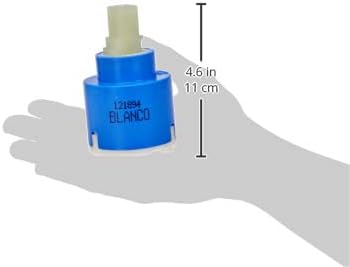
Image 7.1: BLANCO 121894 cartridge showing approximate dimensions.
8. Warranty Information
The BLANCO 121894 Replacement Cartridge is covered by a 1-year limited warranty. This warranty covers manufacturing defects under normal use and service. For specific terms and conditions, please refer to the official BLANCO warranty documentation or contact BLANCO customer support.
9. Customer Support
For further assistance, technical support, or warranty claims, please contact BLANCO customer service through their official website or the contact information provided with your original faucet purchase.
Official BLANCO Website: www.blancoamerica.com


