
OTUS DL-001
OTUS LED Desk Lamp DL-001 User Manual
Brand: OTUS
Introduction
Thank you for choosing the OTUS LED Desk Lamp DL-001. This advanced desk lamp is designed to provide optimal lighting for various tasks, featuring revolutionary gesture control, customizable color temperatures, and adjustable brightness levels. Its eye-caring illumination reduces strain during long hours of use, making it perfect for your home office, study, or creative space. This manual will guide you through the setup, operation, and maintenance of your new lamp.
Product Overview

The OTUS LED Desk Lamp DL-001, showcasing its sleek design and adjustable arm.
Setup
Package Contents:
- 1x OTUS LED Lamp
- 1x Heavy Base
- 1x AC Adapter with 63'' Power Cord
Assembly Instructions:
- Attach the Lamp to the Base: Carefully align the lamp's main pole with the opening in the heavy base. Insert the pole firmly into the base until it is securely seated. Ensure the screw and washer are properly attached at the bottom of the arm to secure it to the base.
- Connect the Power Adapter: Plug the AC adapter into the power input port located at the back of the lamp's base.
- Plug into Power Outlet: Insert the power cord into a standard electrical outlet.
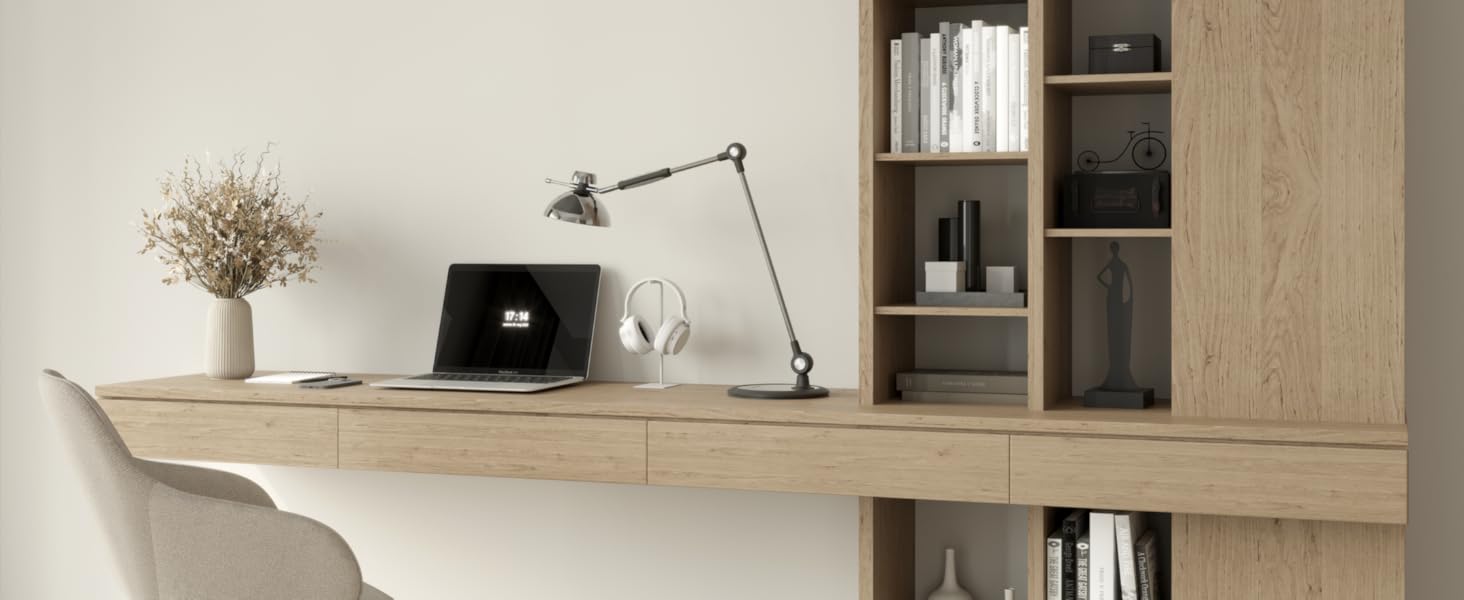
The lamp assembled and placed on a desk, ready for use.
Operating Instructions
Gesture Control (Touchless On/Off):
The OTUS LED Desk Lamp features an infrared motion sensor for touchless operation. To turn the lamp on or off, simply wave your hand over the lamp holder. This allows for convenient control, especially when your hands are occupied, and helps keep the lamp clean by avoiding fingerprints.
Video demonstrating the touchless gesture control for turning the lamp on and off.

Illustration of the hand gesture for activating the lamp's touchless control.
Color Temperature Modes:
The lamp offers 3 distinct color temperature modes to suit your preference and task:
- Warm Light (3000K): Ideal for relaxing or creating a cozy ambiance.
- Daylight (4000K): Best for general reading and everyday tasks, providing a natural light feel.
- Cool Light (6500K): Suitable for focused work, crafting, or tasks requiring high concentration.
Use the dedicated button on the lamp's control panel to cycle through these modes.

Visual representation of the three available color temperature modes.
Adjustable Brightness Levels:
The lamp provides 12 brightness levels, allowing for precise light intensity control. You can adjust the brightness in two ways:
- Stepless Dimming: Touch and hold the '+' or '-' buttons on the control panel for continuous adjustment.
- Stepped Adjustment: Short touches on the '+' or '-' buttons will adjust the brightness in predefined steps.
Memory Function:
The lamp features a memory function that recalls your last used brightness and color temperature settings. When you turn the lamp back on, it will automatically revert to your preferred settings from the previous use.

The lamp's memory function retains your last lighting settings.
Adjustable Swing Arm and Shade:
The lamp is equipped with a sturdy, adjustable swing arm and a rotatable shade, allowing you to direct light precisely where needed. This flexibility makes it suitable for various desk sizes and tasks, from detailed work to general illumination.

Diagram illustrating the lamp's extensive adjustability to find your perfect angle.
Maintenance
Cleaning:
- Always unplug the lamp from the power outlet before cleaning.
- Use a soft, dry cloth to wipe down the lamp's surfaces.
- Avoid using abrasive cleaners, solvents, or harsh chemicals, as these can damage the finish.
Bulb Replacement:
The OTUS LED Desk Lamp uses integrated LED lighting with an average lifespan of 50,000 hours. The LEDs are not user-replaceable. If you experience any issues with the light source, please refer to the troubleshooting section or contact customer support.
Troubleshooting
Lamp Not Turning On:
- Ensure the power cord is securely plugged into both the lamp base and a working electrical outlet.
- Check if the gesture control sensor is obstructed. Remove any objects blocking the sensor.
- Verify that the power outlet is functional by plugging in another device.
Light Flickering:
- Ensure the lamp is connected to a stable power source.
- If using a wall switch, ensure it is fully engaged.
Gesture Control Not Responding:
- Ensure your hand is within the effective range of the sensor (typically a few inches above the lamp holder).
- Clean the sensor area to remove any dust or debris that might interfere with its operation.
- Avoid direct strong light sources shining onto the sensor, as this can affect its performance.
Specifications
| Feature | Specification |
|---|---|
| Model Number | DL-001 |
| Brand | OTUS |
| Product Dimensions | 12"D x 8"W x 35"H |
| Item Weight | 5.73 Pounds |
| Light Source Type | LED |
| Wattage | 10 Watts |
| Brightness | 1500 Lux |
| Color Temperature Modes | 3 (Warm 3000K, Daylight 4000K, Cool 6500K) |
| Brightness Levels | 12 |
| Switch Type | Infrared Motion Sensor (Gesture Control) |
| Special Features | Touchless on/off, Stepless Dimmable Brightness, Memory Function, Eye-Caring Light |
| Average Life | 50,000 Hours |
| Material | Metal, Acrylic |
Warranty and Support
Warranty Information:
OTUS products are manufactured with high-quality materials and craftsmanship. This product comes with a standard manufacturer's warranty covering defects in materials and workmanship from the date of purchase. Please retain your proof of purchase for warranty claims.
Customer Support:
For any questions, technical assistance, or warranty inquiries, please contact OTUS customer support. You can find contact details on our official website or through the retailer where you purchased the product.
Note: Product specifications and features are subject to change without prior notice.
Ask a question about this manual
Ask about setup, troubleshooting, compatibility, parts, safety, or missing instructions. Manuals+ will review the question and use this page’s manual context to help answer it.