
Introduction
This manual provides detailed instructions for the setup, operation, and maintenance of your Sylvania SCR3128 AM/FM Clock Radio. Please read this manual thoroughly before using the device to ensure proper function and to maximize your user experience.
Safety Instructions
- Do not expose this product to rain or moisture.
- Do not place objects filled with liquids, such as vases, on the apparatus.
- Do not block any ventilation openings. Install in accordance with the manufacturer's instructions.
- Do not install near any heat sources such as radiators, heat registers, stoves, or other apparatus (including amplifiers) that produce heat.
- Protect the power cord from being walked on or pinched, particularly at plugs, convenience receptacles, and the point where they exit from the apparatus.
- Only use attachments/accessories specified by the manufacturer.
- Unplug this apparatus during lightning storms or when unused for long periods of time.
Product Overview
The Sylvania SCR3128 is an AM/FM clock radio featuring a large LED display, digital tuning, and dual alarm functionality. Below is an illustration of the unit with its primary controls and indicators.
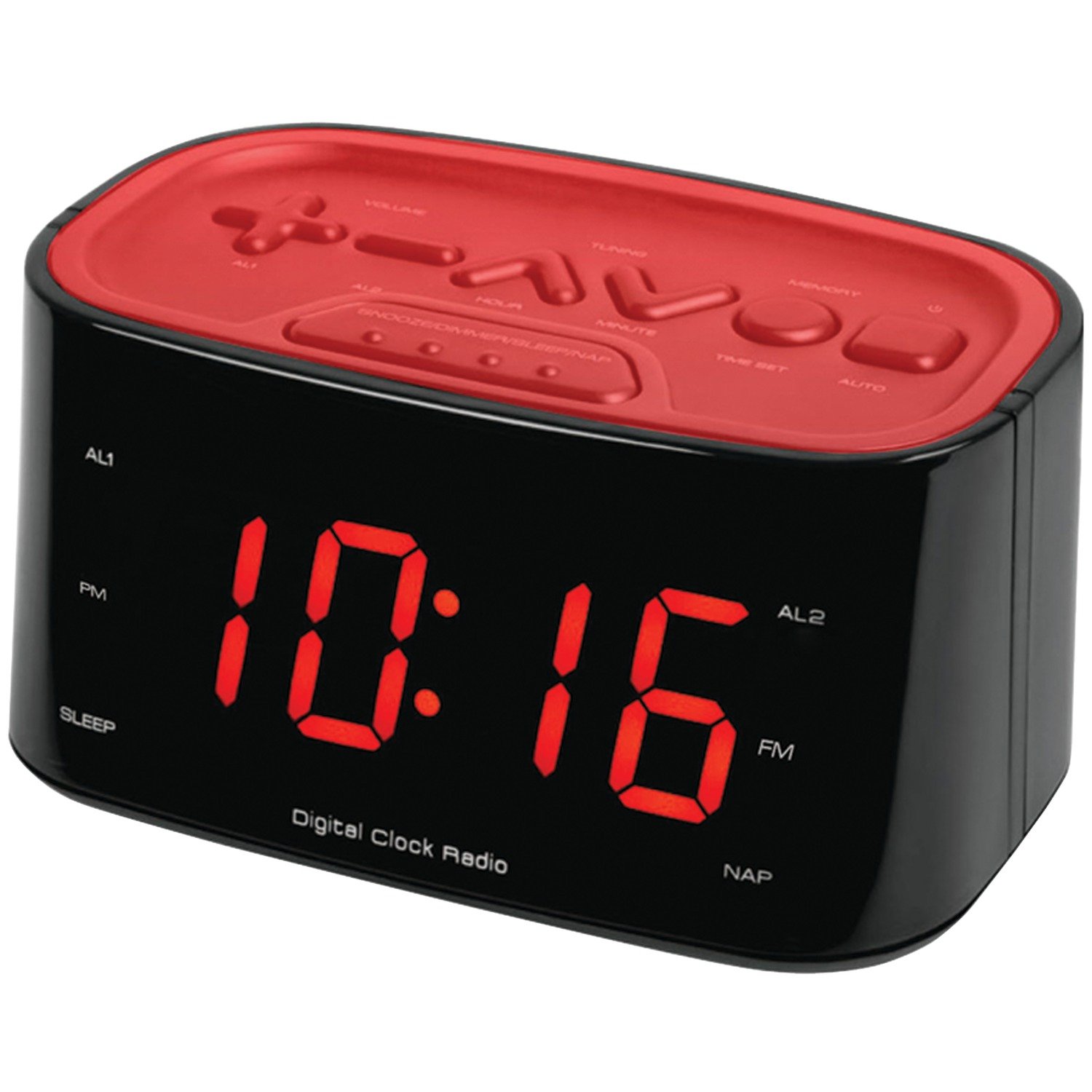
Figure 1: Sylvania SCR3128 Front and Top View
This image displays the Sylvania SCR3128 clock radio. The front features a prominent red LED digital display showing the time "10:16". Indicators for "AL1", "PM", "SLEEP", "Digital Clock Radio", "AL2", "FM", and "NAP" are visible around the display. The top panel, colored red, contains various control buttons: "VOLUME" (up/down), "TUNING" (up/down), "MEMORY", "AL1", "AL2", "HOUR", "MINUTE", "TIME SET", "AUTO", and a larger "SNOOZE/DIMMER/SLEEP/NAP" button.
Controls and Indicators:
- Large LED Display: Shows time, alarm status, and radio frequency.
- VOLUME +/- Buttons: Adjust audio volume for radio.
- TUNING +/- Buttons: Adjust radio frequency.
- MEMORY Button: Stores and recalls radio presets.
- AL1 / AL2 Buttons: Set and activate Alarm 1 and Alarm 2.
- HOUR / MINUTE Buttons: Adjust time and alarm settings.
- TIME SET Button: Initiates time setting mode.
- AUTO Button: Likely for automatic time setting or scanning.
- SNOOZE/DIMMER/SLEEP/NAP Button: Multi-function button for snooze, display brightness adjustment, sleep timer, and NAP alarm.
- PM Indicator: Lights up when the time is in the PM hours.
- SLEEP Indicator: Lights up when the sleep timer is active.
- FM Indicator: Lights up when FM radio is selected.
- NAP Indicator: Lights up when the NAP alarm is active.
Setup
1. Power Connection
- Plug the AC power cord into a standard wall outlet.
- For battery backup (optional, not included), open the battery compartment on the bottom of the unit and insert 2 x AAA batteries. These batteries will maintain time and alarm settings during a power outage but will not power the display or radio.
2. Initial Time Setting
- Press and hold the TIME SET button. The display will begin to flash.
- While the display is flashing, press the HOUR button repeatedly to set the correct hour. Observe the PM indicator for afternoon hours.
- Press the MINUTE button repeatedly to set the correct minute.
- Release the TIME SET button. The time is now set.
Operating Instructions
1. Radio Operation (AM/FM)
- Press the POWER button (usually combined with the AUTO or a dedicated power button, refer to unit for exact label) to turn on the radio.
- Press the FM button (if available, or cycle through modes) to select FM band. The FM indicator will light up.
- Use the TUNING +/- buttons to manually tune to your desired station.
- To automatically scan for stations, press and hold the TUNING +/- button for a few seconds. The radio will scan and stop at the next strong station.
- Adjust the volume using the VOLUME +/- buttons.
Setting Radio Presets:
- Tune to the desired radio station.
- Press the MEMORY button once. A preset number will flash on the display.
- Use the TUNING +/- buttons to select the desired preset number (e.g., P01, P02).
- Press the MEMORY button again to confirm and save the station.
- To recall a preset station, press the MEMORY button repeatedly to cycle through saved stations.
2. Setting Alarms (AL1 / AL2)
- Press and hold the AL1 button. The alarm time will flash.
- Use the HOUR and MINUTE buttons to set the desired alarm time. Observe the PM indicator.
- Press the AL1 button again to confirm the alarm time.
- Immediately after confirming the time, press the AL1 button repeatedly to cycle through alarm modes: OFF, BUZZER, RADIO. Select your preferred alarm source.
- Repeat the process for AL2 using the AL2 button.
- When an alarm is active, its respective indicator (AL1 or AL2) will be lit on the display.
3. Snooze, Dimmer, Sleep, and NAP Functions
The large SNOOZE/DIMMER/SLEEP/NAP button controls multiple features:
- Snooze: When an alarm sounds, press this button to temporarily silence it for approximately 9 minutes. The alarm will sound again after the snooze period.
- Dimmer: When the radio is off, press this button repeatedly to adjust the brightness of the LED display (e.g., High, Medium, Low, Off).
- Sleep Timer: When the radio is on, press this button repeatedly to set a sleep timer (e.g., 90, 60, 30, 15 minutes, OFF). The radio will play for the set duration and then automatically turn off. The SLEEP indicator will light up.
- NAP Alarm: Press and hold this button to activate the NAP alarm setting. Use HOUR/MINUTE to set a short nap duration (e.g., 10, 20, 30 minutes). The NAP indicator will light up.
Maintenance
- Cleaning: Wipe the unit with a soft, dry cloth. Do not use abrasive cleaners or solvents.
- Battery Replacement: If using backup batteries, replace them annually or when the display shows incorrect time after a power outage.
- Storage: If storing the unit for an extended period, disconnect it from power and remove backup batteries.
Troubleshooting
| Problem | Possible Cause | Solution |
|---|---|---|
| Unit does not power on. | Power cord not properly connected. | Ensure the AC power cord is securely plugged into a working outlet. |
| No radio reception or poor sound quality. | Weak signal; antenna not extended. | Extend the FM wire antenna fully. For AM, try repositioning the unit. |
| Alarm does not sound. | Alarm not set or set to OFF; volume too low. | Verify alarm time and mode (BUZZER/RADIO). Ensure radio volume is audible if alarm is set to radio. |
| Time is incorrect after power outage. | Backup batteries are dead or not installed. | Install fresh AAA batteries for backup. Reset the time. |
Specifications
- Model: Sylvania SCR3128
- Display Type: Digital LED
- Radio Bands: AM/FM
- Power Source: AC Power (Battery backup for time/alarm settings)
- Backup Battery: 2 x AAA (not included)
- Dimensions: 9.53 x 19.69 x 7.62 cm (3.75 x 7.75 x 3 inches)
- Weight: 385.55 g (0.85 lbs)
- Special Features: Dual Alarm, Snooze, Dimmer, Sleep Timer, NAP Alarm, Digital Tuning, Station Presets.
Warranty and Support
For warranty information or technical support, please refer to the warranty card included with your product or visit the official Sylvania website. Keep your purchase receipt as proof of purchase for any warranty claims.
For further assistance, you may contact Sylvania customer service through their official channels.
