
1. Introduction
The Risco SHOCKTEC RWT62W86800A is an advanced 2-channel wireless seismic detector integrated with a magnetic contact. Designed for enhanced security, this device utilizes a microprocessor-controlled seismic sensor to detect vibrations and impacts, alongside a magnetic contact for monitoring the opening and closing of doors or windows. Its encapsulated piezo sensor and tri-color LED provide precise sensitivity indications, facilitating accurate calibration for optimal performance. This manual provides comprehensive instructions for the proper installation, operation, and maintenance of your SHOCKTEC RWT62W86800A.
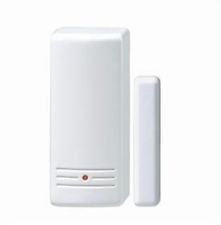
Figure 1: Risco SHOCKTEC RWT62W86800A Wireless Silent Radio Contact. This image shows the compact design of the main detector unit, typically mounted on a window or door frame.
2. Safety Information
Please read all safety instructions carefully before installing or operating the device. Failure to follow these instructions may result in damage to the device, property, or personal injury.
- Installation should be performed by qualified personnel only.
- Ensure the power source is disconnected before performing any installation or maintenance.
- Do not expose the device to extreme temperatures, humidity, or direct sunlight.
- Keep the device away from sources of strong electromagnetic interference.
- Dispose of batteries according to local regulations. Do not incinerate or disassemble batteries.
- Use only batteries specified by the manufacturer.
3. Package Contents
Verify that all items are present in the package before proceeding with installation:
- SHOCKTEC RWT62W86800A Main Unit
- Magnetic Contact (for door/window monitoring)
- Mounting Screws and Anchors
- Double-sided Adhesive Tape (optional mounting)
- Quick Installation Guide (this manual)
- Batteries (may be sold separately, check packaging)
4. Setup and Installation
4.1. Choosing a Mounting Location
Select a location on a door or window frame that is stable and free from excessive vibrations not related to intrusion attempts. The main unit should be mounted on the stationary frame, and the magnetic contact on the moving part (door/window) directly opposite the main unit. Ensure the gap between the main unit and the magnet does not exceed 10mm when the door/window is closed.
4.2. Battery Installation
- Open the cover of the main unit using a small screwdriver.
- Insert the specified batteries (e.g., CR123A, check device label) into the battery compartment, observing correct polarity (+/-).
- Close the cover securely. The device will typically perform a self-test upon power-up.
4.3. Mounting the Detector
- Position the main unit on the desired frame location. Mark the screw holes.
- Drill pilot holes if necessary and secure the main unit with the provided screws. Alternatively, use double-sided adhesive tape for mounting on smooth surfaces.
- Mount the magnetic contact on the moving part of the door/window, aligning it with the main unit's magnetic sensor. Ensure the alignment is precise and the gap is within the recommended distance.
4.4. Enrolling with the Risco System
Refer to your Risco alarm panel's user manual for specific instructions on enrolling wireless devices. Generally, the process involves:
- Putting the Risco panel into "Enrollment" or "Learn" mode.
- Activating the SHOCKTEC RWT62W86800A by opening and closing the monitored door/window (triggering the magnetic contact) or by generating a vibration (triggering the seismic sensor).
- Confirming successful enrollment on the alarm panel.
5. Operating the Device
5.1. Dual Detection Functionality
The SHOCKTEC RWT62W86800A operates as a dual-technology detector:
- Magnetic Contact: Triggers an alarm when the magnetic contact is separated from the main unit (e.g., a door or window is opened).
- Seismic Sensor: Detects vibrations and impacts on the surface it is mounted on (e.g., glass breaking, forced entry attempts).
5.2. Sensitivity Calibration
The device features a tri-color LED indicator to assist in calibrating the seismic sensor's sensitivity.
- Green LED: Indicates optimal sensitivity.
- Yellow LED: Indicates sensitivity is too low.
- Red LED: Indicates sensitivity is too high, potentially leading to false alarms.
Adjust the sensitivity dial (if present, refer to specific model diagram) until the LED indicates optimal sensitivity for the installation environment. Test the detection by gently tapping the protected surface to ensure it triggers appropriately without being overly sensitive.
6. Maintenance
6.1. Battery Replacement
When the device's battery is low, your Risco alarm panel will typically indicate a low battery warning for the specific zone. To replace the batteries:
- Put your alarm system into maintenance mode or notify your monitoring station to avoid false alarms.
- Open the cover of the main unit.
- Remove the old batteries and dispose of them properly.
- Insert new, fresh batteries of the correct type and polarity.
- Close the cover securely.
- Test the device to ensure it communicates correctly with the alarm panel.
6.2. Cleaning
Clean the exterior of the device periodically with a soft, dry cloth. Do not use abrasive cleaners, solvents, or spray directly onto the device.
7. Troubleshooting
| Problem | Possible Cause | Solution |
|---|---|---|
| Device not enrolling with panel. | Incorrect enrollment procedure, out of range, dead battery. | Verify panel is in enrollment mode. Check battery. Move device closer to panel. |
| False alarms from seismic sensor. | Sensitivity too high, external vibrations (e.g., heavy traffic). | Reduce seismic sensitivity using the calibration LED. Re-evaluate mounting location. |
| Magnetic contact not triggering. | Misalignment of magnet and main unit, excessive gap. | Realign magnet and main unit. Ensure gap is within 10mm. |
| Low battery warning. | Batteries are depleted. | Replace batteries as per Section 6.1. |
8. Specifications
| Feature | Detail |
|---|---|
| Model | RWT62W86800A |
| Brand | Risco |
| Type | Wireless Seismic and Magnetic Contact Detector |
| Channels | 2 (Seismic, Magnetic) |
| Sensor Type | Microprocessor-controlled seismic, encapsulated piezo |
| Indication | Tri-color LED for sensitivity calibration |
| Power Source | Battery (type typically CR123A, not included) |
| Manufacturer | Risco |
| ASIN | B01J433GTA |
9. Warranty and Support
Risco products are designed for reliability and performance. This product is covered by a limited warranty against defects in materials and workmanship. For specific warranty terms and conditions, please refer to the warranty card included with your product or visit the official Risco website.
For technical support, troubleshooting assistance, or to inquire about service, please contact your authorized Risco dealer or visit the Risco support portal online:
Risco Official Support Website