
1. Product Overview
The uxcell Sen-hz06K is a high-precision water flow sensor designed for measuring liquid flow rates within a range of 0.3 to 4.0 liters per minute. This sensor features a 6mm inlet and outlet diameter, making it suitable for various applications requiring accurate flow monitoring. It operates by converting water flow into electrical pulses, which can then be read by a microcontroller or other compatible device.
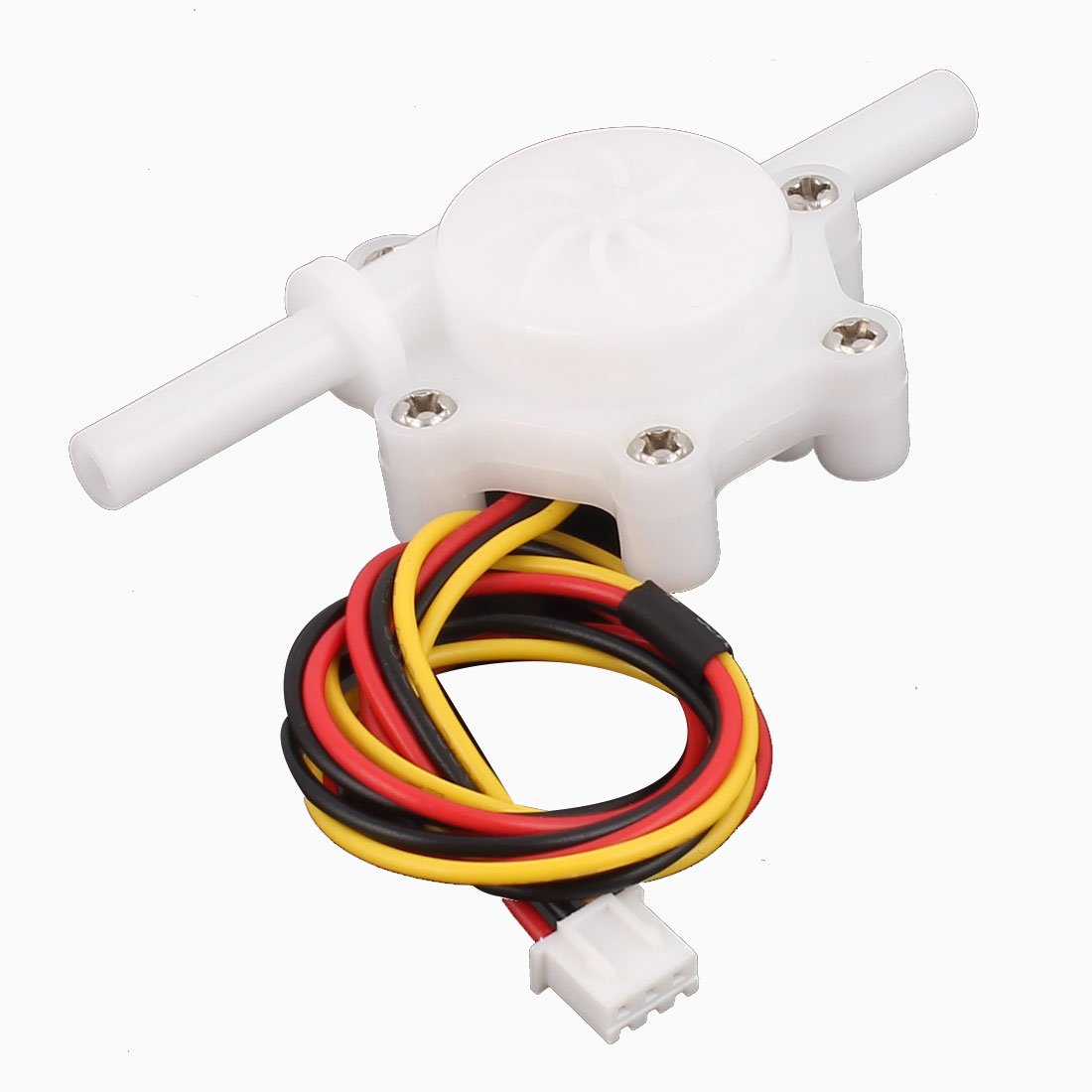
Figure 1: The uxcell Sen-hz06K water flow sensor, showing its main body, 6mm inlet/outlet pipes, and connected wiring harness.
2. Features
- High Precision: Designed for accurate measurement of water flow.
- Wide Flow Rate Range: Measures flow from 0.3 L/min to 4.0 L/min.
- Compact Design: Small form factor for easy integration into various systems.
- Standard Connections: Features 6mm inlet and outlet diameters for common tubing.
- Pulse Output: Provides a pulse signal proportional to the flow rate, compatible with microcontrollers.
3. Specifications
| Parameter | Value |
|---|---|
| Brand | uxcell |
| Model | a16031500ux1210 (Sen-hz06K) |
| Flow Rate Range | 0.3 - 4.0 L/minute |
| Inlet/Outlet Diameter | 6 mm (outer diameter) |
| Output Signal | Pulse signal |
| UPC | 602451767800 |
| ASIN | B01IYACGQI |
4. Safety Information
Please read and understand all safety instructions before installing or operating the uxcell Sen-hz06K water flow sensor. Failure to follow these instructions may result in property damage, injury, or improper operation.
- Electrical Safety: Ensure all electrical connections are made correctly and securely. Avoid exposing electrical components to water or excessive moisture.
- Pressure Limits: Do not exceed the recommended pressure limits for the sensor and connected tubing. High pressure can cause leaks or damage.
- Temperature Limits: Operate the sensor within its specified temperature range to prevent damage.
- Liquid Compatibility: This sensor is designed for water. Do not use it with corrosive liquids, chemicals, or liquids containing particles that could obstruct or damage the internal turbine.
- Installation: Install the sensor in a stable and secure manner to prevent movement or stress on connections.
5. Installation and Setup
Proper installation is crucial for accurate readings and reliable operation. Follow these steps carefully:
- Prepare the System: Ensure the water supply is turned off and the system is depressurized before beginning installation.
- Choose Location: Select a location in your water line where the sensor can be easily accessed and where water flow is consistent and free from turbulence. Install the sensor horizontally for best accuracy, if possible.
- Connect Tubing: Connect the inlet and outlet pipes of the sensor to your water tubing. Ensure a tight, leak-free connection. The sensor typically has an arrow indicating the direction of flow; ensure it aligns with your system's flow direction.
- Electrical Connections: The sensor comes with a 3-wire connector.
- Red Wire: Connect to positive power supply (e.g., +5V DC).
- Black Wire: Connect to ground (GND).
- Yellow Wire: This is the pulse output signal. Connect it to a digital input pin on your microcontroller or data acquisition system.

Figure 2: Close-up of the 3-pin connector for the uxcell Sen-hz06K water flow sensor, showing the red, black, and yellow wires for power, ground, and signal output respectively.
- Power On: Once all connections are secure, turn on the water supply and then apply power to the sensor and your control system.
- Leak Check: Carefully inspect all connections for any leaks. Tighten as necessary.
6. Operating Instructions
The uxcell Sen-hz06K sensor generates a series of electrical pulses, where the frequency of these pulses is directly proportional to the water flow rate. To obtain flow rate measurements, you will need to interface the sensor with a microcontroller (e.g., Arduino, Raspberry Pi) or a dedicated pulse counter.
- Pulse Output: The yellow wire provides the pulse signal. Each pulse represents a specific volume of water that has passed through the sensor.
- Calibration Factor: The sensor typically has a calibration factor (K-factor) which relates the number of pulses per liter (or gallon). This factor is usually provided by the manufacturer or can be determined through calibration. For this sensor, a common K-factor might be around 450 pulses/liter, but it's recommended to verify with specific testing.
- Calculating Flow Rate:
- Measure the frequency of the pulses (pulses per second).
- Flow Rate (L/s) = Pulse Frequency (Hz) / K-factor (pulses/liter)
- Flow Rate (L/min) = (Pulse Frequency (Hz) / K-factor (pulses/liter)) * 60
- Programming: Use interrupt-driven pulse counting on your microcontroller for accurate and efficient measurement.
7. Maintenance
The uxcell Sen-hz06K water flow sensor is designed for low maintenance. However, periodic checks can help ensure its longevity and accuracy.
- Regular Inspection: Periodically check for any signs of leaks at the connections or physical damage to the sensor body or wiring.
- Cleanliness: Ensure the water flowing through the sensor is clean and free of debris. Sediment or particles can clog the turbine or affect its rotation, leading to inaccurate readings or damage. Consider installing a filter upstream if water quality is a concern.
- Avoid Freezing: Do not allow water to freeze inside the sensor, as this can cause irreversible damage to the internal components and housing.
- Storage: If storing the sensor for an extended period, ensure it is drained of water and stored in a dry, temperate environment.
8. Troubleshooting
| Problem | Possible Cause | Solution |
|---|---|---|
| No pulse output / Inaccurate readings |
|
|
| Water leaks at connections |
|
|
9. Warranty and Support
For specific warranty information, please refer to the documentation provided at the time of purchase or contact your retailer. uxcell products are generally covered by a standard manufacturer's warranty against defects in materials and workmanship.
If you encounter issues not covered in this manual or require further assistance, please contact uxcell customer support or your product supplier. When contacting support, please have your product model number (a16031500ux1210) and purchase details ready.