
1. Introduction
Thank you for purchasing the QFX PBX-412200BTD-B Battery Powered Bluetooth Karaoke PA Speaker. This portable audio system is designed to provide high-quality sound and versatile entertainment options, including Bluetooth connectivity, FM radio, USB/SD playback, and karaoke functions. This manual provides essential information for safe operation, setup, and maintenance of your device.
2. Safety Information
- Read all instructions before operating the speaker.
- Keep this manual for future reference.
- Do not expose the unit to rain or moisture to prevent fire or electric shock.
- Do not open the speaker cabinet. There are no user-serviceable parts inside. Refer all servicing to qualified personnel.
- Ensure proper ventilation around the unit. Do not block any ventilation openings.
- Protect the power cord from being walked on or pinched.
- Unplug the unit during lightning storms or when unused for long periods.
- The battery is a sealed lead-acid type. Dispose of batteries responsibly according to local regulations.
3. Package Contents
Please check that all items are present in the package:
- QFX PBX-412200BTD-B PA Speaker Unit
- Microphone
- 2 Game Joysticks
- Remote Control
- Power Cable
- User Manual (this document)
4. Product Overview
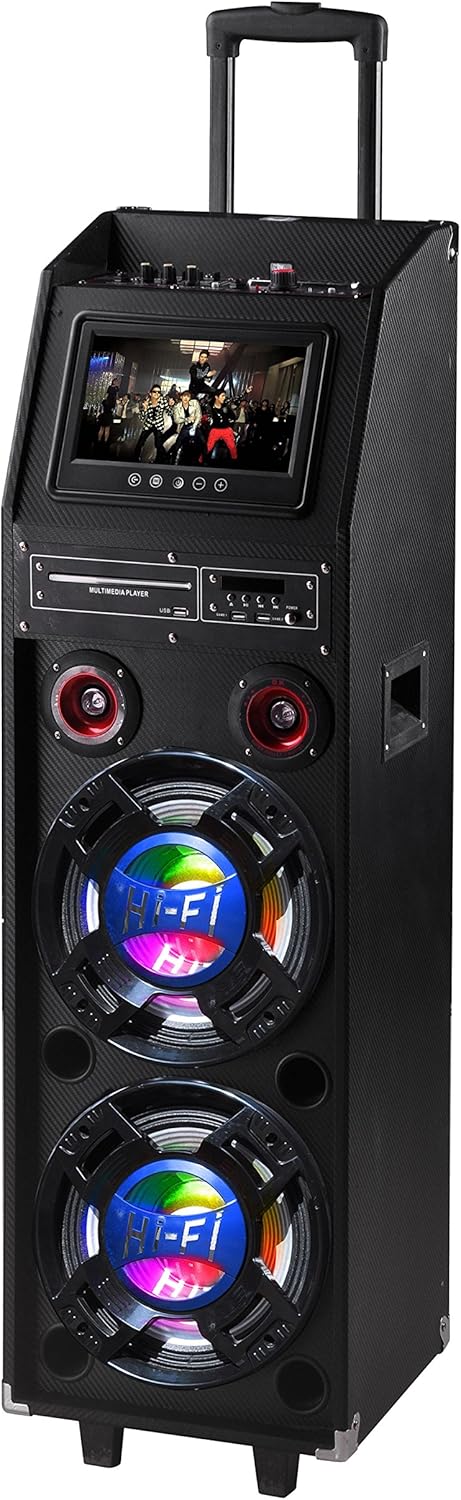
This image displays the QFX PBX-412200BTD-B portable karaoke PA speaker. It features a black textured finish, a retractable handle for portability, and wheels. The front panel includes a display screen, various control knobs and buttons, a multimedia player section with USB/SD slots, and two large woofers with integrated LED lighting. Two smaller tweeters are visible above the woofers. A side handle is also visible for lifting.
The QFX PBX-412200BTD-B is a versatile portable PA speaker system designed for various audio needs. It features a robust enclosure with a retractable handle and wheels for easy transport. The front panel includes a 9-inch LCD display, a multimedia player with USB and SD card slots, and controls for audio input, volume, and effects. The speaker system comprises two 12-inch woofers and two 1-inch tweeters, delivering clear and powerful sound. Integrated LED lights on the woofers enhance the visual experience.
5. Setup
5.1 Initial Charging
- Before first use, fully charge the speaker's internal battery.
- Connect the provided power cable to the AC input on the speaker and then to a standard wall outlet.
- The charging indicator light will illuminate. Allow approximately 8-10 hours for a full charge.
- Once fully charged, the indicator light may change or turn off, depending on the model. Disconnect the power cable.
5.2 Powering On/Off
- To power on the speaker, locate the Power switch (usually on the rear or top panel) and switch it to the 'ON' position.
- To power off, switch the Power switch to the 'OFF' position.
6. Operating Instructions
6.1 Bluetooth Pairing
- Turn on the speaker.
- Press the 'MODE' button on the control panel until 'Bluetooth' mode is selected. The display will show 'BLUE' or a Bluetooth icon, and you will hear an audible prompt.
- Enable Bluetooth on your mobile device (smartphone, tablet, etc.).
- Search for available Bluetooth devices. You should see 'QFX PBX-412200BTD-B' or a similar name in the list.
- Select the speaker from the list to pair. Once paired, you will hear a confirmation sound.
- You can now play audio from your device through the speaker.
6.2 USB/SD Playback
- Insert a USB flash drive or SD card (pre-loaded with MP3 audio files) into the respective slot on the multimedia player panel.
- Press the 'MODE' button to select 'USB' or 'SD' mode. The speaker will automatically begin playing audio files.
- Use the 'PLAY/PAUSE', 'PREV', and 'NEXT' buttons on the control panel or remote control to manage playback.
6.3 FM Radio
- Press the 'MODE' button to select 'FM' radio mode.
- Press and hold the 'PLAY/PAUSE' button to initiate an automatic scan for available FM stations. The speaker will save detected stations.
- Use the 'PREV' and 'NEXT' buttons to navigate through the saved stations.
6.4 Karaoke Function
- Microphone Connection: Connect the included microphone to the 'MIC IN' jack on the control panel. Adjust the 'MIC VOL' and 'ECHO' knobs for desired sound.
- Video Output: Connect an RCA video cable (not included) from the 'VIDEO OUT' port on the speaker to a compatible display (TV, monitor) to view lyrics or video content from USB/SD playback.
- Game Joysticks: Connect the included game joysticks to their respective ports for interactive gaming (if supported by media content).
6.5 LED Lights
The speaker features integrated LED lights on the woofers. A dedicated button or switch on the control panel typically controls these lights, allowing you to turn them on/off or cycle through different modes.
7. Maintenance
- Cleaning: Use a soft, dry cloth to clean the exterior of the speaker. Do not use abrasive cleaners or solvents.
- Battery Care: To prolong battery life, fully charge the speaker after each use and at least once every three months if not in regular use. Avoid completely draining the battery frequently.
- Storage: Store the speaker in a cool, dry place away from direct sunlight and extreme temperatures.
8. Troubleshooting
| Problem | Possible Cause | Solution |
|---|---|---|
| No power | Battery drained; Power cable not connected; Power switch off | Charge the battery; Connect power cable; Turn power switch ON |
| No sound | Volume too low; Incorrect input mode; Device not paired (Bluetooth) | Increase volume; Select correct mode (Bluetooth, USB, FM); Re-pair Bluetooth device |
| Bluetooth not connecting | Speaker not in Bluetooth mode; Device too far; Interference | Ensure speaker is in Bluetooth mode; Move device closer; Avoid obstacles |
| Microphone not working | Microphone not connected; MIC VOL too low | Connect microphone securely; Increase MIC VOL knob |
9. Specifications
| Feature | Specification |
|---|---|
| Model Number | PBX-412200BTD-B |
| UPC | 606540025918 |
| Speaker Configuration | 2 x 12-inch Woofers, 2 x 1-inch Tweeters |
| Display Type | LCD |
| Screen Size | 9 Inches (visible diagonal 23 cm) |
| Connectivity | Bluetooth, USB, SD Card, FM Radio, RCA Input/Output |
| Battery Type | Sealed Lead-Acid |
| Average Battery Life | 3 Hours |
| Product Dimensions (L x W x H) | 41.91 x 37.47 x 125.98 cm (16.5 x 14.75 x 49.6 inches) |
| Product Weight | 31.3 kg (69 lbs) |
| Color | Blue |
| Manufacturer | QFX USA |
10. Warranty and Support
QFX products are designed for reliability and performance. For specific warranty information, please refer to the warranty card included with your purchase or visit the official QFX website. For technical support or service inquiries, please contact QFX customer service through their official channels.


