
1. Introduction
The sparoma CF-2530A Ultrasonic Humidifier is designed to maintain optimal humidity levels in your indoor environment, contributing to a more comfortable atmosphere. This device features a 3.5-liter water tank made from antibacterial material, offering up to 30 hours of continuous operation with a maximum mist output of 250 ml/h. It includes a continuously adjustable mist intensity and a 360-degree rotating nozzle for directed mist flow.
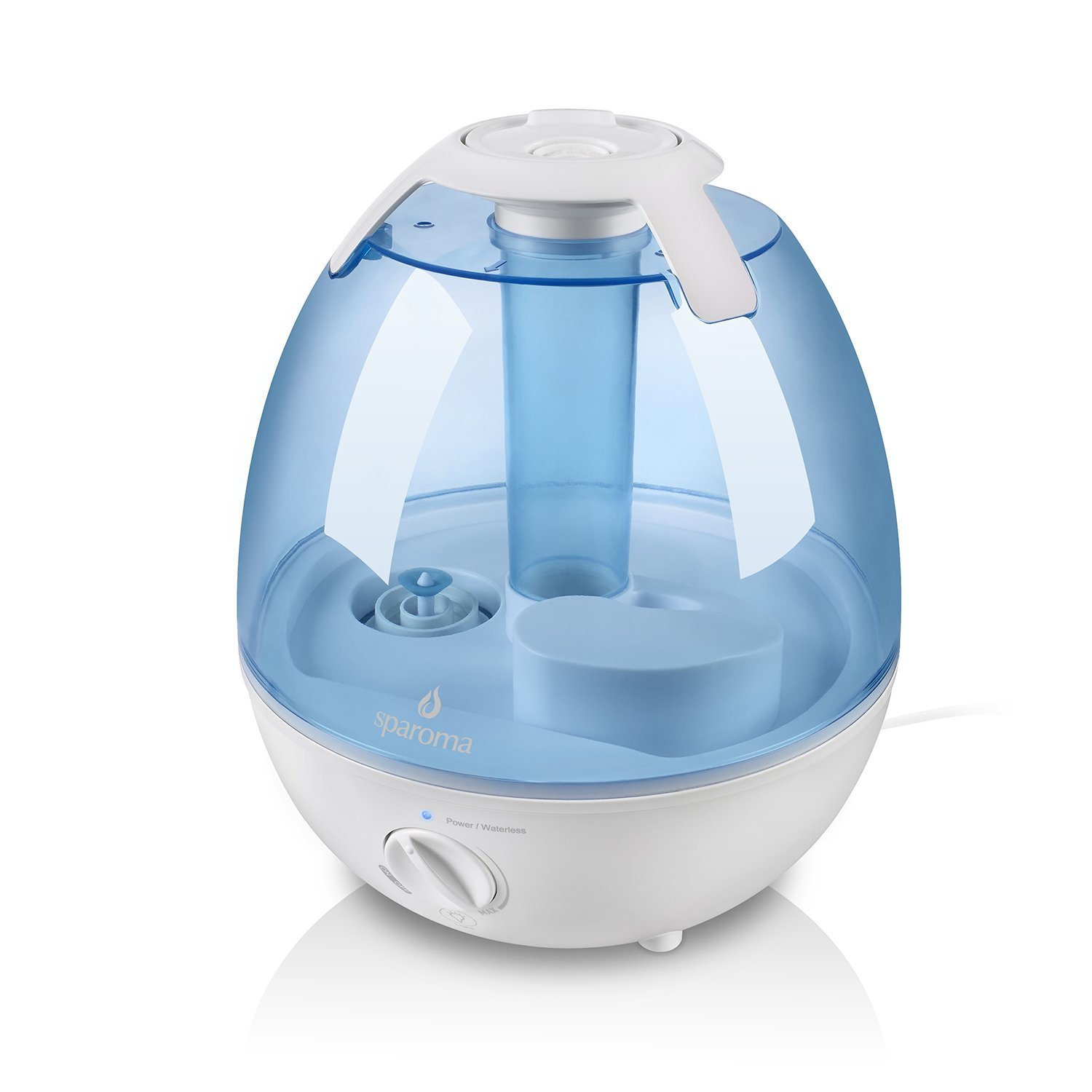
Image 1.1: The sparoma CF-2530A Ultrasonic Humidifier in operation, emitting cool mist.
2. Safety Instructions
Please read all safety instructions carefully before using the humidifier to prevent injury or damage to the appliance.
- Always place the humidifier on a firm, flat, waterproof surface at least 12 cm (5 inches) away from walls and appliances.
- Do not place the humidifier directly on carpet, towels, or other absorbent surfaces.
- Ensure the power cord is not damaged and is placed where it cannot be tripped over.
- Do not operate the humidifier with a damaged cord or plug.
- Unplug the humidifier from the power outlet before filling, cleaning, or moving it.
- Do not immerse the base unit in water or other liquids.
- Do not add essential oils directly into the water tank or base, as this may damage the unit.
- Keep out of reach of children and pets.
- Do not cover the mist outlet during operation.
- Use only clean, cool tap water. Distilled or demineralized water is recommended to prevent mineral buildup.
3. Product Components
Familiarize yourself with the main parts of your sparoma CF-2530A humidifier:
- Water Tank: The transparent upper part that holds the water.
- Base Unit: The lower part containing the electronic components, water basin, and control knob.
- Mist Nozzle: Located on top of the water tank, it directs the mist. It can rotate 360 degrees.
- Control Knob: On the front of the base unit, used for power ON/OFF and mist intensity adjustment.
- Power/Waterless Indicator Light: An LED light on the base unit indicating power status and low water level.
4. Setup
Follow these steps to set up your humidifier for the first time:
- Unpack: Carefully remove all packaging materials and place the humidifier on a stable, level surface.
- Remove Water Tank: Lift the water tank from the base unit.
- Fill Water Tank: Turn the water tank upside down and unscrew the tank cap. Fill the tank with clean, cool tap water. Do not fill past the maximum fill line.
- Secure Tank Cap: Screw the tank cap back on tightly to prevent leaks.
- Place Tank on Base: Place the filled water tank back onto the base unit, ensuring it is seated correctly. Align the 'sparoma' logo on the rotary knob with the corresponding mark on the tank for proper placement.
- Connect Power: Plug the power cord into a suitable electrical outlet.

Image 4.1: Visual guide for filling the water tank of the humidifier.
5. Operating Instructions
Operating your sparoma CF-2530A humidifier is straightforward:
- Power On: Turn the control knob clockwise from the 'OFF' position. The power indicator light will illuminate.
- Adjust Mist Intensity: Continue turning the control knob clockwise to increase the mist output. Turn it counter-clockwise to decrease the mist output. You can continuously adjust the intensity to your desired level.
- Direct Mist: Rotate the mist nozzle on top of the water tank 360 degrees to direct the mist flow in any desired direction.
- 7-Color Light: The humidifier features an atmospheric color-changing light with seven different colors. This light operates automatically when the unit is on.
- Low Water Shut-off: When the water level in the tank is too low, the humidifier will automatically turn off, and the indicator light will change to red (or flash, depending on the model) to alert you to refill the tank.
- Power Off: Turn the control knob counter-clockwise until it clicks into the 'OFF' position. Unplug the unit when not in use.

Image 5.1: The 360-degree rotating mist nozzle allows for flexible mist direction.
6. Maintenance and Cleaning
Regular cleaning is essential to ensure optimal performance and hygiene of your humidifier, especially due to its antibacterial material design.
- Unplug: Always unplug the humidifier before cleaning.
- Empty Water: Remove the water tank and empty any remaining water from both the tank and the base unit.
- Clean Water Tank:
- Fill the water tank with clean water.
- Add a small amount of white vinegar (approximately 1-2 tablespoons) to the tank.
- Shake the tank gently to mix the water and vinegar.
- Let the solution stand in the tank for 10-20 minutes.
- Pour out the water-vinegar solution.
- Rinse the tank thoroughly with fresh water until the vinegar smell is gone.
- Clean Base Unit: Use a soft brush (a small cleaning brush is often included or can be a soft toothbrush) to clean the groove and the ultrasonic transducer in the base unit. Wipe the base with a damp cloth. Do not immerse the base in water.
- Dry: Allow all parts to air dry completely before reassembling or storing the humidifier.
Note: The antibacterial material helps reduce bacterial emissions, but regular cleaning as described above is still necessary to prevent mineral buildup and maintain hygiene.

Image 6.1: The humidifier features antibacterial material to reduce bacterial growth, emphasizing the importance of regular cleaning.
7. Troubleshooting
If you encounter issues with your humidifier, refer to the following common problems and solutions:
| Problem | Possible Cause | Solution |
|---|---|---|
| No mist or very little mist |
|
|
| Water leakage |
|
|
| Unusual odor |
|
|
| Loud noise during operation |
|
|
8. Specifications
| Feature | Specification |
|---|---|
| Model Number | CF-2530A |
| Rated Voltage | 100-240 V, 50 Hz / 60 Hz |
| Rated Power | 25 W |
| Water Capacity | 3.5 Liters |
| Max. Mist Output | 250 ml/h |
| Continuous Operation Time | 10-30 hours (depending on mist setting) |
| Product Dimensions (L x W x H) | 22.9 x 22 x 25.2 cm (9.0 x 8.7 x 9.9 inches) |
| Product Weight | 1.47 kg (3.24 lbs) |
| Special Features | Adjustable mist direction (360° nozzle), 7-color ambient light, Antibacterial water tank material |
9. Warranty and Customer Support
We are committed to providing satisfactory customer service. If you have any questions, concerns, or encounter any problems with your sparoma CF-2530A humidifier, please do not hesitate to contact us. We are always here to assist you.
Please refer to your purchase documentation or the retailer's website for specific warranty details and contact information.