
1. Introduction
Thank you for choosing the Sportstech F10 Treadmill. This manual provides essential information for the safe and effective use of your new fitness equipment. Please read all instructions carefully before assembly and operation. Keep this manual for future reference.
2. Safety Instructions
- Always consult with a physician before starting any new exercise program.
- Ensure the treadmill is placed on a flat, stable surface with adequate clearance around it.
- The maximum user weight for this treadmill is 120 kg. Do not exceed this limit.
- Keep children and pets away from the treadmill during operation.
- Always use the safety key during workouts. In case of an emergency, the safety key will immediately stop the treadmill.
- Wear appropriate athletic footwear and clothing.
- Do not operate the treadmill if it is damaged or malfunctioning.
- The treadmill operates with a low noise level (less than 68dB), but ensure proper ventilation.
3. Package Contents
Verify that all components are present before beginning assembly:
- Sportstech F10 Treadmill main unit
- User Manual (in ENG, DE, FR, ES, IT)
- Installation Tools
- Pulse Belt (included with some models)
4. Assembly and Setup
The Sportstech F10 treadmill is designed for quick and easy assembly. Follow these general steps:
- Unpacking: Carefully remove all components from the packaging.
- Base Assembly: Attach the main frame to the base according to the diagrams in the included manual. Use the provided installation tools.
- Console Attachment: Secure the console to the uprights, ensuring all cables are properly connected.
- Power Connection: Plug the treadmill into a grounded electrical outlet.
- Safety Check: Before first use, ensure all bolts and nuts are tightened and the safety key functions correctly.


Video: This video demonstrates the key features of the Sportstech F10 treadmill, including its easy folding mechanism, operation, and integration with fitness apps. It highlights the convenience and functionality for home use.
5. Operating Instructions
5.1 Console Overview
The F10 features a large LCD display with blue backlighting, showing essential training data such as speed, time, distance, calories, and pulse.
5.2 Starting a Workout
- Step onto the treadmill belt, placing your feet on the side rails.
- Attach the safety key clip to your clothing.
- Press the 'START' button on the console. The treadmill will begin at a low speed.
- Adjust the speed using the '+' and '-' buttons. The maximum speed is 10 km/h.
5.3 Programs and Incline
- The F10 offers 13 pre-set training programs to vary your workouts. Select a program using the 'PROG' button.
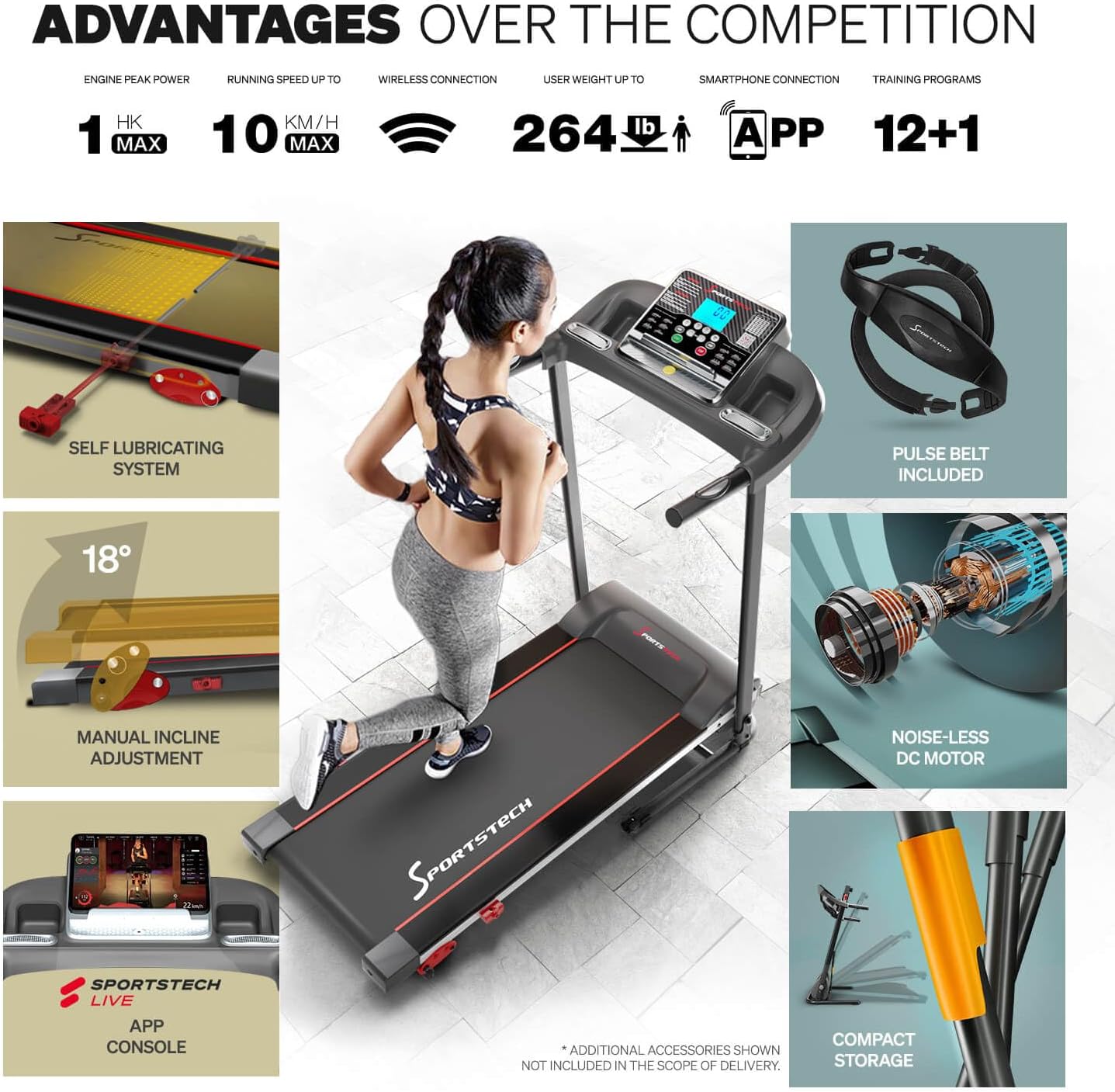
- The treadmill features a manual incline adjustment with 3 levels, allowing for a maximum incline of 18 degrees. Adjust the incline before starting your workout.
5.4 App Connectivity
Enhance your training experience by connecting your device to the treadmill via the multimedia console. The F10 is compatible with KINOMAP and Sportstech Live apps, offering video events, coaching, and multiplayer modes.


5.5 Heart Rate Monitoring
The included pulse belt provides accurate heart rate data, allowing you to optimize your training intensity. Follow the instructions provided with the pulse belt for proper use and pairing.

6. Maintenance
6.1 Lubrication
The Sportstech F10 features an innovative self-lubricating system that evenly releases silicone oil over a long period. This eliminates the need for frequent and inconvenient manual re-oiling.
6.2 Cleaning
Regularly wipe down the treadmill with a damp cloth to remove sweat and dust. Do not use abrasive cleaners or solvents.
6.3 Storage
The F10 treadmill is designed with an Easy Folding System, allowing it to be folded compactly for storage. This makes it ideal for homes with limited space. Ensure the treadmill is securely locked in its folded position before moving or storing.
7. Troubleshooting
- Treadmill not starting: Check if the power cord is securely plugged in and the safety key is correctly placed.
- Unusual noises: Ensure all bolts are tightened. If the noise persists, contact customer support.
- Belt slipping: The running belt may need adjustment or re-tensioning. Refer to the detailed manual for instructions or contact support.
- Console not displaying: Check power connections and ensure the console cables are properly seated.
8. Specifications
| Feature | Detail |
|---|---|
| Model Number | sp_f10_v_de |
| Product Dimensions (L x W x H) | 128.5D x 62W x 116.5H cm |
| Folded Size | 1240 x 620 cm (Note: This seems to be a typo in source data, likely referring to 1240mm x 620mm or 124cm x 62cm) |
| Item Weight | 20.5 Kilograms |
| Material | Alloy Steel |
| Maximum Speed | 10 Kilometers per hour |
| Maximum User Weight | 120 Kilograms |
| Special Features | Manual Incline, On Wheels |
| Maximum Incline Percentage | 30.61 (Note: This is likely a percentage value, not degrees) |
| Display Type | LCD |
| Power Source | Corded Electric |
| Input Power | 746 Watt |
| Number of Programs | 4 (Note: Product title mentions 13 programs, specifications list 4. Please refer to the actual product for clarification.) |
| Running Surface (L x W) | 1010 x 345 mm (39.7 x 13.5 inches) |
9. Warranty and Support
For warranty information, technical support, or service inquiries, please refer to the contact details provided in the original product packaging or visit the official Sportstech website. Keep your proof of purchase for warranty claims.


