
SAMSON CR-277
Samson CR-277-HH Handheld Wireless System User Manual
Model: CR-277 | Brand: SAMSON
Introduction
Thank you for choosing the Samson CR-277-HH Handheld Wireless System. This system is designed to provide reliable and high-quality audio transmission for various applications, including live performances, presentations, and public speaking. It features a dual UHF wireless receiver and two dynamic handheld microphone transmitters, ensuring clear and consistent sound.
This manual provides detailed instructions for setting up, operating, maintaining, and troubleshooting your CR-277-HH system. Please read it thoroughly before use to ensure optimal performance and longevity of your equipment.

Figure 1: The Samson CR-277-HH Handheld Wireless System, showing the CR277 dual UHF receiver and two HT7 handheld microphone transmitters.
Setup Guide
Unpacking and Inspection
Carefully unpack all components and inspect them for any signs of damage. If any item is missing or damaged, contact your dealer immediately.
The package should include:
- CR277 Half-Rack Dual UHF Wireless Receiver
- Two HT7 Dynamic Handheld Microphone Transmitters
- Power Adapter
- Audio Cables (e.g., 1/4-inch to 1/4-inch)
- 9-volt Batteries (for transmitters)
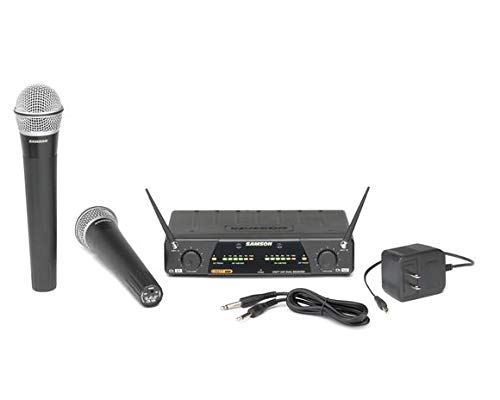
Figure 2: Included components of the Samson CR-277-HH system, showing the receiver, two microphones, power adapter, and connecting cables.
Receiver Placement
Place the CR277 receiver on a stable, flat surface, away from potential sources of interference such as computers, large metal objects, or other wireless devices. Ensure adequate ventilation around the unit.
Connecting the Receiver
- Connect the included power adapter to the DC input on the rear panel of the CR277 receiver and then to a suitable power outlet.
- Connect the receiver's audio outputs to your mixer, amplifier, or PA system. You can use either the two independent 1/4-inch outputs (one for each channel) or the single 1/4-inch mix output.
- Extend the tuned molded antennas for optimal signal reception.
Battery Installation (HT7 Transmitters)
Each HT7 handheld microphone transmitter requires one 9-volt battery for operation. To install the battery:
- Unscrew the bottom section of the microphone handle.
- Insert a fresh 9-volt battery, observing the correct polarity (+/-).
- Screw the bottom section back onto the microphone handle until secure.
Each transmitter is designed to operate for approximately 12 hours on a single 9-volt battery.
Operating Instructions
Powering On/Off
- Receiver: Press the POWER button on the front panel of the CR277 receiver to turn it on. The power indicator will illuminate.
- Transmitters: Slide the ON/OFF switch on each HT7 microphone transmitter to the 'ON' position. The power/battery indicator on the transmitter will light up.
Adjusting Levels
The CR277 receiver features independent level controls for each channel (Ch U1 and Ch U2). Adjust these knobs to set the desired output volume for each microphone. Monitor the multi-segment RF level and peak audio indicators to ensure optimal signal strength without clipping.
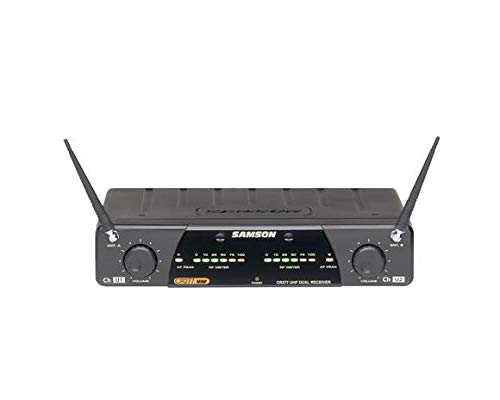
Figure 3: Front panel of the CR277 receiver, highlighting the independent level controls, RF level, and peak audio indicators for each channel.
Using the Microphones
Hold the HT7 microphone approximately 2-6 inches from your mouth for best vocal pickup. The Q7 dynamic microphone element is designed for clear and articulate sound reproduction.
Squelch Control
The CR277 receiver includes squelch control for each channel. This feature helps to eliminate unwanted noise when the transmitter signal is weak or absent. Adjust the squelch knob clockwise to increase the squelch threshold, reducing background noise. Adjust it counter-clockwise to decrease the threshold, allowing weaker signals to pass through.
Maintenance
Cleaning
To clean the receiver and microphones, use a soft, dry cloth. For stubborn dirt, a slightly damp cloth can be used, but ensure no moisture enters the internal components. Do not use abrasive cleaners or solvents.
Battery Replacement
Replace the 9-volt batteries in the HT7 transmitters when the power/battery indicator on the microphone begins to dim or when audio quality degrades. Always use fresh, high-quality alkaline batteries for optimal performance and battery life.
Storage
When not in use for extended periods, remove the batteries from the transmitters to prevent leakage. Store the system in a cool, dry place, away from direct sunlight and extreme temperatures.
Troubleshooting
If you encounter issues with your Samson CR-277-HH system, refer to the table below for common problems and their solutions.
| Problem | Possible Cause | Solution |
|---|---|---|
| No sound from microphone | Transmitter off or low battery Receiver not powered on Volume levels too low Incorrect cable connection | Ensure transmitter is ON and battery is fresh Verify receiver is powered on Increase volume on receiver and connected audio device Check all audio cable connections |
| Interference or static | Other wireless devices nearby Antennas not properly extended Receiver too far from transmitter Squelch setting too low | Move away from other wireless devices Ensure antennas are fully extended and positioned correctly Reduce distance between transmitter and receiver Increase squelch level on receiver |
| Short battery life | Old or low-quality batteries Continuous use | Use fresh, high-quality alkaline 9-volt batteries Turn off transmitters when not in use |
| Audio distortion | Input level too high Microphone too close to sound source | Reduce volume on receiver or connected device Increase distance between microphone and sound source |
Technical Specifications
| Feature | Specification |
|---|---|
| Model Number | CR-277 |
| Microphone Form Factor | Handheld |
| Polar Pattern | Omnidirectional |
| Connectivity Technology | Wireless |
| Number of Channels | 2 |
| Power Source (Transmitters) | 9-volt Battery |
| Battery Life (Transmitters) | Approx. 12 hours |
| Receiver Outputs | Two independent 1/4-inch, one 1/4-inch mix |
| Impedance | 600 Ohm |
| Item Weight | 1.25 kg (System) |
| Included Components | Battery |
| Compatible Devices | Camera (as per specification, though typically audio mixers/PA systems) |
| Recommended Uses | Karaoke |
Warranty and Support
Samson products are manufactured to the highest standards and are backed by a limited warranty. For specific warranty terms and conditions, please refer to the warranty card included with your product or visit the official Samson website.
For technical support, service, or replacement parts, please contact your authorized Samson dealer or Samson customer service directly. Keep your purchase receipt as proof of purchase for warranty claims.
Ask a question about this manual
Ask about setup, troubleshooting, compatibility, parts, safety, or missing instructions. Manuals+ will review the question and use this page’s manual context to help answer it.