
Introduction
This manual provides essential information for the safe and effective use of your Beautyrest Heated Blanket. Designed for comfort and warmth, this blanket features Secure Comfort Technology, multiple heat settings, and an automatic shut-off timer. Please read all instructions carefully before use and retain this manual for future reference.

Image: The Beautyrest King Size Ivory Heated Blanket, neatly folded in its packaging, showcasing the soft texture and including two controllers.
Important Safety Information
WARNING: To reduce the risk of burns, electric shock, fire, or injury, this product must be used in accordance with the following instructions.
- Do not use with infants, children, incapacitated persons, or anyone insensitive to heat.
- Do not use with a damaged cord or plug.
- Do not use with pins or other metallic objects.
- Do not use if wet.
- Do not use with alcohol, narcotics, or any medication that causes drowsiness.
- Do not use in conjunction with another heating pad or blanket.
- Do not cover the controller while in use to avoid overheating.
- Always unplug the blanket when not in use.
- This product contains chemicals known to the State of California to cause cancer and birth defects or other reproductive harm.
Package Contents
- 1 x Beautyrest Heated Blanket (King Size, Ivory)
- 2 x Digital Controllers (for King size)
- 2 x Power Cords
Setup
- Unpack: Carefully remove the heated blanket and controllers from the packaging.
- Position: Lay the heated blanket flat on your bed, ensuring the connector is positioned at the foot of the bed.
- Connect Controllers: Locate the connector on the blanket. Align the arrows on the controller cord with the arrows on the blanket connector and firmly push together until they click into place. For King size blankets, there are two connectors and two controllers, one for each side of the bed.
- Plug In: Plug the power cords from the controllers into a 110V-120V @ 60Hz wall outlet. Ensure the outlets are easily accessible.

Image: A detailed view of the two digital controllers, highlighting features such as the LCD display, 20 heat levels, and 10-hour auto shut-off.
Video: An unboxing and setup guide for a heated blanket, demonstrating how to connect the controllers and prepare the blanket for use.
Operating Instructions
- Power On: Press the 'On/Off' button on the controller to turn on the blanket. The LCD display will illuminate.
- Adjust Heat Settings: Use the 'Up' and 'Down' arrow buttons to select your desired heat level from 1 to 20. The blanket offers adjustable heat from 85°F to 105°F, depending on ambient temperature.
- Fast Heating: Press the 'Preheat' button for a quick warm-up. This feature provides rapid heating for approximately one hour.
- Set Auto Shut-Off Timer: Press the 'Timer' button to cycle through the available auto shut-off times, from 1 to 10 hours. The blanket will automatically turn off after the selected duration.
- Dual Controls (King Size): For King size blankets, each side has an independent controller, allowing two users to customize their individual heat settings and timer preferences.
- Power Off: Press the 'On/Off' button again to turn off the blanket. Always unplug the blanket from the wall outlet when not in use.
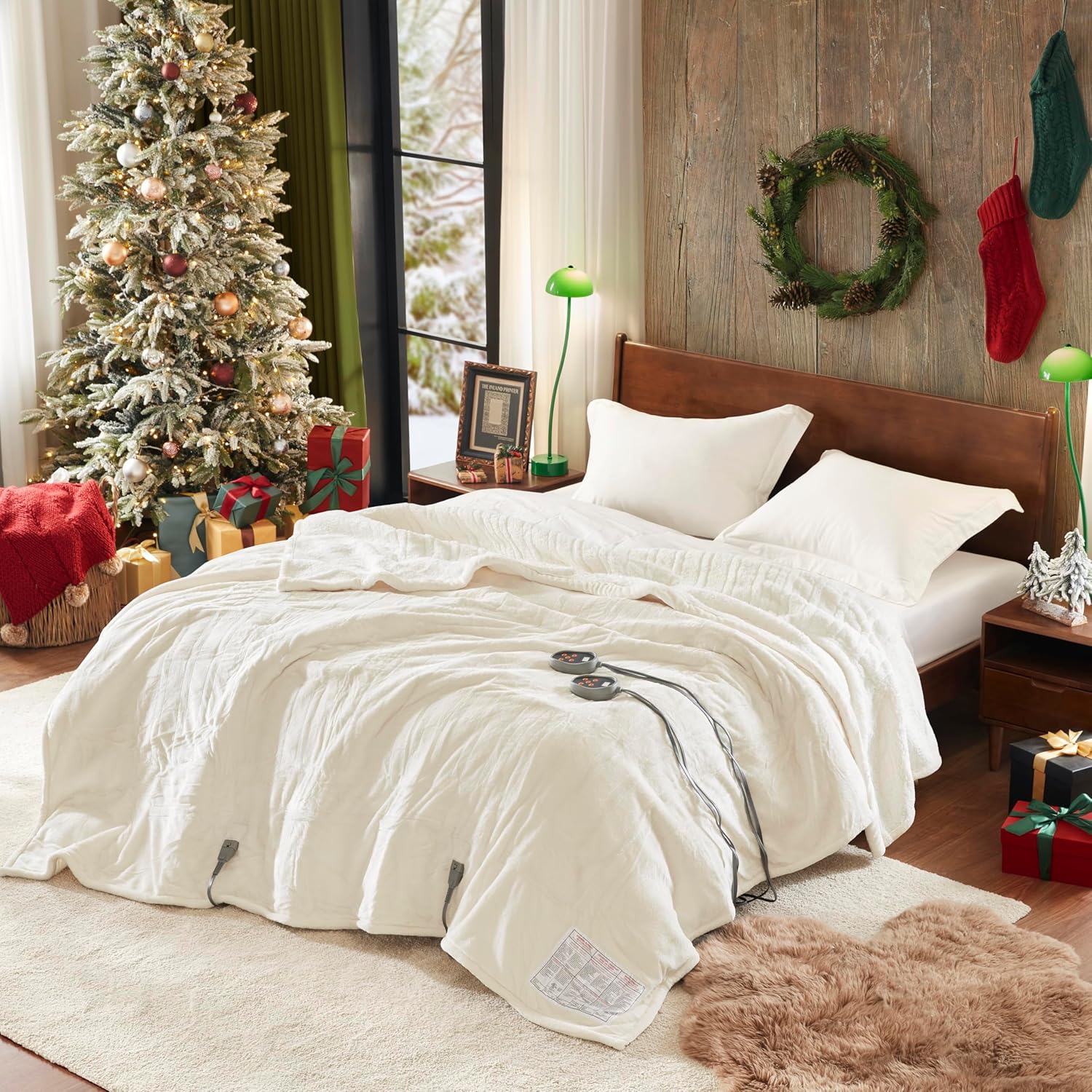
Image: The Beautyrest King Size Ivory Heated Blanket spread on a bed, illustrating its placement and the accessibility of the dual controllers.
Video: A demonstration of a heated blanket's features, including controller operation for heat settings and auto shut-off, highlighting its reversible design and energy-saving benefits.
Care and Maintenance
- Disconnect: Always unplug the blanket from the wall outlet and detach the controllers from the blanket before cleaning.
- Machine Washable: The blanket is machine washable. Wash on a gentle cycle in cold water. Do not bleach.
- Drying: Tumble dry on low heat or line dry. Ensure the blanket and all connectors are completely dry before reattaching controllers or plugging into an outlet.
- Storage: For long-term storage, gently fold or roll the blanket. Avoid excessive folding, twisting, or placing heavy objects on it to prevent damage to the internal heating wires. Store in a cool, dry place.

Image: Visual instructions for easy care, demonstrating how to unplug the blanket and place it in a washing machine, alongside a display of available color options.
Video: A guide on how to wash and store a heated blanket, emphasizing the importance of unplugging and drying thoroughly, and proper storage techniques to maintain performance.
Troubleshooting
| Problem | Solution |
|---|---|
| Light blinking on controller | Unplug and reconnect, ensuring the controller is properly connected. If the issue persists, contact customer support. |
| Blanket not heating well | Ensure the blanket is powered on and set to the maximum level. Allow time for it to heat up. |
| Only parts of the blanket are getting warm | This is usually caused by a bunched or pinched heating element. Lay the blanket flat, untucked, and free from heavy objects. Straighten the heating wires as needed to restore function. Lay the blanket flat and run your fingers along the wire, paying special attention to the top and bottom of the blanket where the wire bends. If any portion of the wire is twisted on itself, manually twist it back. |
Specifications
- Model: BR54-0653
- Size: King (90 inches L x 100 inches W)
- Color: Ivory
- Material: 100% Polyester (Plush & Sherpa)
- Heat Settings: 20 levels (85°F - 105°F)
- Auto Shut-Off: 1-10 hours
- Controls: Dual digital controllers for King size
- Special Features: Secure Comfort Technology (Virtually Zero EMF), Quick Heat, Machine Washable, UL Certified, OEKO-TEX certified
- Power: 110V-120V @ 60Hz (Max 160W)
- Item Weight: 10.59 pounds
Warranty and Support
Your Beautyrest Heated Blanket is covered by a 5-year limited warranty. This warranty covers defects in materials and workmanship under normal use. For warranty claims, technical support, or any questions regarding your product, please contact the manufacturer or the retailer where the product was purchased.
Please retain your proof of purchase for warranty validation.


