
1. Introduction
This manual provides comprehensive instructions for the installation, operation, and maintenance of the Electronet Analytical Instruments CT-100S. Please read this manual thoroughly before using the instrument to ensure safe and efficient operation. Keep this manual for future reference.
2. Product Overview
The Electronet Analytical Instruments CT-100S is a robust and reliable conductivity transmitter designed for on-line measurement in various industrial applications. It features a 2-wire system with 4-20 mA DC output, Hart communication capability, and an intuitive LCD display for real-time indication. Its design emphasizes ease of installation and operation, making it suitable for demanding environments.
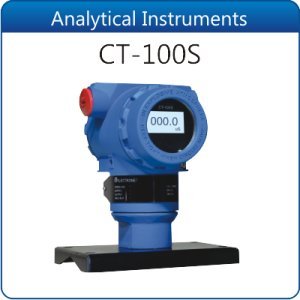
Figure 2.1: Electronet Analytical Instruments CT-100S Conductivity Transmitter. This image shows the compact blue housing of the CT-100S unit with a digital display indicating "000.0" and a black base for mounting.
3. Key Features
- Hart Communication: Enables advanced digital communication for configuration and diagnostics.
- On-line Measurement: Provides continuous, real-time conductivity readings.
- 2-Wire System: Simplifies wiring and reduces installation costs.
- 4-20 mA DC Output: Standard industrial output for seamless integration with control systems.
- Auto / Manual Temperature Compensation: Ensures accurate readings across varying temperatures.
- Simple Operating Interface: Features basic pictographs for intuitive user interaction.
- Easy Installation: Comes with a pre-assembled empty enclosure and plug-in terminals.
- On-line Indication: Clear readings provided via an LCD display.
- IP-65 Rated Enclosure: Offers protection against dust and water ingress, suitable for harsh environments.
- Analytical Instruments, Conductivity: Specifically designed for conductivity measurement.
4. Setup and Installation
The CT-100S is designed for straightforward installation. Follow these general guidelines:
- Mounting: Securely mount the pre-assembled enclosure in the desired location, ensuring it is easily accessible for wiring and viewing the display. The IP-65 rating allows for outdoor or dusty/wet environments.
- Wiring: Connect the 2-wire system to your control panel or data acquisition system using the provided plug-in terminals. Ensure correct polarity for the 4-20 mA DC output. Refer to the wiring diagram (if available in product packaging) for specific connections.
- Sensor Connection: Connect the appropriate conductivity sensor to the CT-100S unit. Ensure a secure and watertight connection.
- Power Supply: Apply power to the 2-wire loop. The unit will power up and the LCD display should become active.
- Initial Configuration: If necessary, use a Hart communicator to set initial parameters such as measurement range, units, and temperature compensation settings. The simple operating interface with pictographs can also guide basic setup.
Note: Always ensure power is disconnected before performing any wiring or maintenance to prevent electrical shock.
5. Operating Instructions
The CT-100S features a user-friendly interface for daily operation.
- LCD Display: The on-line LCD display provides continuous indication of the measured conductivity value. Observe the display for real-time readings.
- Navigation: Use the interface buttons (if present, indicated by pictographs) to navigate through menus for viewing parameters or making adjustments.
- Temperature Compensation: The unit automatically compensates for temperature variations. Manual compensation can be selected if required, typically for calibration purposes.
- Hart Communication: For advanced diagnostics, calibration, or configuration, connect a Hart communicator to the device. Refer to the Hart communicator's manual for specific instructions.
- 4-20 mA Output: The 4-20 mA DC output continuously transmits the measured conductivity value to your connected control system.
6. Maintenance
Regular maintenance ensures the longevity and accuracy of your CT-100S.
- Cleaning: Periodically clean the exterior of the unit with a soft, damp cloth. Do not use abrasive cleaners or solvents.
- Sensor Maintenance: The conductivity sensor should be cleaned and calibrated regularly according to the sensor manufacturer's recommendations and the specific application requirements. Fouling of the sensor can lead to inaccurate readings.
- Inspection: Routinely inspect all wiring and connections for signs of wear, corrosion, or damage. Ensure all terminals are secure.
- Calibration: Calibrate the CT-100S and its sensor periodically using certified conductivity standards to maintain measurement accuracy.
7. Troubleshooting
This section provides solutions to common issues. For problems not listed here, contact technical support.
| Problem | Possible Cause | Solution |
|---|---|---|
| No display/No power | No power to the 2-wire loop; incorrect wiring. | Check power supply to the loop. Verify wiring connections and polarity. |
| Inaccurate readings | Fouled sensor; sensor calibration required; incorrect temperature compensation setting. | Clean the sensor. Perform sensor and instrument calibration. Check temperature compensation mode (auto/manual). |
| No 4-20 mA output | Wiring issue; instrument fault. | Verify wiring to the control system. Check instrument status on LCD. Contact support if fault persists. |
| Communication error (Hart) | Incorrect Hart communicator connection; device address conflict. | Ensure proper connection of Hart communicator. Verify device address. |
8. Specifications
| Parameter | Value |
|---|---|
| Brand | Electronet |
| Manufacturer | Electronet |
| Model Number | Electonet-26 (CT-100S) |
| ASIN | B01IHOV9PA |
| First Available | 15 July 2016 |
| Output | 4-20 mA DC (2-wire system) |
| Communication | Hart communication |
| Display | LCD display |
| Enclosure Rating | IP-65 |
| Temperature Compensation | Auto / Manual |
9. Warranty and Support
Specific warranty details for the Electronet Analytical Instruments CT-100S are not provided within this manual. For warranty information, technical support, or service inquiries, please contact Electronet directly or refer to the documentation provided with your purchase.
You may find contact information on the manufacturer's official website or on the product packaging.