
1. Introduction
The Electronet Electromagnetic Flow Meter ELMAG-200 is a robust and reliable instrument designed for accurate measurement of conductive liquid flow. Utilizing advanced electromagnetic principles, this device offers high precision, minimal pressure drop, and long-term stability, making it suitable for various industrial applications. Its full-bore design ensures maintenance-free operation and provides local indication through an LCD display. This manual provides essential information for the proper installation, operation, and maintenance of the ELMAG-200 to ensure optimal performance and longevity.
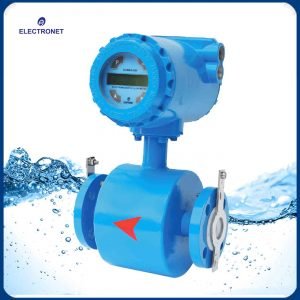
Figure 1: Electronet Electromagnetic Flow Meter ELMAG-200. This image displays the blue-colored flow meter with its integrated digital display and flanged connections, designed for inline installation in pipelines.
2. Setup and Installation
Proper installation is crucial for the accurate and reliable operation of the ELMAG-200 flow meter. Follow these guidelines carefully:
- Site Selection: Choose a location where the meter is easily accessible for inspection and maintenance. Ensure the pipe is always full of liquid at the measurement point.
- Mounting Orientation: The meter can be installed horizontally or vertically. For vertical installations, ensure the flow is upwards to keep the pipe full.
- Pipe Preparation: Ensure the pipeline is clean and free of debris before installation. Use appropriate gaskets and ensure proper alignment to prevent leaks.
- Grounding: Proper grounding is essential to prevent electrical interference and ensure accurate readings. Connect the meter's grounding terminal to a good earth ground.
- Wiring: Connect the power supply (90 to 260V AC or optional 24V DC) and signal cables according to the wiring diagram provided with the unit. Ensure all connections are secure and insulated.
- Empty Pipe Indication: The ELMAG-200 features an empty pipe indication. Ensure the pipe is completely filled with liquid before commencing operation to avoid false readings.
3. Operating Instructions
Once installed and powered, the ELMAG-200 is designed for straightforward operation. The local LCD display provides real-time flow data.
- Power On: Apply power to the unit. The LCD display will illuminate and perform a self-test.
- Display Readings: The LCD will typically show instantaneous flow rate and totalized flow. Refer to the specific model's display layout for detailed information.
- Parameter Configuration (Optional): If your model includes communication ports (e.g., HART communication), refer to the separate communication protocol manual for advanced parameter configuration and data retrieval.
- Monitoring: Continuously monitor the flow readings. The meter is designed for stable and accurate measurement of conductive liquids.
4. Maintenance
The ELMAG-200 is designed to be largely maintenance-free due to its full-bore construction. However, periodic checks can help ensure continued optimal performance.
- Regular Inspection: Periodically inspect the meter and its connections for any signs of leaks, corrosion, or physical damage.
- Electrode Cleaning: In applications with highly fouling liquids, the electrodes may require occasional cleaning. This should only be performed by qualified personnel after isolating the meter and draining the pipeline.
- Wiring Check: Ensure all electrical connections remain secure and free from moisture or damage.
- Calibration: While the meter is factory calibrated, re-calibration may be necessary after extended periods of use or if accuracy issues are suspected. Contact Electronet support for calibration services.
5. Troubleshooting
This section provides solutions to common issues you might encounter with the ELMAG-200 flow meter.
| Problem | Possible Cause | Solution |
|---|---|---|
| No display/No power | No power supply; Loose wiring; Blown fuse. | Check power source; Verify wiring connections; Replace fuse if necessary. |
| Inaccurate readings | Air bubbles in pipe; Improper grounding; Fouled electrodes; Incorrect calibration. | Ensure pipe is full; Verify grounding; Clean electrodes (if applicable); Contact support for calibration. |
| Empty pipe indication | Pipe not completely full; Sensor issue. | Ensure continuous flow and full pipe; Check sensor for damage. |
| No flow reading despite flow | Liquid not conductive; Sensor damage; Wiring issue. | Confirm liquid conductivity; Inspect sensor; Check wiring. |
If the problem persists after attempting these solutions, please contact Electronet technical support.
6. Specifications
Key technical specifications for the Electronet Electromagnetic Flow Meter ELMAG-200 (Model Electonet-18):
| Feature | Detail |
|---|---|
| Brand | Electronet |
| Model Number | Electonet-18 |
| ASIN | B01IHOUN7A |
| Power Supply | 90 to 260V AC (Optional 24V DC) |
| Display | Local LCD Indication |
| Application | Conductive Liquids |
| Construction | Full Bore Type |
| Maintenance | Maintenance Free Design |
| Special Features | Empty Pipe Indication, Material Option (depending on process data), Communication Port (optional), HART Communication (optional) |
| Item Weight | 453.59 g |
| Date First Available | 15 July 2016 |
7. Warranty and Support
Electronet products are manufactured to high quality standards. For specific warranty terms and conditions, please refer to the warranty card included with your product or visit the official Electronet website. For technical assistance, troubleshooting beyond this manual, or to inquire about calibration and repair services, please contact Electronet customer support:
- Manufacturer: Electronet
- Website: www.electronet.in
- Contact Information: Refer to the official website or product packaging for the most current contact details.
Always provide your product model (ELMAG-200, Electonet-18) and serial number when contacting support for faster service.