1. Introduction
This manual provides detailed instructions for the proper setup, operation, and maintenance of your Astromania 1X40RD Red Green Dot Sight. This high-precision sight is designed for rapid and accurate target acquisition, featuring dual red and green illumination with adjustable brightness levels. Constructed from durable aluminum alloy, it offers weatherproof, anti-fog, and shockproof performance for reliable use in various conditions.
2. Package Contents
Verify that all items listed below are present in your package:
- 1 x Astromania 1X40RD Red Green Dot Sight
- 1 x Wrench (for adjustments)
- 2 x Lens Caps (one front, one rear)
- 1 x Cleaning Cloth
- 1 x User Manual (English)
3. Product Features
- High Precision: Designed for faster and more accurate target acquisition.
- Dual Illumination: Features both red and green dots with 5-level brightness control for varied lighting conditions.
- Durable Construction: Made from high-quality aluminum alloy with a durable black matte finish.
- Weatherproof Design: Waterproof, anti-fog, and shockproof, ensuring performance in diverse environments.
- Multi-Coated Lens: Anti-glare reflective coating on the front lens for clear vision.
- Flexible Eye Relief: Suitable for various users and rifle types.
- Mounting Compatibility: Designed for easy installation on both 11mm and 20mm Picatinny and Weaver rails.
- Precise Adjustments: Features precise windage and elevation adjustments for zeroing.
4. Components Overview
Familiarize yourself with the main components of your red dot sight:

Image 1: Astromania 1X40RD Red Green Dot Sight with key components labeled. Visible labels include Battery House, Up/Down adjustment, Red and Green dot adjustment, Left/Right adjustment, Goggle (front and rear lens), Wrench, and Cleaning Cloth.
- Battery House: Compartment for the CR2032 lithium cell battery.
- Up/Down Adjustment: Knob for vertical (elevation) adjustments of the reticle.
- Left/Right Adjustment: Knob for horizontal (windage) adjustments of the reticle.
- Red and Green Dot Adjustment: Rotary switch to select dot color and brightness level.
- Objective Lens (Front Goggle): The front lens of the sight.
- Ocular Lens (Rear Goggle): The rear lens through which the user views.
5. Setup Instructions
5.1. Battery Installation
- Unscrew the battery compartment cap located on top of the sight (labeled 'Battery House' in Image 1).
- Insert one CR2032 lithium cell battery with the positive (+) side facing upwards. Note: Battery is not included.
- Securely screw the battery compartment cap back on.
5.2. Mounting the Sight
The sight is compatible with both 11mm and 20mm Picatinny and Weaver rails.
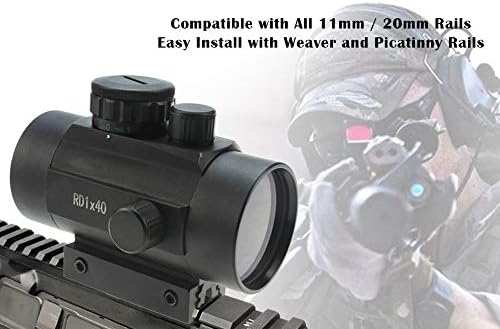
Image 2: The Astromania 1X40RD Red Green Dot Sight securely mounted on a rifle, demonstrating its application.
- Loosen the mounting screws on the base of the sight.
- Align the sight's base with the desired rail section on your firearm or telescope.
- Slide the sight onto the rail until it is in the desired position.
- Tighten the mounting screws firmly using the provided wrench to secure the sight. Ensure it is stable and does not wobble.

Image 3: A diagram illustrating the sight's compatibility with both 11mm (A) and 20mm (B) Picatinny and Weaver rails, highlighting its versatile mounting options.
5.3. Zeroing the Sight
Zeroing is the process of aligning the reticle (dot) with the point of impact. This typically requires live firing or a bore-sighting tool.
- With the sight mounted, activate the red or green dot (see Section 6.1).
- Fire a test shot at a target from a known distance.
- Observe the point of impact relative to your aim point.
- Use the 'Up/Down' (elevation) and 'Left/Right' (windage) adjustment knobs to move the reticle. Each click typically represents a specific change in impact at a given distance. Adjust the reticle in the direction you want the bullet's impact to move.
- Repeat steps 2-4 until the point of impact matches your aim point.
6. Operating Instructions
6.1. Power On/Off and Brightness Adjustment
The rotary switch on top of the sight controls power, dot color, and brightness.
- Rotate the switch from the '0' (off) position to 'R' for red dot or 'G' for green dot.
- Continue rotating the switch to increase the brightness level from 1 (lowest) to 5 (highest).
- To turn off the sight, rotate the switch back to the '0' position.
7. Maintenance
7.1. Cleaning
- Use the provided cleaning cloth to gently wipe the lenses. Avoid using abrasive materials or harsh chemicals.
- For stubborn dirt, a small amount of lens cleaning solution designed for optics can be applied to the cloth, not directly to the lens.
- Wipe the exterior body with a soft, damp cloth as needed.
7.2. Storage
- Always turn off the sight when not in use to conserve battery life.
- Store the sight in a cool, dry place, away from direct sunlight and extreme temperatures.
- Ensure lens caps are in place to protect the lenses from dust and scratches.
8. Troubleshooting
- Dot not appearing: Check if the battery is correctly installed and has sufficient charge. Ensure the brightness switch is turned to a numbered setting (1-5) and not '0'.
- Dot is dim: Increase the brightness level using the rotary switch. Replace the battery if the dot remains dim at higher settings.
- Inaccurate zero: Re-zero the sight following the instructions in Section 5.3. Ensure the sight is securely mounted and not loose.
- Fogging: While the sight is anti-fog, extreme temperature changes can sometimes cause temporary condensation. Allow the sight to acclimate to the ambient temperature.
9. Specifications
| Feature | Specification |
|---|---|
| Brand | Astromania |
| Model Number | 51632 |
| Magnification | 1x |
| Objective Lens Diameter | 40 mm |
| Field Of View | 57 Degrees |
| Reticle Type | Duplex (Red/Green Dot) |
| Brightness Settings | 5 levels for Red, 5 levels for Green |
| Material | Aluminum |
| Mounting Type | Weaver Mount (Compatible with 11mm & 20mm rails) |
| Compatible Devices | Cross Bow, Handgun, Rifle, Shotgun |
| Power Source | CR2032 Lithium Cell Battery (not included) |
| Product Dimensions | 5.7 x 3.1 x 2.6 inches |
| Item Weight | 9.1 ounces |
10. Warranty and Support
For warranty information or technical support, please refer to the documentation included with your purchase or contact Astromania customer service directly. Contact details can typically be found on the manufacturer's official website or through your retailer.