
1. Introduction
The CONTEC08A is a fully automatic digital blood pressure monitor designed for accurate and convenient measurement of blood pressure and pulse rate. This device utilizes oscillometry for precise readings and is suitable for use by adults, pediatric patients, and neonates, thanks to its versatile cuff options. It features a high-definition color LCD display for clear visibility and a large memory capacity to store readings for multiple users.

Image: The CONTEC08A Blood Pressure Monitor displaying blood pressure and pulse readings.
This manual provides essential information for the safe and effective operation of your CONTEC08A Blood Pressure Monitor. Please read it thoroughly before first use and keep it for future reference.
2. Product Features
- Accurate Measurement: Utilizes advanced oscillometry technology for precise blood pressure and pulse rate readings.
- Multi-Size Cuffs: Includes three cuffs (adult, child, infant) to accommodate various arm circumferences, ensuring accurate measurements across different user types.
- Large Memory Storage: Stores up to 300 readings, with capacity for three distinct user profiles (100 readings per user), facilitating long-term tracking.
- High-Definition Color LCD Display: Provides clear and strong visibility of readings and system information.
- PC Software Compatibility: Allows for data review, analysis, trend visualization, and report printing via free downloadable PC software.
- Irregular Blood Pressure Alert: Automatically alerts the user if irregular blood pressure is detected. Alarm limits can be customized.

Image: Diagram illustrating the premium features and display elements of the CONTEC08A monitor.

Image: Visual representation of the monitor's key features, including display, storage, and software capabilities.
3. Package Contents
Upon opening the package, please verify that all components are present and undamaged:
- CONTEC08A Blood Pressure Monitor (1 unit)
- USB Cable (1 unit)
- Adult Cuff (8.7"-12.6" / 22-32 cm) (1 unit)
- Child Cuff (7.1"-10.2" / 18-26 cm) (1 unit)
- Infant Cuff (3.9"-7.5" / 10-19 cm) (1 unit)
- User Manual (1 unit)
- Packing Box (1 unit)
Note: A power adapter charger is not included and must be purchased separately. The provided USB cable is for data transfer to PC software, not for charging or powering the device.

Image: All components included in the CONTEC08A Blood Pressure Monitor package.
4. Setup
4.1 Power Supply
The CONTEC08A monitor requires 4 AA batteries for operation. Insert the batteries into the battery compartment located on the underside of the device, ensuring correct polarity (+/-). Alternatively, the device can be powered via an external power adapter (not included) connected to the DC input port.
4.2 Initial System Settings
Upon first power-on or after battery replacement, you may need to configure basic system settings. Use the navigation buttons (UP, ENTER, DOWN) to adjust the following:
- Language: Select your preferred display language (e.g., EN for English).
- Unit: Choose the measurement unit for blood pressure (e.g., mmHg).
- User Type: Select the appropriate user type for measurement (ADU for Adult, NEO for Neonate, PED for Pediatric). This setting is crucial for accurate readings and alarm limits.
- User Permission: Configure access settings if applicable.

Image: The system setup screen on the CONTEC08A, allowing configuration of language, units, and user types.
4.3 Cuff Selection and Connection
Select the appropriate cuff size based on the arm circumference of the user. The monitor includes three cuff sizes:
- Adult Cuff: 8.7"-12.6" (22-32 cm) upper arm circumference.
- Child Cuff: 7.1"-10.2" (18-26 cm) upper arm circumference.
- Infant Cuff: 3.9"-7.5" (10-19 cm) upper arm circumference.
Connect the selected cuff's air tube securely to the air port on the side of the monitor.
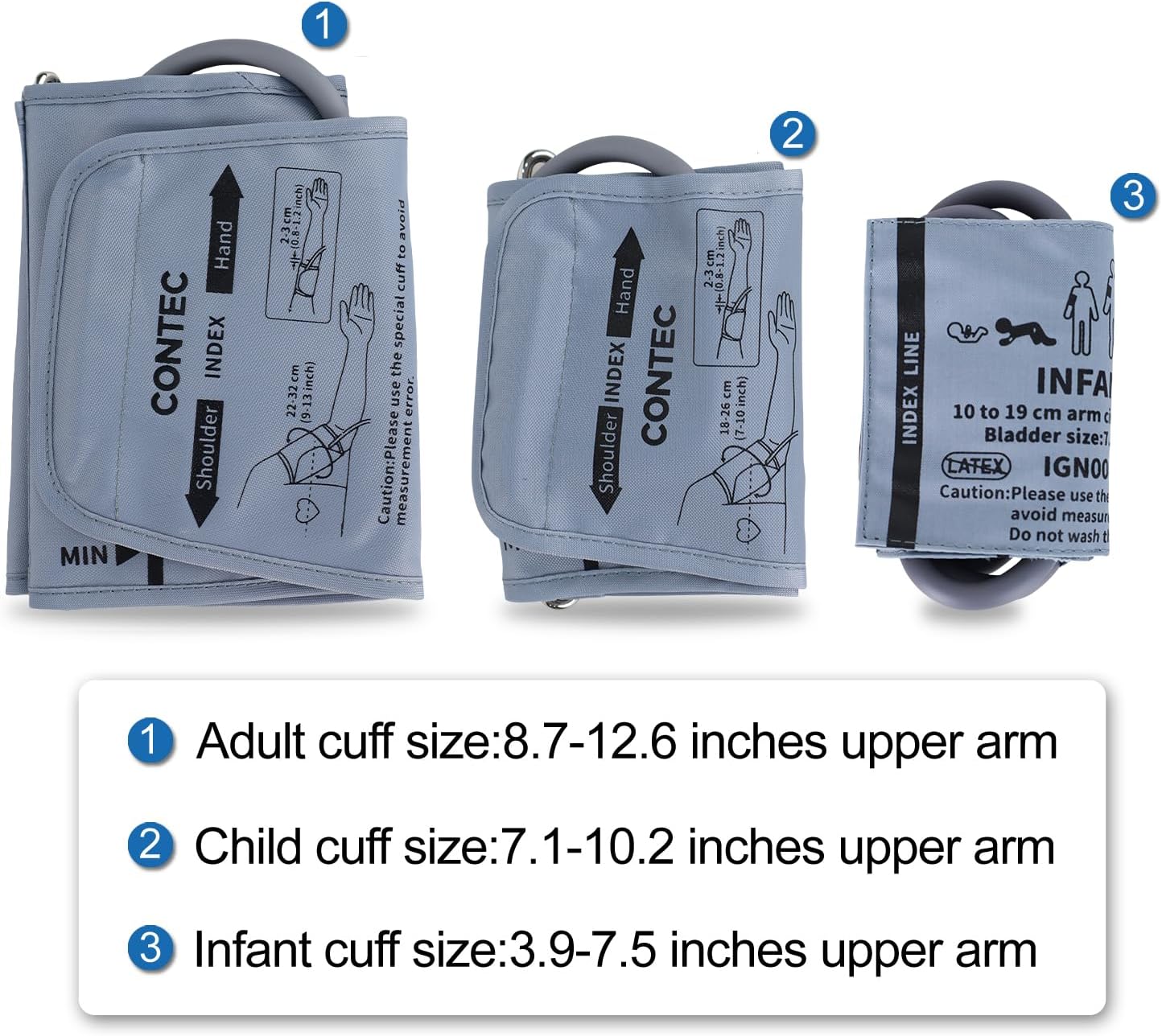
Image: The three different cuff sizes included with the monitor, designed for adult, child, and infant use.
5. Operation
5.1 Preparing for Measurement
- Sit in a comfortable position with your back supported and feet flat on the floor.
- Rest your arm on a flat surface so that the cuff is at heart level.
- Ensure the cuff is applied directly to bare skin, approximately 1-2 cm above the elbow joint. The air tube should run down the center of your arm.
- Remain still and silent during the measurement. Avoid talking or moving.

Image: Proper posture and environment for accurate blood pressure measurement, emphasizing the monitor's advanced data collection.
5.2 Taking a Measurement
- Press the ON/OFF button to power on the device.
- Ensure the correct user type (Adult, Pediatric, Neonate) is selected in the system settings if you are measuring for different individuals.
- Press the START/STOP button to begin the measurement. The cuff will inflate automatically.
- Remain still and relaxed until the measurement is complete and the cuff deflates.
- Your systolic pressure (SYS), diastolic pressure (DIA), and pulse rate (PR) will be displayed on the screen.
- The reading will be automatically saved to the selected user's memory.
- Press the ON/OFF button again to power off the device, or it will automatically shut down after a period of inactivity.
5.3 Reviewing Stored Readings
The monitor can store up to 100 readings for each of the three user profiles (User 1, User 2, User 3). To review past measurements:
- With the device powered on, press the LIST button (or navigate to the 'Memory' option using the Menu button).
- Use the UP and DOWN buttons to scroll through the stored readings.
- Each reading will display the date, time, systolic pressure, diastolic pressure, and pulse rate.

Image: The monitor's display showing total storage capacity and individual user profiles for data management.
6. PC Software
The CONTEC08A monitor supports data transfer to a personal computer for advanced analysis and reporting. The PC software allows you to:
- Review stored measurement data in detail.
- Analyze trends over time through graphs and statistics.
- Print comprehensive reports of your blood pressure history.
To obtain the software, please download it from the link provided in the package box or contact CONTEC customer support. Connect the monitor to your PC using the supplied USB cable to transfer data.
7. Maintenance and Care
7.1 Cleaning
Wipe the monitor and cuff with a soft, dry cloth. If necessary, use a cloth lightly dampened with water or a mild detergent. Do not use abrasive cleaners, alcohol, or organic solvents. Ensure no liquid enters the device.
7.2 Storage
Store the device in a clean, dry place away from direct sunlight, extreme temperatures, and high humidity. Keep it out of reach of children and pets. Do not store the device with the cuff inflated.
7.3 Battery Replacement
Replace all 4 AA batteries when the low battery indicator appears on the display. Always replace all batteries at the same time with new ones of the same type. Remove batteries if the device will not be used for an extended period to prevent leakage.
8. Troubleshooting
| Problem | Possible Cause | Solution |
|---|---|---|
| No display/Device won't turn on | Batteries are dead or incorrectly inserted. | Check battery polarity; replace with new batteries. |
| "Loose Cuff" error message | Cuff is not applied correctly or is too loose. | Re-apply the cuff snugly to the arm, ensuring it is at heart level and the air tube is properly connected. |
| Inaccurate or inconsistent readings | Movement or talking during measurement; incorrect cuff size; improper arm position. | Remain still and silent. Ensure correct cuff size is used. Position arm correctly at heart level. Take multiple readings for average. |
| Device overheats | Faulty batteries or internal circuit issue. | Immediately remove batteries. Discontinue use and contact customer support. Do not attempt to repair. |
| Irregular Heartbeat Indicator (if applicable) | Detection of an irregular heartbeat during measurement. | This is an informational alert. If this indicator appears frequently, consult a healthcare professional. |
If you encounter problems not listed here or if solutions do not resolve the issue, please contact CONTEC customer support.
9. Specifications
| Specification | Detail |
|---|---|
| Model Number | CONTEC08A |
| Display Type | LED Color Display |
| Measurement Method | Oscillometry |
| Power Source | 4 AA batteries (required) or Corded Electric (adapter not included) |
| Product Dimensions | 4.65"L x 3.78"W x 2.99"Th |
| Package Dimensions | 6.54 x 4.72 x 4.65 inches |
| Item Weight | 1.57 Pounds |
| Manufacturer Recommended Age | 22 months and up |
| Included Components | Monitor, 3 Cuffs (Adult, Child, Infant), USB Cable, User Manual |
| UPC | 756040906115 |
10. Warranty and Support
CONTEC is committed to providing high-quality products. For information regarding product warranty, please refer to the warranty card included with your purchase or visit the official CONTEC website. Keep your purchase receipt as proof of purchase for any warranty claims.
For technical support, troubleshooting assistance, or inquiries about your CONTEC08A Blood Pressure Monitor, please contact CONTEC customer service. You can find contact information on the CONTEC official website or through the retailer where you purchased the product.
Visit the CONTEC Store on Amazon for more products and information.


