
Introduction
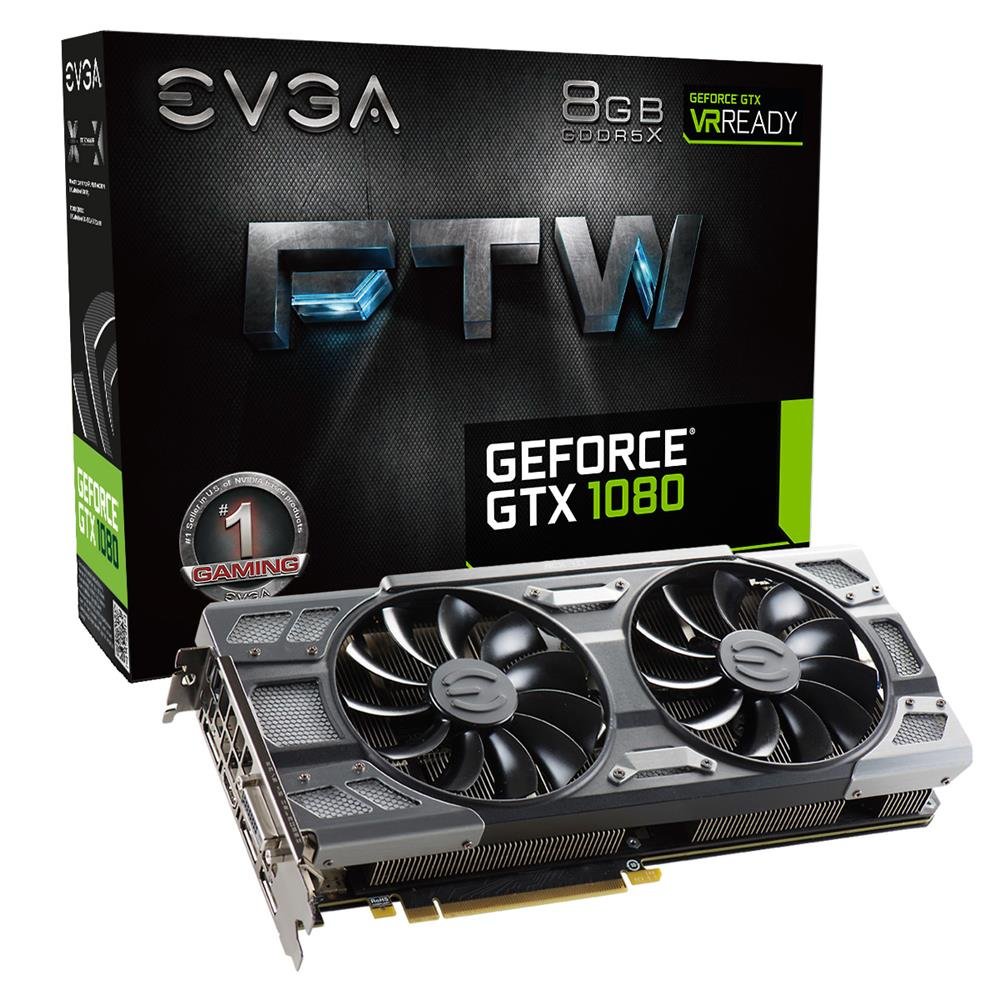
The EVGA GeForce GTX 1080 FTW DT GAMING ACX 3.0 Graphics Card is designed to deliver high-performance graphics for gaming and demanding applications. Featuring NVIDIA's "Pascal" graphics processor, 8GB GDDR5X memory, and EVGA ACX 3.0 cooling technology, this card offers efficient operation and advanced visual capabilities. This manual provides essential information for installation, operation, maintenance, and troubleshooting to ensure optimal performance and longevity of your graphics card.
What's in the Box
Verify that all components are present in the packaging:
- EVGA GTX 1080 FTW DT GAMING ACX 3.0 Graphics Card
- Driver CD
- Installation Guide
- 6Pin(2) to 8 Pin Adapter
- EVGA Gaming Poster
- Powered by EVGA Case Badge
- EVGA Enthusiast Built Sticker
Features
Key features of the EVGA GeForce GTX 1080 FTW DT GAMING ACX 3.0 Graphics Card include:
- Real Base Clock: 1607 MHz / Real Boost Clock: 1733 MHz
- Memory Detail: 8192MB GDDR5X
- Completely adjustable RGB LED using EVGA Precision XOC software
- No additional software required to achieve listed clock speeds
- Double BIOS for enhanced reliability
- DX12 OSD Support with EVGA Precision XOC for low latency and plug-and-play compatibility with leading VR headsets
- Form Factor: Plug-in Card
- EVGA ACX 3.0 cooling technology with optimized swept fan blades, double ball bearings, and an extreme low power motor for improved airflow and quieter operation.
Setup
Follow these steps to install your EVGA GeForce GTX 1080 graphics card:
- Prepare Your System: Power off your computer and unplug all cables. Open your computer case.
- Locate PCIe Slot: Identify an available PCI Express x16 slot on your motherboard. This graphics card is a bulky component and may require significant space. Ensure adequate clearance within your PC case.
- Install the Graphics Card: Carefully align the graphics card with the PCIe slot and press down firmly until it is securely seated. Secure the card to the case with the appropriate screws.
- Connect Power Cables: Connect the required 6-pin and 8-pin (or two 6-pin) PCIe power connectors from your power supply to the graphics card. Ensure your power supply meets the minimum wattage requirements (typically 500W or higher, depending on your system configuration).
- Close Case and Connect Peripherals: Close your computer case, reconnect all cables, and connect your display to one of the video output ports (HDMI or DisplayPort) on the graphics card.
- Install Drivers: Power on your computer. Insert the provided Driver CD or download the latest drivers from the official EVGA website (www.evga.com/drivers). Follow the on-screen instructions to complete the driver installation.
- Install EVGA PrecisionX OC (Optional): For advanced control over RGB LED lighting, fan curves, and monitoring, install the EVGA PrecisionX OC software from the EVGA website.
Operating
Once installed and drivers are updated, your EVGA GeForce GTX 1080 is ready for use. This card is highly compatible with various Windows operating systems, including Windows 11, provided the latest drivers are installed. It excels in:
- Gaming: Experience smooth gameplay in demanding titles, including first-person shooters and sports simulations, at high resolutions and settings.
- Video Editing: Utilize the GPU's processing power for faster rendering and smoother workflow in video editing applications.
- VR Applications: Benefit from DX12 OSD support and low latency for an immersive virtual reality experience.
- General Computing: Enhance overall system responsiveness and visual quality for everyday tasks.
Ensure your operating system and graphics drivers are always up to date for optimal performance and stability.
Maintenance
Proper maintenance helps extend the lifespan and maintain the performance of your graphics card:
- Dust Removal: Periodically clean dust from the fans and heatsink using compressed air. Ensure the computer is powered off and unplugged before cleaning.
- Airflow: Maintain good airflow within your PC case. Ensure case fans are functioning correctly and that cables are managed to prevent obstruction of airflow.
- Driver Updates: Regularly check for and install the latest graphics drivers from the EVGA or NVIDIA website.
- Software Monitoring: Use EVGA PrecisionX OC or similar software to monitor temperatures and fan speeds, ensuring the card operates within safe limits.
Troubleshooting
If you encounter issues with your graphics card, consider the following troubleshooting steps:
- No Display:
- Ensure the monitor cable is securely connected to the graphics card and the monitor.
- Verify that the graphics card is fully seated in the PCIe slot and that all power cables are connected.
- Test with a different display cable or monitor if possible.
- Driver Issues:
- Perform a clean installation of the latest graphics drivers. Uninstall existing drivers before installing new ones.
- Ensure your operating system is fully updated.
- Overheating/Performance Drops:
- Check for dust buildup on the heatsink and fans and clean if necessary.
- Ensure adequate airflow within your PC case.
- Monitor temperatures using EVGA PrecisionX OC. If temperatures are consistently high, consider improving case ventilation.
- System Instability/Crashes:
- Verify that your power supply unit (PSU) provides sufficient wattage for your entire system, including the graphics card.
- Check for any conflicting software or background processes.
For further assistance, refer to the EVGA support website or contact their customer service.
Specifications
| Feature | Detail |
|---|---|
| Brand | EVGA |
| Model Number | 08G-P4-6284-KR |
| Graphics Processor | NVIDIA GeForce GTX 1080 |
| Graphics Coprocessor | GDDR5X |
| Graphics RAM Size | 8192 MB |
| Graphics RAM Type | GDDR5X |
| Real Base Clock | 1607 MHz |
| Real Boost Clock | 1733 MHz |
| Video Output Interface | HDMI, DisplayPort |
| Display Maximum Resolution | 3840x2160 |
| Graphics Card Interface | PCI Express |
| Number of Fans | 2 (ACX 3.0 cooling) |
| Compatible Devices | Desktop |
| Item Weight | 3 Pounds |
| UPC | 843368041359 |
Warranty and Support
The EVGA GeForce GTX 1080 FTW DT GAMING ACX 3.0 Graphics Card comes with a 3-year warranty. For warranty claims, technical support, or additional product information, please visit the official EVGA website or contact their customer support team.
EVGA Support Website: www.evga.com/support


