
Visionis VAR111
Contents
Visionis FPC-5689 VIS-3005 Access Control Keypad Reader User Manual
Model: VIS-3005

Technology Within Your Reach
Product Overview
The Visionis FPC-5689 VIS-3005 is a robust, weatherproof access control keypad reader designed for both indoor and outdoor use. It features a metal anti-vandal construction and integrates with a mini controller for enhanced security. This system supports up to 1000 users and offers multiple entry methods including PIN code, proximity card, and proximity key tag. It is ideal for high-end buildings, residential communities, and various public places requiring secure access.

Image: The complete Visionis VIS-3005 access control system, including the keypad, mini controller, and ten key tags.
What's Included
The package for the Visionis FPC-5689 VIS-3005 includes the following components:
- One (1) VIS-3005 Access Control Indoor + Outdoor Rated IP68 Metal Anti-Vandal Keypad + Reader Standalone with Mini Controller + Wiegand 26, Slim Design, No Software, EM Cards, 1000 Users.
- One (1) VIS-MINI-CNTRL: 1 Door Controller for Access Control Systems with No Software, supporting up to 1,000 users.
- Ten (10) VS-VIS-KEYTAG: Access Control Proximity contactless Smart Entry Keyfobs (26 bit, 125khz).
- Additional accessories such as a remote control, Diode IN4004 (for relay circuit protection), self-tapping screws, wall anchors, and a screwdriver.

Image: A visual representation of the accessories included with the VIS-3005 system, such as the mini controller, remote control, diode, master add/delete cards, screws, wall anchors, and a screwdriver.
Specifications
Detailed technical specifications for the Visionis VIS-3005 Keypad and Mini Controller:
| Feature | Specification |
|---|---|
| Manufacturer | Visionis |
| Part Number | VAR111 |
| Material | Stainless Steel |
| Input Voltage | DC 12V |
| Operating Temperature | -45°C ~ 55°C (-49°F ~ 131°F) |
| Operating Humidity | 0% ~ 95% |
| User Capacity | 1000 Users |
| Access Ways | Card, Code, Card+Code |
| Card Frequency | 125KHz for EM cards |
| Searching Time | Less than 0.1s after reading card |
| Keypad Features | Backlight Keypad, Supports external wired doorbell |
| Waterproof Rating | IP68 |

Image: Keypad dimensions showing 133mm (5.23in.) height, 59mm (2.32in.) width, and 26mm (1.02in.) depth.

Image: Mini Controller dimensions showing 65mm (2.56in.) length, 54mm (2.13in.) width, and 19mm (0.75in.) height.
Setup and Installation
The VIS-MINI-CNTRL offers a secure option by allowing the keypad to be installed outside while the controller, which stores all user credentials, is installed in a restricted, secure area inside. This prevents unauthorized access even if the external keypad is tampered with.
Wiring and Connectivity
The VIS-MINI-CNTRL is a mini controller for a single door and can connect to any Wiegand reader thanks to its Wiegand 26-37 bits input. Ensure all wiring is done according to the provided wiring diagram to establish proper communication between the keypad, controller, and the locking device.

Image: Diagram illustrating how the VIS-MINI-CNTRL can connect to various Wiegand readers, including different keypad and biometric fingerprint models.

Image: Visualizing the secure installation concept where the mini controller is placed inside a restricted area, while the keypad is accessible from the outside. This setup ensures the door remains locked even if the external keypad is tampered with.
Operating Instructions
The VIS-3005 keypad allows for three modes of entry:
- PIN Code: Users can enter a pre-programmed personal identification number to gain access.
- Proximity Card: Users can present a compatible 125KHz EM proximity card to the reader for access.
- Proximity Key Tag: Similar to proximity cards, users can use a key tag for convenient access.
- Card + PIN: For enhanced security, access can be configured to require both a proximity card/tag and a PIN code.
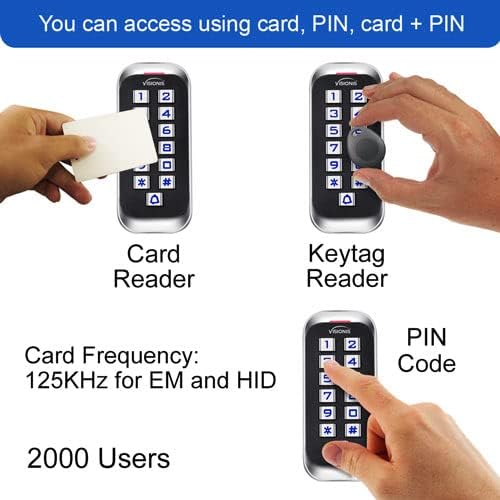
Image: Demonstrates the various access methods supported by the keypad: card reader, keytag reader, and PIN code entry.
Programming Users
Refer to the detailed programming instructions in the separate User Manual (VIS-3004 VIS-3005 User Manual) for adding, deleting, and managing user credentials (PINs, cards, and key tags). Master Add Card and Master Delete Card are provided for simplified user management.
Maintenance
To ensure optimal performance and longevity of your Visionis VIS-3005 access control system, follow these maintenance guidelines:
- Regular Cleaning: Wipe the keypad surface with a soft, damp cloth. Avoid abrasive cleaners or solvents that could damage the finish or electronic components.
- Inspect Wiring: Periodically check all wiring connections for any signs of wear, corrosion, or loose connections. Ensure all connections are secure.
- Firmware Updates: Check the Visionis website for any available firmware updates that may improve performance or add new features. Follow update instructions carefully.
- Environmental Protection: Although the keypad is IP68 rated for weather resistance, ensure proper installation to prevent water ingress, especially around cable entries.
- Battery Check (if applicable): While the main unit is powered by DC 12V, if any connected components (e.g., remote control) use batteries, ensure they are replaced as needed.
Troubleshooting
If you encounter issues with your Visionis VIS-3005 system, consider the following common problems and solutions:
| Problem | Possible Cause & Solution |
|---|---|
| Keypad not responding | Check power supply (DC 12V). Ensure wiring is secure and not damaged. |
| Access denied for valid credentials | Verify user programming. Ensure the card/tag is compatible (125KHz EM). Check if the keypad is in a locked mode. |
| Door not unlocking | Check wiring to the electric lock. Ensure the lock itself is functioning correctly. Verify the controller's relay output. |
| Keypad backlight not working | This may indicate a power issue or internal fault. Contact support if other functions are affected. |
| System beeps continuously | Refer to the specific beep codes in the detailed user manual for diagnosis. Often indicates an error or alarm state. |
For more complex issues or problems not listed here, please contact Visionis customer support.
Product Video Overview
Watch the official product overview video for the Visionis VIS-3005 to learn more about its features and capabilities.
Video: An official product overview of the VIS-3005 Access Control Keypad, highlighting its features, design, and applications. This video is provided by the seller, FPC-Security.
Warranty and Support
Visionis products are designed for reliability and performance. For information regarding product warranty, returns, or technical support, please refer to the official Visionis website or contact their customer service directly. Keep your purchase receipt for warranty claims.
Contact Information:
- Visit the Visionis Store on Amazon for more products and information.
Ask a question about this manual
Ask about setup, troubleshooting, compatibility, parts, safety, or missing instructions. Manuals+ will review the question and use this page’s manual context to help answer it.