
Introduction
This manual provides essential instructions for the safe and efficient use of your Ariete 6235 Steam Iron. Please read all instructions carefully before using the appliance and retain this manual for future reference.

Image: The Ariete 6235 Steam Iron in purple and white, showcasing its design and controls.
Important Safety Instructions
- Always ensure the voltage indicated on the rating plate corresponds to your mains voltage.
- Do not immerse the iron, power cord, or plug in water or other liquids.
- Keep the iron out of reach of children when it is connected to the mains or cooling down.
- Never leave the iron unattended when it is switched on or connected to the power supply.
- Unplug the iron from the electrical outlet before filling or emptying the water tank, and when not in use.
- Do not operate the iron with a damaged cord or plug, or if the iron has been dropped or damaged.
- Use the iron only for its intended household purpose.
- The soleplate can become extremely hot; avoid direct contact.
Product Components
Familiarize yourself with the parts of your Ariete 6235 Steam Iron:
- Water spray nozzle
- Water filling inlet with cover
- Steam control knob (Dry/Steam/Max Steam)
- Steam boost button
- Spray button
- Temperature control dial
- Self-clean button
- Power indicator light
- Ceramic soleplate
- Water tank
- Power cord
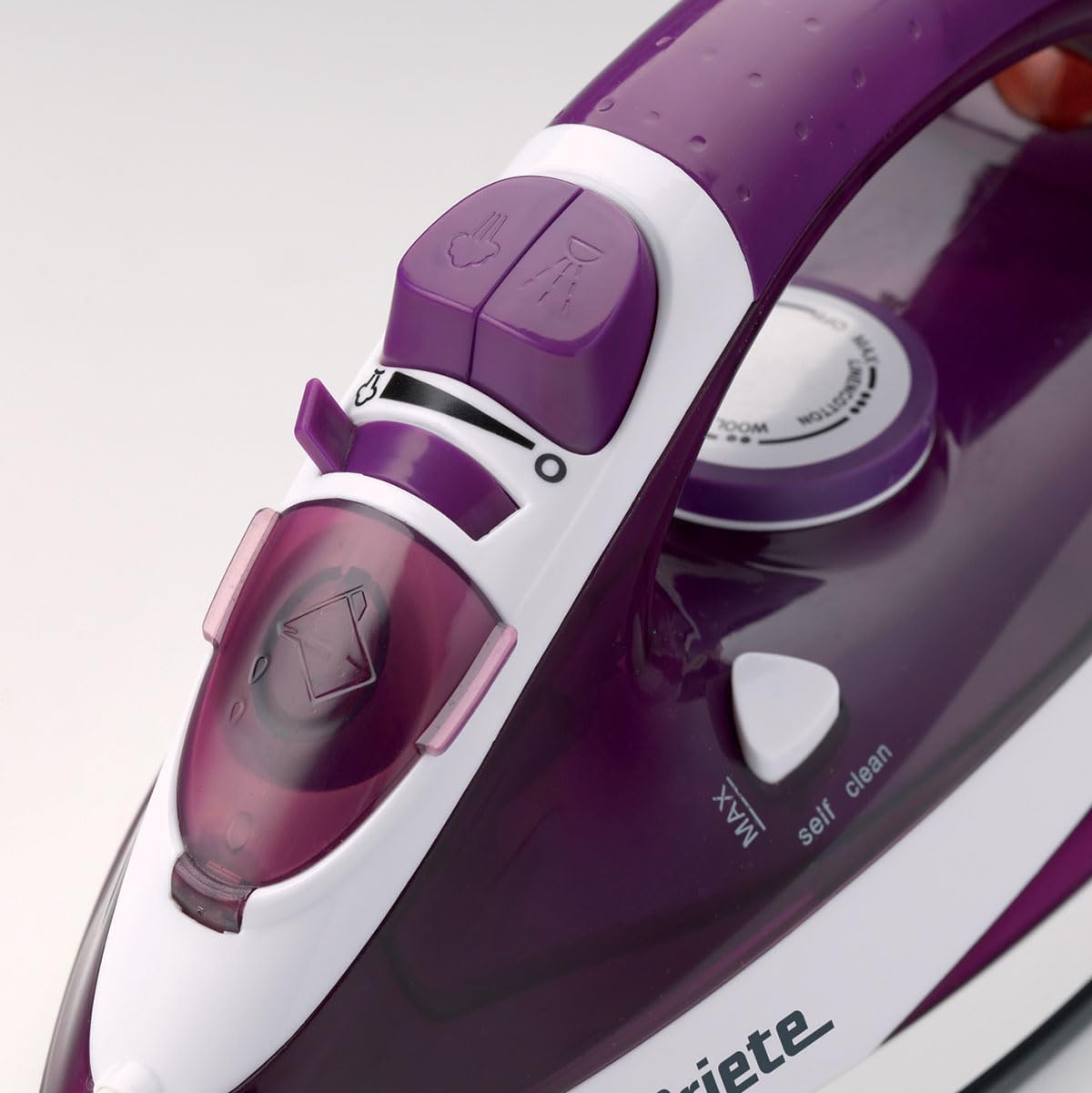
Image: A detailed view of the iron's control panel, showing the temperature dial, steam buttons, and self-clean button.
Setup and First Use
1. Unpacking
Remove all packaging materials and labels from the iron. Inspect the iron for any damage. If damaged, do not use and contact customer support.
2. Filling the Water Tank
- Ensure the iron is unplugged from the power outlet.
- Set the steam control knob to the "Dry" position.
- Open the water filling inlet cover.
- Using the provided measuring cup, carefully pour tap water into the water tank up to the "MAX" level indicator. Do not overfill.
- Close the water filling inlet cover securely.

Image: A hand pouring water into the iron's water tank using a measuring cup, illustrating the correct filling procedure.
3. First Use Preparation
During the first use, a slight odor or smoke may occur as manufacturing residues burn off. This is normal and will dissipate quickly. To prevent staining clothes, iron an old piece of fabric first.
Operating Instructions
1. Temperature Setting
- Plug the iron into a suitable electrical outlet.
- Turn the temperature control dial to the desired setting based on the fabric type. Refer to the fabric care labels on your garments.
- The power indicator light will illuminate, indicating the iron is heating. It will turn off when the set temperature is reached.
2. Dry Ironing
For dry ironing, ensure the steam control knob is set to the "Dry" position. Wait for the iron to reach the desired temperature before use.
3. Steam Ironing
- Fill the water tank as described in the "Setup" section.
- Set the temperature control dial to the steam ironing range (usually indicated by a steam symbol or higher temperature settings).
- Once the iron reaches the set temperature (indicator light off), turn the steam control knob to the desired steam level (e.g., "Steam" or "Max Steam").
- Steam will be emitted from the soleplate.
4. Steam Boost Function
For stubborn creases, press the steam boost button. A powerful burst of steam will be released. Wait a few seconds between bursts to allow the iron to reheat.
5. Vertical Steam
The vertical steam function allows you to remove creases from hanging garments, curtains, or drapes. Hold the iron vertically, approximately 15-30 cm away from the fabric, and press the steam boost button.
6. Spray Function
Press the spray button to lightly moisten fabric, which can help in removing difficult creases.

Image: The Ariete 6235 Steam Iron being used to iron a blue collared shirt, demonstrating its practical application.
Maintenance and Storage
1. Self-Clean Function
- Fill the water tank to the MAX level.
- Set the steam control knob to "Dry" and the temperature dial to "MAX".
- Plug in the iron and wait for the indicator light to turn off.
- Unplug the iron.
- Hold the iron horizontally over a sink and press the self-clean button. Hot water and steam will flush out mineral deposits.
- Release the button when the water tank is empty.
- Repeat if necessary.
2. Cleaning the Soleplate
Allow the iron to cool completely. Wipe the ceramic soleplate with a damp cloth. Do not use abrasive cleaners or metallic scouring pads.
3. Emptying and Storage
After each use, unplug the iron and allow it to cool. Empty any remaining water from the tank. Store the iron upright in a safe, dry place.
Troubleshooting Guide
| Problem | Possible Cause | Solution |
|---|---|---|
| Iron does not heat up. | Not plugged in; power outlet fault; temperature dial set to MIN. | Check power connection; test outlet with another appliance; set temperature dial to desired heat. |
| No steam is produced. | Water tank empty; temperature too low; steam control knob set to DRY. | Fill water tank; set temperature to steam range; turn steam control knob to STEAM. |
| Water leaks from soleplate. | Temperature too low for steam; water tank overfilled. | Allow iron to reach proper steam temperature; do not overfill water tank. |
| White flakes or residue on clothes. | Mineral deposits in the iron. | Perform the self-clean function. |
| Incorrect plug for region. | Product purchased in a region with different plug standards. | Use an appropriate adapter or contact seller for regional compatibility. |
Technical Specifications
| Feature | Detail |
|---|---|
| Model Name | 6235 |
| Power | 2000 Watt |
| Soleplate Material | Ceramic |
| Continuous Steam | 25 g/min |
| Steam Boost | 140 g/min |
| Water Tank Capacity | 0.3 L |
| Vertical Steam | Yes |
| Anti-Drip Function | Yes |
| Spray Function | Yes |
| Cable Length | 2 m |
| Product Dimensions (L x W x H) | 13.5 x 12 x 28.5 cm |
| Item Weight | 900 Grams |
Warranty and Support
Warranty Information
This product is covered by a 1-year warranty by FELKHEDMA. Please retain your proof of purchase for warranty claims. The warranty covers manufacturing defects under normal household use.
Customer Support
For technical assistance, spare parts, or warranty inquiries, please contact your local Ariete service center or the retailer where the product was purchased. Do not attempt to repair the appliance yourself.