
Makita DRC200Z
Makita DRC200Z Robotic Vacuum User Manual
Model: DRC200Z
Introduction
The Makita DRC200Z 18V X2 LXT Lithium-Ion 36V Brushless Cordless Robotic Vacuum is designed for automated cleaning of large flooring spaces in commercial environments. This tool-only model requires two 18V LXT Lithium-Ion 5.0Ah batteries (sold separately) for operation. It features an efficient brushless motor, a 3-stage cleaning system, and advanced filtration for micro dust particulates.
Key features include a large capacity dust bin, two navigation options for varying obstacle levels, a timer function, and remote control capability. Boundary tape is included to define restricted cleaning zones.

Figure 1: Front view of the Makita DRC200Z Robotic Vacuum, showcasing its compact design and side brushes.
Safety Information
Always read and understand all safety warnings and instructions before operating the robotic vacuum. Failure to follow the warnings and instructions may result in electric shock, fire, and/or serious injury.
- Battery Safety: Use only specified Makita 18V LXT Lithium-Ion batteries. Do not use damaged or non-genuine batteries.
- Area Preparation: Clear the cleaning area of loose objects, power cords, and small items that could entangle the vacuum or be ingested.
- Supervision: Do not leave the robotic vacuum unattended during operation, especially in areas with potential hazards.
- Liquid Spills: Do not use the vacuum to pick up liquids or wet debris.
- Maintenance: Disconnect batteries before performing any maintenance or cleaning.

Figure 2: Control panel of the robotic vacuum, highlighting important warning labels for safe operation.
Setup
- Unpacking: Carefully remove all components from the packaging. Verify all parts are present, including the robotic vacuum, remote control, and boundary tape.
- Battery Installation: Open the battery compartments on the top of the vacuum. Insert two fully charged Makita 18V LXT Lithium-Ion batteries, ensuring they click into place. Close the battery compartment covers securely.
- Dust Bin Installation: Ensure the dust bin is properly seated inside the vacuum. Refer to Figure 3 for visual guidance.
- Boundary Tape Placement: Use the included boundary tape to define areas where the robotic vacuum should not enter. Place the tape flat on the floor.

Figure 3: Illustration of accessing and removing the dust bin for installation or emptying.
Operating Instructions
Powering On/Off
- To power on, press the power button on the vacuum's control panel or the remote control.
- To power off, press and hold the power button until the indicators turn off.
Cleaning Modes
The DRC200Z offers two primary cleaning modes:
- Random Mode: The vacuum cleans randomly, changing direction upon encountering obstacles. Suitable for areas with many obstacles.
- Pattern Mode: The vacuum cleans in a systematic pattern, ideal for large, open spaces with fewer obstacles.
Select the desired mode using the mode selection button on the control panel or remote.
Timer Function
Set a cleaning schedule using the timer function on the control panel or remote control. Consult the full user guide for detailed timer programming instructions.
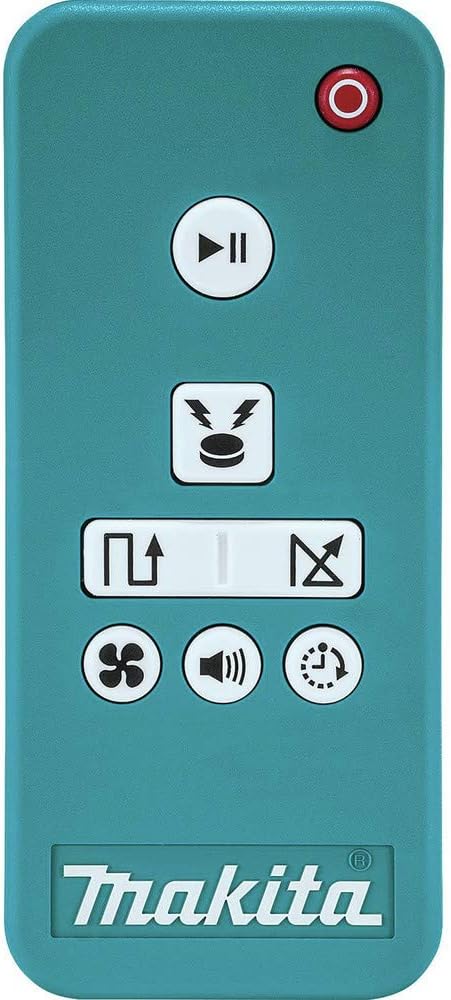
Figure 4: The remote control for the robotic vacuum, used to select modes, set timers, and control movement.
Maintenance
Regular maintenance ensures optimal performance and extends the life of your robotic vacuum.
Dust Bin Emptying
- Empty the dust bin after each use or when the 'Dust Bin Full' indicator illuminates.
- To empty, open the top cover, remove the dust bin, and dispose of collected debris.
Filter Cleaning/Replacement
- The vacuum features a HEPA filter engineered to capture micro dust particulates.
- Clean the filter regularly by tapping it gently to remove dust. Do not wash the filter with water.
- Replace the filter every 3-6 months, or more frequently depending on usage.
Brush Cleaning
- Regularly inspect and clean the main brush and side brushes for tangled hair or debris.
- Remove the main brush cover and lift out the brush for cleaning.
- The side brushes can be removed by unscrewing them. Refer to Figure 5 for brush locations.

Figure 5: Underside view illustrating the main brush and two side brushes, which require periodic cleaning.

Figure 6: A detailed view of one of the side brushes, which helps sweep debris into the vacuum's path.
Troubleshooting
| Problem | Possible Cause | Solution |
|---|---|---|
| Vacuum does not turn on. | Batteries not installed or discharged. | Ensure batteries are properly installed and fully charged. |
| Vacuum stops unexpectedly. | Dust bin full; brushes tangled; obstacle detected. | Empty dust bin, clean brushes, clear obstacles. |
| Poor cleaning performance. | Dust bin full; dirty filter; worn brushes. | Empty dust bin, clean/replace filter, clean/replace brushes. |
| Vacuum does not follow boundary tape. | Tape improperly placed; sensors dirty. | Ensure tape is flat and clean, clean vacuum sensors. |
Specifications
| Feature | Detail |
|---|---|
| Brand | Makita |
| Model Name | Makita DRC200Z 18V X2 LXT Lithium-Ion Brushless Cordless Robotic Vacuum, Tool Only |
| Power Source | 18V X2 (36V) LXT Lithium-Ion Batteries (Tool Only) |
| Motor Type | Brushless |
| Cleaning System | 3-stage (side brushes, main brush, vacuum suction) |
| Filter Type | HEPA Filter |
| Dust Bin Capacity | 5/8 Gallon (approx. 2.37 Liters) |
| Approx. Cleaning Area (with 5.0Ah batteries) | 5,380 Sq.Ft. (hard flooring) |
| Approx. Continuous Operation (with 5.0Ah batteries) | Up to 200 minutes ("main brush plus vacuum" mode) |
| Product Dimensions | 21.3"L x 18"W x 7"H |
| Item Weight | 17.16 pounds |
| Noise Level | 64 dB |
| Included Components | Boundary Tape (SH00000240) |
Warranty and Support
The Makita DRC200Z Robotic Vacuum comes with a 3-year limited warranty. This warranty covers defects in materials and workmanship under normal use.
For warranty claims, technical support, or service, please contact Makita customer service or an authorized Makita Factory Service Center. You can find more information and contact details on the official Makita website: www.makitatools.com.
A detailed User Guide in PDF format is also available for download: Makita DRC200Z User Guide (PDF).
Related documentsDRC200Z


Ask a question about this manual
Ask about setup, troubleshooting, compatibility, parts, safety, or missing instructions. Manuals+ will review the question and use this page’s manual context to help answer it.