
Introduction
Thank you for purchasing the Kingbox Star Projector Night Light. This device is designed to transform any room into a relaxing celestial environment, projecting stars and moon onto your walls and ceiling. Please read this manual carefully before operating the device to ensure proper use and to maximize its lifespan. Keep this manual for future reference.
Safety Information
- Do not disassemble or modify the device. Unauthorized repairs will void the warranty.
- Keep the device away from water, moisture, and high temperatures.
- Use only the specified power source (4 x AAA batteries or USB cable).
- Avoid direct eye exposure to the LED lights.
- This product is not a toy. Keep out of reach of small children.
- Ensure proper ventilation around the device during operation.
Package Contents
- Kingbox Star Projector Night Light (QO3S-4)
- USB Power Cable
- User Manual
- Note: 4 x AAA batteries are not included.
Product Overview
Familiarize yourself with the components of your Kingbox Star Projector Night Light.

Figure 1: Front view of the Kingbox Star Projector Night Light, showcasing its spherical design and the projected star and moon patterns. The base features control buttons and a power input.
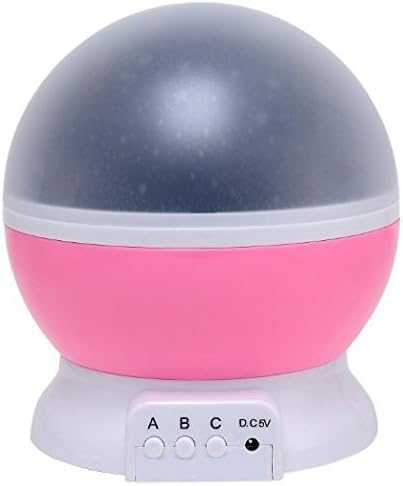
Figure 2: Side view of the projector, highlighting the 'A', 'B', 'C' buttons and the D.C. 5V USB power input port located on the front base.

Figure 3: The projector with its outer dome removed, revealing the inner projection film designed with star and moon cutouts to create the celestial effect.

Figure 4: An internal view of the projector with the dome removed, showing the arrangement of the LED light sources. This model features 3 x 0.5W colorful LEDs and 1 x 0.8W warm white LED.

Figure 5: A visual representation of the different color combinations and projection patterns achievable with the Kingbox Star Projector, including single colors and multi-color blends.
Setup
- Power Source:
- Battery Power: Open the battery compartment cover on the bottom of the unit. Insert 4 x AAA batteries (not included) according to the polarity markings. Close the cover securely.
- USB Power: Connect the provided USB cable to the D.C. 5V port on the projector. Plug the other end of the USB cable into a compatible USB power adapter (e.g., phone charger, computer USB port) or a power bank.
- Placement: Place the projector on a flat, stable surface in the desired room. For best projection results, place it in a dark room.
- Dome Attachment: Ensure the outer dome is securely placed on the projector if you wish to use it for projection. If you want to use it as a simple night light without projection, you can remove the outer dome.
Operating Instructions
The Kingbox Star Projector features three control buttons (A, B, C) on its base:
- Button A: Press to activate the warm white light. Press again to turn it off.
- Button B: Press to cycle through various color modes (blue, red, green, multi-color combinations, flashing modes). Press repeatedly to select your desired color or effect.
- Button C: Press to activate the rotation function, making the projected stars and moon slowly rotate. Press again to stop the rotation.
To turn off the projector completely, ensure all light modes (Button A and B) are off and the rotation (Button C) is off. Alternatively, disconnect the USB power cable or remove the batteries.
Maintenance
- Cleaning: Use a soft, dry cloth to wipe the surface of the projector. Do not use abrasive cleaners or solvents.
- Storage: When not in use for extended periods, remove the batteries to prevent leakage. Store the device in a cool, dry place.
- Dome Care: Handle the projection dome carefully to avoid scratches, which can affect projection quality.
Troubleshooting
| Problem | Possible Cause | Solution |
|---|---|---|
| Projector does not turn on. | No power or low batteries. | Ensure USB cable is properly connected or replace AAA batteries. |
| Projection is dim or blurry. | Room is too bright; dome is dirty or scratched. | Use in a darker room. Clean the dome with a soft, dry cloth. |
| Rotation function not working. | Button C not pressed; motor issue. | Press Button C. If issue persists, contact customer support. |
| Lights are not changing colors. | Button B not pressed repeatedly. | Press Button B multiple times to cycle through all color modes. |
Specifications
| Feature | Detail |
|---|---|
| Model | QO3S-4 |
| Power Source | 4 x AAA Batteries (not included) or USB DC 5V |
| Light Source | LED (Warm White, Blue, Green, Red) |
| Dimensions | Approx. 5.8 x 5.3 x 5.1 inches (Package Dimensions) |
| Weight | Approx. 14.1 ounces |
| Connectivity | USB |
Warranty and Support
Kingbox products are designed for reliability and performance. For warranty information or technical support, please refer to the contact details provided on the product packaging or visit the official Kingbox website. Please have your model number (QO3S-4) and purchase details ready when contacting support.
For further assistance, you may also visit the Kingbox Store on Amazon.


