
Introduction
The Thermaltake AC-032-CN5NAN-PB Individually Sleeved Cable Kit is designed to enhance the aesthetics and functionality of your PC build. These cables feature individual sleeving with black heat-shrinks, ensuring high-quality assembly and reliable support for high currents, contributing to stable system performance. The individual sleeving also aids in easier installation and improved airflow within your computer case.
This manual provides essential information for the proper installation, operation, maintenance, and troubleshooting of your cable kit.
Package Contents
- 1 x Individually Sleeved 20+4Pin ATX Cable
- 2 x Individually Sleeved 4+4Pin CPU Cables
- 4 x Individually Sleeved 6+2pin PCI-E Cables
- 3 x Individually Sleeved SATA Cables (each with 4 SATA connectors)
- 2 x Individually Sleeved 4Pin Peripheral Cables (each with 4 Peripheral connectors)
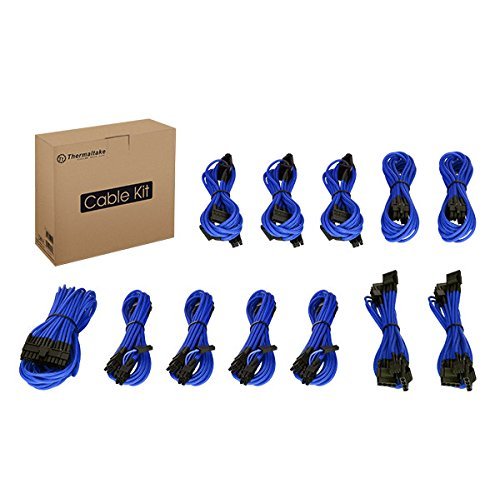
Image: The Thermaltake AC-032-CN5NAN-PB Individually Sleeved Cable Kit, showcasing the various blue sleeved cables included in the package.
Setup and Installation
Compatibility Check
Before installation, it is crucial to verify that your Power Supply Unit (PSU) is compatible with this cable kit. Incompatible cables can cause damage to your PSU or other components. This cable kit is designed for specific Thermaltake PSUs. Refer to the following list for compatible models:
- Toughpower Grand Series: 650W, 750W, 850W (Fully Modular)
- Toughpower Grand Series: 650W, 750W, 850W (Semi-Modular)
- Toughpower DPS G Series: 450W, 550W, 650W, 750W, 850W, 1050W
- Toughpower Series: 550W, 650W, 750W (Semi-Modular)
- EVO Blue 2.0 Series: 650W, 750W, 850W
- Smart SE Series: 530W, 630W, 730W
- Smart Series: 450W, 550W, 650W, 750W, 850W (Semi-Modular)
If your PSU is not listed, consult Thermaltake's official support or product documentation for compatibility confirmation.
Installation Steps
- Power Off and Unplug: Ensure your computer system is completely powered off and disconnected from the main power outlet before beginning installation.
- Access Components: Open your computer case to gain access to the Power Supply Unit (PSU) and other components requiring power connections.
- Identify Cable Types: Match the appropriate sleeved cables from the kit to their corresponding ports on your PSU and components (e.g., 20+4Pin ATX to motherboard, 4+4Pin CPU to CPU power, 6+2pin PCI-E to graphics card, SATA to storage drives, 4Pin Peripheral to fans or other accessories).
- Connect to PSU: For modular PSUs, connect one end of each sleeved cable firmly into the correct output port on the PSU. Ensure the connectors are fully seated and latched.
- Connect to Components: Connect the other end of each sleeved cable to its respective component (motherboard, CPU, GPU, SSD/HDD, etc.). Again, ensure all connections are firm and secure.
- Cable Management: Route the sleeved cables neatly within your case to optimize airflow and improve aesthetics. Use cable ties or routing channels if available.
- Close Case and Power On: Once all cables are securely connected and managed, close your computer case, reconnect the power cable, and power on your system.
Operation
Once properly installed, the Thermaltake Individually Sleeved Cable Kit operates passively by providing stable power delivery from your PSU to your computer components. No active user interaction is required for the cables themselves after installation.
Ensure that all connections remain secure during system operation. Any loose connections can lead to system instability or component malfunction.
Maintenance
To ensure the longevity and optimal performance of your sleeved cable kit, consider the following maintenance guidelines:
- Keep Clean: Periodically clean the cables and connectors to prevent dust buildup, which can hinder airflow and potentially affect conductivity. Use a soft, dry cloth or compressed air.
- Avoid Sharp Bends: Do not bend the cables excessively or at sharp angles, as this can damage the internal wires or the sleeving.
- Check Connections: Occasionally, with the system powered off and unplugged, gently check that all cable connections to the PSU and components remain firm and fully seated.
- Inspect for Damage: If you ever remove or re-route cables, inspect them for any signs of wear, fraying, or damage to the connectors. Do not use damaged cables.
Troubleshooting
If you encounter issues after installing your cable kit, refer to the following troubleshooting steps:
Cables Do Not Fit
- Verify PSU Compatibility: Double-check the compatibility list provided in the Setup section. This cable kit is designed for specific Thermaltake PSUs and may not be universally compatible.
- Check Orientation: Ensure you are attempting to connect the cables in the correct orientation. Connectors are often keyed to prevent incorrect insertion. Do not force connections.
- Inspect Connectors: Examine both the cable connectors and the PSU/component ports for any obstructions or manufacturing defects that might prevent a proper fit.
System Instability or No Power
- Secure Connections: With the system powered off and unplugged, re-verify that all cables are firmly and fully seated at both the PSU and component ends. A loose connection is a common cause of power issues.
- Check for Damaged Cables: Carefully inspect each cable for any visible damage, such as frayed wires, bent pins, or broken connectors. If a cable appears damaged, discontinue use and replace it.
- Test with Original Cables (if applicable): If possible, temporarily reinstall your original PSU cables to determine if the issue persists. This can help isolate whether the problem lies with the sleeved cables or another system component.
Poor Airflow
- Re-route Cables: If airflow is restricted, re-route the cables to create a cleaner path for air movement. Utilize cable management features of your case, such as routing holes and tie-down points.
- Use Cable Ties: Secure bundles of cables together to keep them tidy and out of the way of fans and airflow paths.
Specifications
- Model Number: AC-032-CN5NAN-PB
- Manufacturer: Thermaltake
- ASIN: B01I2UC6BK
- Item Weight: Approximately 0.01 ounces (per cable, actual kit weight may vary)
- Date First Available: July 7, 2016
- Cable Types Included: 20+4Pin ATX, 4+4Pin CPU, 6+2pin PCI-E, SATA, 4Pin Peripheral
Warranty and Support
This Thermaltake product is covered by a manufacturer's warranty. For detailed information regarding warranty terms, conditions, and duration, please refer to the warranty card included with your purchase or visit the official Thermaltake website.
For technical support, product inquiries, or to report any issues not covered in this manual, please contact Thermaltake customer service directly through their official website: www.thermaltake.com.