
1. Introduction
This manual provides comprehensive instructions for the installation, operation, and maintenance of the TPS UDC-701 RFID Access Control System Keypad. Designed for hobby electronics and DIY activities, this keypad offers a reliable solution for electronic circuit access control.
Please read this manual thoroughly before attempting to install or operate the device to ensure proper functionality and safety.
2. Important Safety Information
WARNING: Electronics items are static sensitive. Take precautionary measures before use to prevent damage to the device or other components.
WARNING: This item is strictly NOT TO BE USED FOR MEDICAL PURPOSES. It is intended solely for hobby electronics and DIY activities.
- Always disconnect power before making any connections or disconnections.
- Ensure proper grounding to prevent electrostatic discharge.
- Do not expose the device to moisture or extreme temperatures.
- Handle with care to avoid physical damage.
3. Legal Disclaimer
We make no representations or warranties of any kind, express or implied, about the completeness, accuracy, reliability, suitability or availability with respect to the Item or the information, products, services, or related graphics contained on the website for any purpose. Any reliance you place on such information is therefore strictly at your own risk.
In no event will we be liable for any loss or damage including without limitation, indirect or consequential loss or damage, or any loss or damage whatsoever arising from loss of data or profits arising out of, or in connection with, the use of this Item.
4. Product Overview
The UDC-701 is an RFID access control keypad designed for integration into various electronic circuits. It typically consists of a keypad for manual code entry and an RFID reader for card/tag authentication.
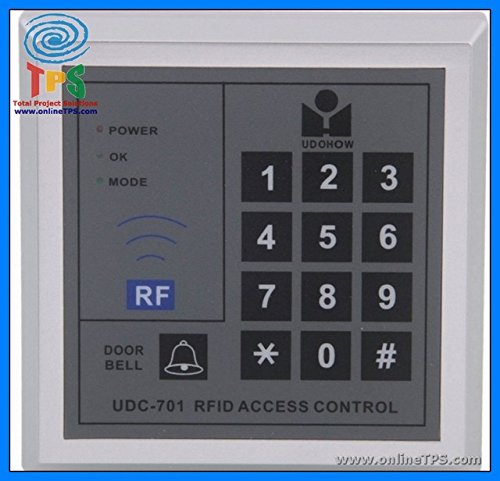
Figure 1: Front view of the TPS UDC-701 RFID Access Control System Keypad. This image shows the integrated keypad and RFID reader area.
4.1. Components
- Keypad: For entering numerical access codes.
- RFID Reader: For reading RFID cards or tags.
- Indicator LEDs: (If present) To show status (e.g., access granted, access denied, power).
- Wiring Terminals/Pins: For connecting to power, lock mechanisms, and other control circuits.
5. Setup and Installation
Proper installation is crucial for the reliable operation of the UDC-701 keypad. Refer to your specific circuit diagram for detailed connection points.
5.1. Power Supply Connection
- Connect the positive (+) terminal of your DC power supply to the VCC input of the keypad.
- Connect the negative (-) terminal (ground) of your DC power supply to the GND input of the keypad.
- Ensure the power supply voltage and current meet the specifications outlined in Section 8.
5.2. Lock Mechanism Connection (Example)
The keypad typically provides an output signal to control a lock mechanism (e.g., an electromagnetic lock or a relay). The connection method depends on the type of lock and your control circuit.
- Connect the control output pin of the keypad to the input of your relay module or lock driver circuit.
- Ensure the lock mechanism is powered by an appropriate external power supply, not directly by the keypad, unless specified.
5.3. Mounting
Mount the keypad securely in a location that allows for easy access and operation, away from direct moisture or excessive heat. Use appropriate fasteners for your mounting surface.
6. Operating Instructions
The UDC-701 operates by verifying entered codes or RFID tags against programmed credentials.
6.1. Initial Power-Up
Upon initial power-up, the keypad may enter a default state or require programming. Refer to your specific controller's documentation for initial setup procedures.
6.2. Programming Access Codes/RFID Tags
The method for programming access codes and RFID tags will depend on the specific controller or microcontroller you are using with the UDC-701. Typically, this involves:
- Entering a master programming code.
- Selecting an option to add a new user code or RFID tag.
- Entering the desired numerical code or presenting the RFID tag to the reader.
- Exiting programming mode.
Consult the documentation of your main control unit (e.g., Arduino, Raspberry Pi, dedicated access controller) for precise programming steps.
6.3. Granting Access
- Using Keypad: Enter a valid access code followed by the '#' or 'Enter' key (if applicable).
- Using RFID: Present a valid RFID card or tag to the RFID reader area.
Upon successful authentication, the keypad will typically activate its output for a set duration, triggering the connected lock mechanism.
7. Maintenance
The UDC-701 keypad is designed for low maintenance. Follow these guidelines to ensure its longevity:
- Cleaning: Use a soft, dry cloth to clean the keypad surface. Avoid abrasive cleaners or solvents.
- Environmental Protection: Keep the device away from excessive dust, moisture, and direct sunlight.
- Wiring Inspection: Periodically check all wiring connections for looseness or corrosion.
8. Troubleshooting
| Problem | Possible Cause | Solution |
|---|---|---|
| Keypad not responding / No power indicator | No power supply or incorrect wiring. | Check power connections and ensure the power supply is active and within specifications. |
| RFID tags not being read | Tag not compatible, tag damaged, or reader malfunction. | Ensure tags are compatible (e.g., 125kHz EM4100). Try a different tag. Check reader connections. |
| Access denied with correct code/tag | Code/tag not programmed, programming error, or controller issue. | Verify the code/tag is correctly programmed into your control system. Check the controller's logic. |
| Lock not activating | Lock wiring issue, lock power supply issue, or keypad output not connected/configured. | Check lock mechanism wiring and its dedicated power supply. Verify keypad output is correctly connected to the lock driver. |
9. Specifications
| Feature | Detail |
|---|---|
| Model Number | UDC-701 (Manufacturer: CNB-1067) |
| Brand | TPS |
| ASIN | B01I1DKBMO |
| Manufacturer | Chips-N-Boards |
| Application | Hobby Electronics / DIY Activities |
| Type | RFID Access Control System Keypad |
| (Typical Operating Voltage) | (Refer to specific product documentation or datasheet for exact voltage range, usually 5V-12V DC) |
| (Typical RFID Frequency) | (Refer to specific product documentation or datasheet, commonly 125kHz or 13.56MHz) |
Note: Specific electrical parameters (e.g., operating voltage, current draw, RFID frequency) are not provided in the source data. Please refer to the product's official datasheet or contact the manufacturer for precise technical specifications.
10. Warranty and Support
For warranty information and technical support, please refer to the documentation provided by the retailer or manufacturer at the time of purchase.
As this product is intended for hobby electronics and DIY activities, support may vary. It is recommended to consult online communities and resources for common questions and project-specific assistance.


