1. Introduction
This manual provides detailed instructions for the installation, operation, and troubleshooting of your Neoteck 192kHz Digital to Analog Audio Converter (DAC) with Volume Control. This device is designed to convert digital coaxial or Toslink optical audio signals into analog stereo L/R RCA and 3.5mm jack audio outputs simultaneously.
Please read this manual thoroughly before using the product to ensure proper function and to prevent damage.
2. Product Overview
The Neoteck NTK056 DAC allows you to connect modern digital audio sources, such as TVs, Blu-ray players, or game consoles, to older analog audio systems, headphones, or speakers. It features a high-grade aluminum alloy design for enhanced durability and signal integrity, along with gold-plated sockets for optimal connection.

Figure 2.1: Front and Back Panel Overview of the DAC
The device includes a volume control knob for adjusting the output level of both RCA and 3.5mm jack audio, offering convenience for various listening setups.
3. Features
- Converts Coaxial or Toslink digital audio signals to analog L/R RCA and 3.5mm Jack audio.
- Supports simultaneous output to RCA L/R and 3.5mm Jack.
- Integrated volume control for adjusting output audio levels.
- High-grade aluminum alloy design for durability and electromagnetic noise-free transmission.
- Gold-plated sockets for enhanced signal quality.
- Supports uncompressed 2-channel LPCM or PCM digital audio signal output.
- Plug and Play operation; no drivers required.
- Compact and portable design.
4. Package Contents
Please check the package contents upon receipt to ensure all items are present:
- 1 x Neoteck Digital to Analog Audio Converter (NTK056)
- 1 x Optical Cable (Toslink)
- 1 x USB Power Cable
- 1 x User Manual
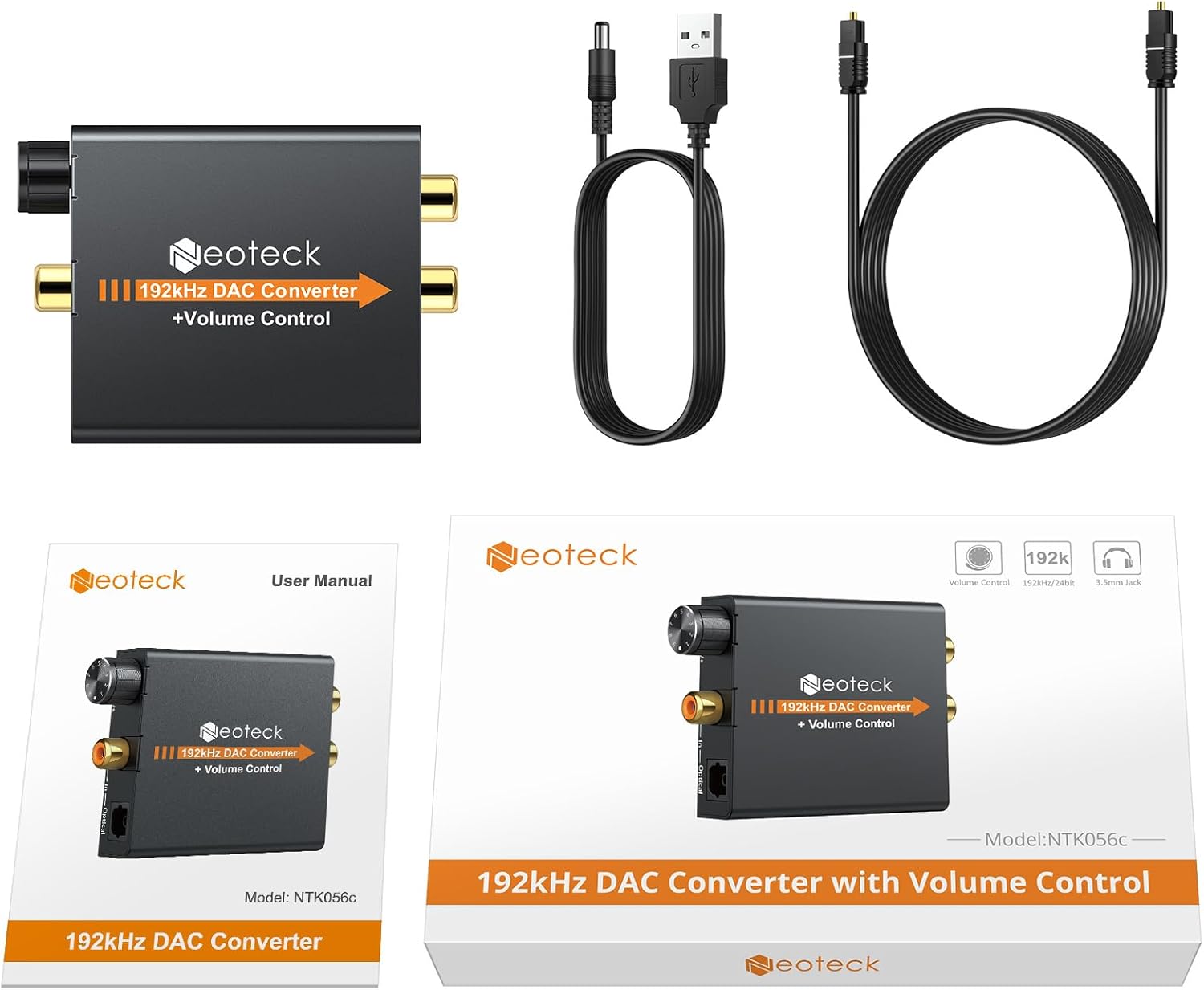
Figure 4.1: Package Contents
5. Setup Instructions
Follow these steps to set up your Neoteck DAC:
- Connect Digital Audio Input: Connect your digital audio source (e.g., TV, Blu-ray player) to the DAC using either a Coaxial cable or an Optical (Toslink) cable. Insert the cable into the corresponding "Coaxial In" or "Optical In" port on the DAC.
- Connect Analog Audio Output: Connect your analog audio receiver (e.g., amplifier, speakers, headphones) to the DAC.
- For RCA output: Use an RCA L/R cable to connect the "L Out" and "R Out" ports on the DAC to your amplifier or active speakers.
- For 3.5mm Jack output: Plug your headphones or 3.5mm speakers into the "Power" (headphone) jack on the DAC.
- Connect Power: Connect the provided USB power cable to the "DC 5V" port on the DAC. Plug the other end of the USB cable into a 5V USB power adapter (not included) or a USB port on your TV/device. The red power indicator light will illuminate when power is supplied.
- Configure Audio Output on Source Device: It is crucial to set your source device's (e.g., TV) digital audio output format to PCM or LPCM. This DAC does not support 5.1 channel audio formats like Dolby or DTS. Refer to your source device's manual for specific instructions on how to change this setting.

Figure 5.1: Connection Diagram

Figure 5.2: Setting TV Audio Output to PCM
Video 5.1: Setup and Operation Guide for Neoteck DAC. This video demonstrates how to connect the DAC to a TV and audio system, including setting the TV's audio output to PCM and adjusting the volume.
6. Operating Instructions
Once the DAC is properly connected and powered on, and your source device is configured for PCM/LPCM output:
- Power Indicator: The red LED light on the DAC indicates that the device is receiving power.
- Volume Control: Use the rotary knob on the front of the DAC to adjust the output volume for both the RCA and 3.5mm headphone outputs. Turn clockwise to increase volume (V+) and counter-clockwise to decrease volume (V-).
- Audio Playback: Play audio from your digital source. Sound should now be output through your connected analog audio system or headphones.

Figure 6.1: Volume Control Knob
7. Troubleshooting
- No Sound Output:
- Ensure the DAC is powered on (red LED illuminated).
- Verify all cables (digital input, analog output, power) are securely connected.
- Crucially, check your source device's (TV, Blu-ray player) audio output settings. It must be set to PCM or LPCM. This converter does not support Dolby, DTS, or other 5.1 channel formats.
- Increase the volume on the DAC using the volume knob and on your connected audio system/headphones.
- Try a different digital input cable (optical or coaxial) if available, or test with a different source device.
- Distorted or Intermittent Sound:
- Ensure the digital audio format is set to PCM/LPCM on your source device. Non-supported formats will result in noise or no sound.
- Check for loose cable connections.
- While the DAC is rated for 192kHz, some users have reported optimal performance up to 96kHz 24bit. If experiencing severe clipping or audio issues at 192kHz, try reducing the sample rate on your source device if possible.
- Ensure the power supply is stable (use a dedicated 5V USB adapter if experiencing issues with TV USB ports).
- Volume Control Not Working:
- Confirm the volume knob is being rotated correctly (V+ for increase, V- for decrease).
- Ensure your connected audio device (headphones, speakers) is also turned on and its volume is not at minimum.
8. Specifications
| Parameter | Value |
|---|---|
| Brand | Neoteck |
| Model Number | NTK056 |
| Input Audio | Coaxial or Toslink digital audio |
| Output Audio | L/R RCA, 3.5mm Jack audio |
| Input Audio Connector | Toslink, 1x RCA (Coaxial) |
| Output Audio Connector | 2x RCA (R/L), 1x 3.5mm Jack |
| Sampling Rate | Up to 192kHz |
| Material | Aluminum |
| Product Dimensions (L x W) | 2.95" x 2.17" (approx. 7.5cm x 5.5cm) |
| Item Weight | 3.2 ounces (approx. 90g) |

Figure 8.1: Product Dimensions
9. Safety Information
Please observe the following safety precautions:
- Do not expose this device to water, moisture, or excessive humidity.
- Do not attempt to disassemble or modify the device. This may void the warranty and cause damage.
- Use only the specified 5V DC power supply. Using an incorrect power adapter may damage the device.
- Keep the device away from heat sources and direct sunlight.
- Ensure proper ventilation around the device during operation.
10. Warranty and Support
Neoteck products are designed for reliability and performance. For warranty information or technical support, please refer to the contact details provided on the product packaging or the official Neoteck website. Keep your purchase receipt as proof of purchase for warranty claims.