
1. Introduction and Overview
The Beurer TL30 Portable Daylight Lamp is designed to simulate natural daylight, providing 10,000 lux of UV-free LED light. This device is intended to support well-being, particularly during periods of reduced natural light. Its compact and portable design makes it suitable for use at home, in the office, or while traveling.

Image: The Beurer TL30 Portable Daylight Lamp shown with its protective felt case.
2. Safety Information
Please read this entire manual carefully before using the Beurer TL30 Daylight Lamp. Retain this manual for future reference. Observe all safety warnings and instructions to prevent injury or damage to the device.
- This device is for personal use only and not for commercial or medical purposes.
- Do not use the lamp if you have eye conditions such as glaucoma, cataracts, or retinal diseases, or if you are taking medications that increase light sensitivity. Consult a healthcare professional if unsure.
- Keep the device away from water and moisture. Do not operate with wet hands.
- Ensure the power adapter is compatible with your local power supply.
- Do not attempt to open or repair the device yourself. Contact authorized service personnel.
- Keep out of reach of children.
For comprehensive safety guidelines, refer to the full PDF user manual available at: Beurer TL30 User Manual (PDF)
3. Package Contents
Verify that all items are present and undamaged upon unpacking:
- Beurer TL30 Daylight Lamp
- Removable Stand
- Protective Storage Case
- Power Adapter
4. Setup
- Attach the Stand: Locate the removable clip-on stand. Insert it into the designated slot on the back of the lamp. The stand allows for both portrait and landscape orientation.
- Position the Lamp: Place the lamp on a stable, flat surface such as a desk or table. Ensure it is positioned at a comfortable distance from you.
- Connect Power: Plug the power adapter into the lamp's power input, then plug the adapter into a suitable electrical outlet.

Image: The adjustable clip-on stand allows for flexible positioning of the lamp.
5. Operating Instructions
The Beurer TL30 Daylight Lamp features simple one-touch operation:
- Turn On: Gently touch the power button located on the device. The lamp will illuminate.
- Turn Off: Touch the power button again to turn off the lamp.

Image: A user operating the Beurer TL30 Daylight Lamp, demonstrating its use for daylight simulation.
6. Usage Guidelines
For optimal results and safety, follow these guidelines:
- Distance: Position the lamp approximately 4 inches (10 cm) from your face to achieve the recommended 10,000 lux light intensity.
- Duration: Begin with shorter sessions, such as 20-30 minutes per day, and gradually increase if desired and comfortable. Consult a healthcare professional for personalized recommendations.
- Timing: Use the lamp primarily in the morning to help regulate your natural sleep-wake cycle. Avoid use late in the evening as it may interfere with sleep.
- Eye Contact: While it is not necessary to stare directly into the light, ensure the light enters your eyes indirectly. You can engage in other activities like reading or working while using the lamp.

Image: The lamp in use, illustrating its benefits such as increased energy, improved mood, boosted focus, and balanced sleep.
7. Maintenance and Cleaning
To ensure the longevity and proper functioning of your Beurer TL30 Daylight Lamp:
- Always unplug the device before cleaning.
- Clean the lamp surface with a slightly damp, soft cloth. Do not use abrasive cleaners or solvents.
- Do not immerse the device in water or any other liquid.
- Store the lamp in its protective case when not in use to prevent dust accumulation and damage.

Image: The compact tablet design of the Beurer TL30, highlighting its portability and ease of handling for cleaning and storage.
8. Troubleshooting
If you encounter issues with your Beurer TL30 Daylight Lamp, refer to the following common solutions:
| Problem | Possible Cause | Solution |
|---|---|---|
| Lamp does not turn on. | No power supply. | Check if the power adapter is securely plugged into both the lamp and the electrical outlet. Ensure the outlet is functional. |
| Light intensity seems low. | Lamp is too far away. | Ensure the lamp is positioned approximately 4 inches (10 cm) from your face for optimal 10,000 lux output. |
If the problem persists after attempting these solutions, please contact Beurer customer support or refer to the detailed troubleshooting section in the full user manual.
9. Technical Specifications
| Specification | Detail |
|---|---|
| Model | TL30 |
| Product Dimensions | 1"D x 9"W x 6"H (2.54 cm D x 22.86 cm W x 15.24 cm H) |
| Item Weight | 1 Pound (0.45 kg) |
| Light Source Type | LED |
| Light Intensity | 10,000 Lux (at approx. 4 inches / 10 cm) |
| UV-Free | Yes |
| Voltage | 5 Volts (DC) |
| Material | Plastic |
| Switch Type | Touch |
| Mounting Type | Tabletop |
| Special Feature | Lightweight, Portable |
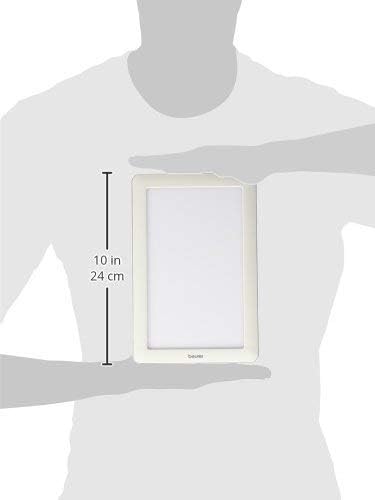
Image: The Beurer TL30 Daylight Lamp held by a person, illustrating its compact size and approximate 10-inch height.
10. Warranty and Support
The Beurer TL30 Portable Daylight Lamp comes with a limited lifetime warranty. For warranty claims or technical support, please contact Beurer North America LP customer service. Keep your proof of purchase for warranty validation.
For additional information and support, you may refer to the official Beurer website or the comprehensive user manual PDF: Beurer TL30 User Manual (PDF)
11. Disposal
At the end of its service life, do not dispose of the device with household waste. Dispose of it in accordance with local regulations for electronic waste. Contact your local authorities for information on recycling facilities.