
1. Product Overview
The InSize 2866-10 Thickness Gauge is a precision instrument designed for accurate measurement of material thickness. It operates on an ultrasonic measuring principle and is controlled by a microprocessor, ensuring quick response and high accuracy. This gauge is built to international standards, offering optimum performance and long-lasting nature.
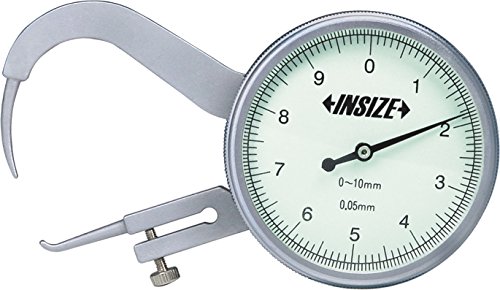
Figure 1: InSize 2866-10 Thickness Gauge. This image displays the silver-colored gauge featuring a large circular dial with a black needle, indicating measurements. The gauge has two pointed tips, one fixed and one movable, designed to measure the thickness of various materials. The dial shows markings from 0 to 9, with a stated measurement range of 0-10mm and an accuracy of 0.05mm. The 'INSIZE' brand logo is prominently displayed on the dial.
2. Setup
- Unpacking: Carefully remove the thickness gauge from its packaging. Inspect for any signs of damage during transit.
- Component Check: Ensure all parts, including the main gauge body, pointed tips, and the dial indicator, are intact and free from obstructions.
- Familiarization: Before use, familiarize yourself with the gauge's components: the fixed anvil (upper pointed tip), the movable spindle (lower pointed tip), the dial indicator, and the locking screw (if present, for the movable tip).
- Cleaning: Gently wipe the gauge with a soft, lint-free cloth to remove any dust or debris. Avoid using harsh chemicals.
3. Operating Instructions
Follow these steps for accurate thickness measurements:
- Zeroing the Gauge: Before taking a measurement, ensure the gauge reads zero when the two pointed tips are brought together without any object in between. If it does not read zero, gently adjust the outer bezel of the dial until the needle aligns with the '0' mark.
- Positioning the Object: Carefully place the material or object whose thickness you wish to measure between the fixed and movable pointed tips of the gauge.
- Applying Pressure: Gently release the movable tip so it makes firm contact with the object. Do not apply excessive force, as this can lead to inaccurate readings or damage the gauge.
- Reading the Measurement: Read the measurement directly from the dial indicator. The gauge has a measurement range of 0 to 10mm and an accuracy of 0.05mm. The large needle indicates the measurement in millimeters.
- Removing the Object: Once the reading is taken, carefully open the tips and remove the object.
4. Maintenance
Proper maintenance ensures the longevity and accuracy of your InSize Thickness Gauge:
- Cleaning: After each use, wipe the gauge clean with a soft, dry, lint-free cloth. For stubborn dirt, a cloth lightly dampened with isopropyl alcohol can be used, but ensure no liquid enters the dial mechanism.
- Storage: Store the gauge in its original protective case or a similar padded container when not in use. Keep it in a dry environment, away from direct sunlight, extreme temperatures, and corrosive substances.
- Handling: Avoid dropping or subjecting the gauge to impact, as this can affect its calibration and internal mechanisms.
- Lubrication: Do not attempt to lubricate any internal parts unless specifically instructed by the manufacturer.
- Calibration Check: Periodically check the gauge's zero point. If consistent inaccuracies are observed, professional calibration may be required.
5. Troubleshooting
If you encounter issues with your thickness gauge, refer to the following common problems and solutions:
| Problem | Possible Cause | Solution |
|---|---|---|
| Inaccurate Readings | Gauge not zeroed; Dirt/debris on tips; Damaged tips; Internal mechanism issue. | Re-zero the gauge; Clean tips thoroughly; Inspect tips for damage (replace if necessary); Contact support for repair. |
| Needle Sticking/Jumping | Dust/dirt inside mechanism; Bent spindle; Lack of proper storage. | Gently tap the gauge to dislodge dust (if minor); Avoid self-repair, contact support; Store in a clean, dry place. |
| Tips Not Closing Fully | Obstruction between tips; Bent tips. | Remove any obstruction; Inspect tips for alignment and damage. |
6. Technical Specifications
| Feature | Detail |
|---|---|
| Brand | Insize |
| Manufacturer | InSize |
| Model Number | 2866-10 |
| Item Weight | 220 g |
| Package Dimensions | 15.8 x 10 x 4.4 cm |
| Measurement Range | 0 - 10 mm |
| Accuracy | 0.05 mm |
| Country of Origin | India |
| Date First Available | 28 June 2016 |
7. Warranty and Support
Insize products are manufactured to international standards and come with a full guarantee. For any inquiries regarding warranty, service, or technical support, please contact your authorized Insize dealer or the manufacturer directly. Ensure you have your product model number (2866-10) and purchase details available when seeking support.
Insize is committed to providing high-performance products and ensuring trouble-free use through dedicated service and support.