
Introduction
This manual provides instructions for the AULCMEET Universal Replacement Remote Control, model PN-14. This remote is designed to be compatible with a wide range of Panasonic LED, LCD, and 3D televisions, offering a direct replacement for many original Panasonic remote models, including N2QAYB000926, N2QAYB000485, and N2QAYB000837. It operates using infrared technology and requires two AA batteries (not included).
The remote is pre-programmed for most Panasonic TVs, allowing for immediate use upon battery installation without complex setup procedures. Please read this manual carefully to ensure proper use and to understand all features of your new remote control.
Setup
1. Battery Installation
- Locate the battery compartment on the back of the remote control.
- Slide the battery cover downwards or press the latch and lift to open.
- Insert two (2) new AA-size alkaline batteries, ensuring the positive (+) and negative (-) terminals match the diagrams inside the compartment.
- Replace the battery cover, ensuring it clicks securely into place.
2. Initial Use
After installing the batteries, the remote control is generally ready for immediate use with most Panasonic LED, LCD, and 3D televisions. Point the remote directly at your TV and press the POWER button. If the TV turns on or off, the remote is successfully paired and ready to operate.
No additional programming steps are typically required for this universal replacement remote with compatible Panasonic models.
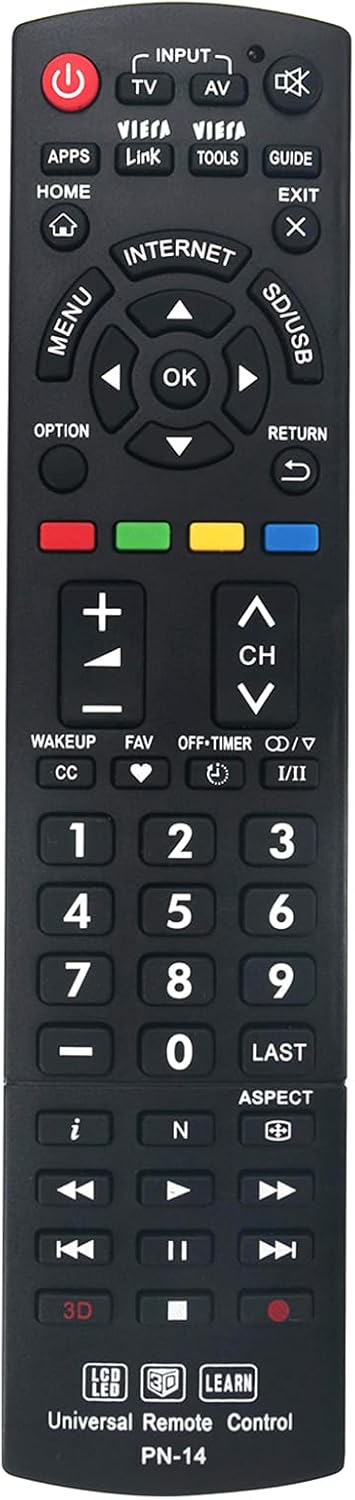
Image: Front view of the AULCMEET Universal Remote Control PN-14. This image displays the full layout of the remote's buttons, including power, input, channel, volume, navigation, and specific Panasonic functions like VIERA Link and APPS.
Operating Instructions
The AULCMEET PN-14 remote control features a comprehensive set of buttons designed to replicate the functionality of your original Panasonic TV remote. Below is a guide to common button functions:
- POWER (Red Button): Turns the TV on or off.
- INPUT / TV / AV: Selects the video input source (e.g., HDMI 1, AV, Component).
- VIERA Link / VIERA Tools: Accesses Panasonic's integrated control features for connected devices and quick settings.
- APPS / HOME: Opens the Smart TV application menu or returns to the home screen.
- GUIDE / EXIT: Displays the electronic program guide or exits current menus.
- MENU / OK / Navigation Arrows: Navigates through on-screen menus and confirms selections.
- OPTION / RETURN: Accesses context-sensitive options or returns to the previous screen.
- Volume (+/-): Adjusts the sound volume.
- Channel (CH ^/v): Changes TV channels.
- Mute: Silences the TV audio.
- Number Buttons (0-9): Directly enters channel numbers.
- LAST: Returns to the previously viewed channel.
- ASPECT: Changes the screen aspect ratio.
- Color Buttons (Red, Green, Yellow, Blue): Used for specific functions within menus or interactive services.
- Media Playback Controls (Play, Pause, Stop, Rewind, Fast Forward): Controls media playback on compatible devices or TV functions.
- 3D: Activates or deactivates 3D mode on compatible 3D televisions.
For specific functions related to your TV model, refer to your television's original user manual.
Maintenance
Battery Replacement
Replace batteries when the remote's response becomes sluggish or stops working. Always replace both AA batteries at the same time with new ones. Do not mix old and new batteries, or different types of batteries.
Cleaning
To clean the remote control, gently wipe the surface with a soft, dry cloth. For stubborn dirt, slightly dampen the cloth with water or a mild, non-abrasive cleaner. Do not use harsh chemicals or immerse the remote in water.
Storage
Store the remote in a cool, dry place away from direct sunlight and extreme temperatures. If the remote will not be used for an extended period, remove the batteries to prevent leakage and potential damage.
Troubleshooting
- Remote is not working:
- Ensure the batteries are inserted correctly with the correct polarity (+/-).
- Replace old batteries with new AA alkaline batteries.
- Check for any obstructions between the remote control and the TV's infrared sensor.
- Ensure you are within the effective operating range (up to 33 feet) and pointing the remote directly at the TV.
- Some buttons are not responding:
- Verify that the button functionality is supported by your specific Panasonic TV model. Some advanced features may vary.
- Clean the remote control, especially around the unresponsive buttons, to remove any dirt or debris that might be interfering.
- TV is not responding to the remote:
- Confirm that your TV is a Panasonic LED, LCD, or 3D model. This remote is specifically designed for these types of Panasonic televisions.
- Try restarting your TV by unplugging it from the power outlet for a few minutes, then plugging it back in.
Specifications
| Brand | AULCMEET |
| Model Number | PN-14 |
| Connectivity Technology | Infrared |
| Compatible Devices | Panasonic LED, LCD, and 3D TVs |
| Power Source | 2 x AA Batteries (not included) |
| Number of Buttons | 30 |
| Maximum Range | 33 Feet (approx. 10 meters) |
| Item Weight | 3 Ounces (approx. 85 grams) |
| UPC | 714838436527 |

Image: The AULCMEET Universal Remote Control PN-14 shown alongside its approximate dimensions. The remote measures approximately 8.46 inches (21.5 cm) in length and 1.97 inches (5 cm) in width.
Warranty Information
Specific warranty details for the AULCMEET Universal Replacement Remote Control PN-14 are not provided in the product information. Please refer to the retailer or your purchase documentation for any applicable warranty terms and conditions.
Support
For further assistance or inquiries regarding the AULCMEET Universal Replacement Remote Control PN-14, please contact the seller or the manufacturer directly through the platform where the product was purchased. Ensure you have your order details and product model number (PN-14) available when seeking support.

Image: A person using the AULCMEET Universal Remote Control PN-14 to operate a television. This illustrates the remote in a typical home usage scenario, highlighting its ease of use for controlling TV functions.