
HomeSpot GW12W-050240UU
Contents
HomeSpot 5V 2.4A Power Supply/Adapter/Charger User Manual
Model: GW12W-050240UU
Brand: HomeSpot
Product Overview
This manual provides instructions for the HomeSpot 5V 2.4A Power Supply/Adapter/Charger, designed for use with devices such as Raspberry Pi and Arduino. It includes a 5-foot long Micro USB cable with an integrated on/off switch for convenient power control.

Image: The HomeSpot 5V 2.4A power adapter shown alongside its 5-foot Micro USB cable, which features an inline on/off switch. This image displays the complete product package.
Setup Instructions
- Unpack the Components: Carefully remove the power supply unit and the Micro USB cable from their packaging.
- Connect the Cable: Insert the USB-A end of the Micro USB cable into the USB port on the HomeSpot power supply. Ensure a firm connection.
- Plug into Power Outlet: Insert the power supply unit into a standard AC wall outlet (100-240V).
- Connect to Device: Plug the Micro USB end of the cable into the Micro USB port of your compatible device, such as a Raspberry Pi or Arduino.
- Power On: Locate the inline on/off switch on the Micro USB cable. Press the button to turn on the power supply to your device.
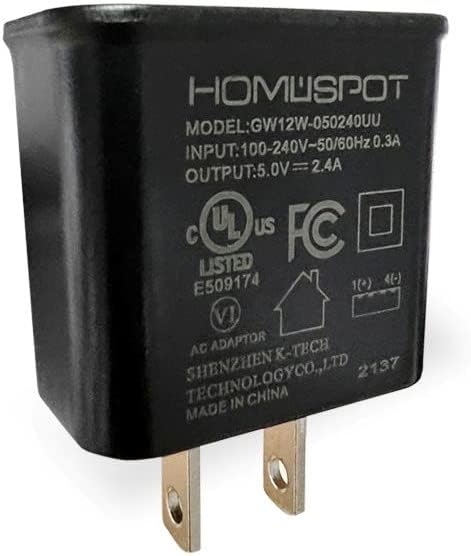
Image: A detailed view of the HomeSpot power adapter, highlighting its model number (GW12W-050240UU), input/output specifications, and UL listing. This shows the adapter's labeling and plug configuration.
Operating Instructions
The HomeSpot power supply is designed for stable and efficient power delivery to your electronic projects and devices. Its primary function is to provide a consistent 5V at 2.4A output.
- On/Off Switch Functionality: The inline switch on the Micro USB cable allows for convenient power cycling of your connected device without needing to unplug the power supply from the wall outlet or the cable from the device. Press the button once to toggle power on or off.
- Power Output: This power supply delivers a stable 5 Volts (V) at 2.4 Amperes (A), suitable for a wide range of microcontrollers and single-board computers like Raspberry Pi and Arduino that require a 5V power source.
- UL Listed Safety: The power supply is UL Listed, indicating it meets specific safety standards.

Image: The 5-foot Micro USB cable with its inline on/off switch, laid out next to a ruler to demonstrate its length. This image emphasizes the cable's practical features and dimensions.
Maintenance
- Cleaning: Disconnect the power supply from the wall outlet before cleaning. Use a soft, dry cloth to wipe the exterior of the power supply and cable. Do not use liquid cleaners or abrasive materials.
- Storage: Store the power supply and cable in a cool, dry place away from direct sunlight and extreme temperatures. Avoid tightly coiling the cable to prevent damage.
- Inspection: Periodically inspect the cable and power supply for any signs of damage, such as frayed wires, bent pins, or cracks in the casing. If damage is observed, discontinue use and replace the product.
Troubleshooting
| Problem | Possible Cause | Solution |
|---|---|---|
| Device not powering on. |
|
|
| Device experiences instability or reboots. |
|
|
| Cable or adapter feels warm. |
|
|
Specifications
| Model Number | GW12W-050240UU |
| Input Voltage | 100-240V AC, 50/60Hz, 0.3A |
| Output Voltage/Current | 5V DC, 2.4A |
| Cable Length | 5 feet (1.5 meters) |
| Connector Type | Micro USB (with inline on/off switch) |
| Compatible Devices | Raspberry Pi, Arduino, and other 5V Micro USB powered devices |
| Certifications | UL Listed |
| Item Weight | 0.958 ounces |
| Manufacturer | SHENZHEN K-TECH TECHNOLOGY CO.,LTD |
Warranty and Support
HomeSpot offers a standard 12-month warranty for this product. This warranty is automatically extended to 18 months upon product registration on the official HomeSpot website. Please refer to the product packaging or the HomeSpot website for detailed warranty terms and conditions.
For technical support, troubleshooting assistance, or warranty claims, please contact HomeSpot customer service through their official website or the contact information provided with your purchase. When contacting support, please have your product model number (GW12W-050240UU) and purchase details ready.
Documents and downloads
Ask a question about this manual
Ask about setup, troubleshooting, compatibility, parts, safety, or missing instructions. Manuals+ will review the question and use this page’s manual context to help answer it.