
1. Introduction
Thank you for purchasing the Tiger JBH-G101-W Microcomputer Rice Cooker. This manual provides essential information for the safe and efficient operation, maintenance, and troubleshooting of your new appliance. Please read this manual thoroughly before first use and keep it for future reference.
2. Important Safety Precautions
To ensure safe operation and prevent damage to the appliance or injury to yourself and others, please observe the following safety guidelines:
- Always connect the rice cooker to a grounded electrical outlet with the correct voltage (100 Volts).
- Do not immerse the main unit in water or any other liquid.
- Unplug the appliance from the power outlet when not in use, before cleaning, and during assembly or disassembly of parts.
- Keep the appliance out of reach of children. Close supervision is necessary when the appliance is used near children.
- Do not operate the appliance if the power cord or plug is damaged, or if the appliance malfunctions or has been damaged in any manner.
- Ensure the steam vent is clear and not blocked during operation. Avoid placing hands or face directly over the steam vent.
- Use only accessories and attachments recommended by the manufacturer.
- Do not use the appliance outdoors.
3. Product Overview
3.1 Components
Familiarize yourself with the main parts of your Tiger rice cooker:

Figure 3.1: Front view of the Tiger JBH-G101-W Rice Cooker.

Figure 3.2: All components included with the rice cooker, including the main unit, inner pot, inner lid, measuring cup, and rice spatula.
- Main Unit: The primary body of the rice cooker housing the heating element and control panel.
- Inner Pot: The removable non-stick pot where rice is cooked. It has water level markings for different rice types.
- Inner Lid: The removable lid inside the main lid, which can be detached for cleaning.
- Measuring Cup: A standard cup for measuring rice.
- Rice Spatula: A non-stick spatula for serving rice.
- Power Cord: Detachable cord for connecting to power.
3.2 Control Panel
The control panel allows you to select cooking modes, set timers, and start/stop cooking.
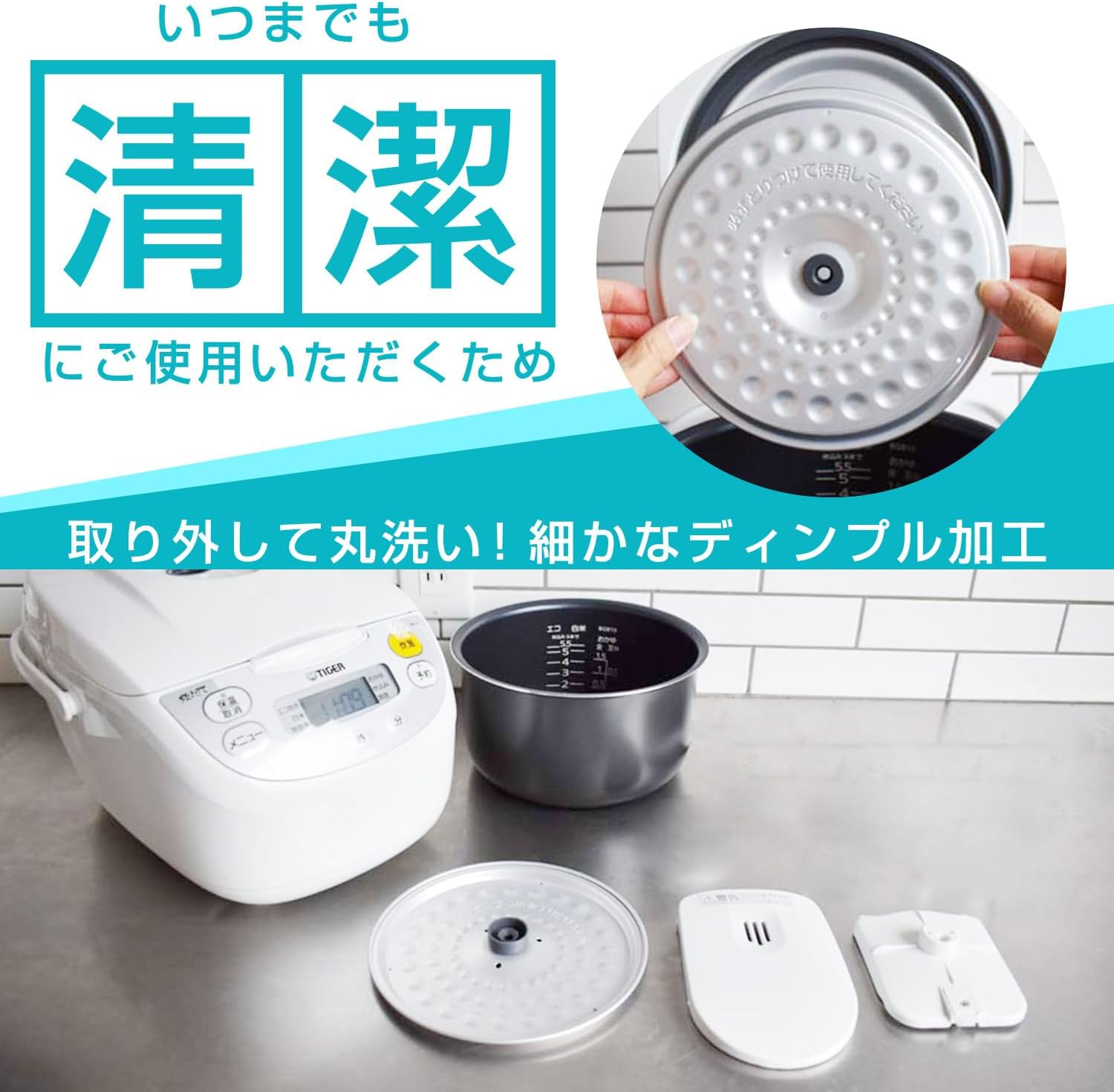
Figure 3.3: Detailed view of the control panel with buttons and digital display.
- Display: Shows cooking time, current time, and selected mode.
- Menu Button: Cycles through various cooking modes (e.g., White Rice, Eco Cooking, Quick Cooking, Porridge, Stew/Soup).
- Cook Button: Starts the cooking process.
- Keep Warm/Cancel Button: Activates or cancels the keep warm function, or stops cooking.
- Timer Button: Sets the delay timer for cooking.
- Hour/Minute Buttons: Adjust time settings for the timer.
4. Setup
Before using your rice cooker for the first time, follow these steps:
- Unpack: Carefully remove all packaging materials and accessories from the box.
- Clean: Wash the inner pot, inner lid, measuring cup, and rice spatula with warm, soapy water. Rinse thoroughly and dry completely. Wipe the exterior of the main unit with a damp cloth.
- Placement: Place the rice cooker on a stable, flat, heat-resistant surface, away from direct sunlight and heat sources. Ensure adequate ventilation around the unit.
- Connect Power: Insert the power cord into the rice cooker's power inlet, then plug the other end into a suitable electrical outlet.

Figure 4.1: Proper connection of the detachable power cord to the rice cooker.
5. Operating Instructions
5.1 Basic Rice Cooking (White Rice)
- Measure Rice: Use the provided measuring cup to measure the desired amount of rice. One cup typically yields about 2-3 servings of cooked rice.
- Wash Rice: Rinse the rice thoroughly in a separate bowl until the water runs clear.
- Add Rice to Inner Pot: Place the washed rice into the inner pot.
- Add Water: Add water up to the corresponding water level mark inside the inner pot for the amount of rice you are cooking. For example, if cooking 3 cups of white rice, fill water to the '3' mark for white rice.
- Place Inner Pot: Ensure the exterior of the inner pot is dry, then place it into the main unit.
- Close Lid: Close the outer lid securely until it clicks.
- Select Mode: Press the 'Menu' button repeatedly until 'White Rice' (or desired mode) is selected on the display.
- Start Cooking: Press the 'Cook' button. The cooking indicator light will illuminate, and the display will show the remaining cooking time or a cooking animation.
- Completion: Once cooking is complete, the rice cooker will beep, and automatically switch to 'Keep Warm' mode.

Figure 5.1: Inner pot showing water level markings for accurate water measurement.

Figure 5.2: Example of perfectly cooked rice, achievable with proper use of the rice cooker.
5.2 Cooking Modes
Your rice cooker offers several cooking modes for various needs:

Figure 5.3: The menu options available on the rice cooker's display.
- White Rice: Standard cooking for regular white rice.
- Eco Cooking: An energy-saving mode that optimizes cooking time and power consumption.
- Quick Cooking: For faster cooking when time is limited. Note that rice texture may vary slightly.
- Porridge: Specifically designed for cooking porridge or congee.
- Stew/Soup: A versatile mode for preparing stews, soups, or other slow-cooked dishes.
5.3 Timer Function
The timer function allows you to set a delayed cooking start time:
- Prepare rice and water in the inner pot as usual.
- Press the 'Timer' button. The display will show a default timer setting.
- Use the 'Hour' and 'Minute' buttons to adjust the desired completion time.
- Press the 'Cook' button to confirm. The timer indicator will light up, and the cooker will start cooking automatically at the set time.
5.4 Keep Warm Function
After cooking, the rice cooker automatically switches to 'Keep Warm' mode to maintain the rice at an optimal serving temperature. To cancel the 'Keep Warm' function, press the 'Keep Warm/Cancel' button.
6. Maintenance and Cleaning
Regular cleaning ensures optimal performance and extends the lifespan of your rice cooker.

Figure 6.1: The inner pot and inner lid are easily removable for thorough cleaning.
6.1 Daily Cleaning
- Inner Pot: After each use, remove the inner pot and wash it with warm, soapy water using a soft sponge. Do not use abrasive cleaners or metal scrubbers, as this can damage the non-stick coating. Rinse and dry thoroughly.
- Inner Lid: Detach the inner lid and wash it with warm, soapy water. Rinse and dry completely.
- Main Unit Exterior: Wipe the exterior of the rice cooker with a damp cloth. Do not use harsh chemicals.
6.2 Periodic Cleaning
- Steam Vent: Periodically check the steam vent for any blockages and clean if necessary.
- Condensation Collector (if applicable): If your model has a condensation collector, empty and clean it regularly.
7. Troubleshooting
If you encounter any issues with your rice cooker, refer to the table below for common problems and their solutions.
| Problem | Possible Cause | Solution |
|---|---|---|
| Rice is undercooked/hard | Insufficient water; inner pot not properly seated; wrong cooking mode selected. | Ensure correct water level; reseat inner pot; select appropriate cooking mode. |
| Rice is overcooked/mushy | Too much water; rice not rinsed properly. | Reduce water slightly next time; rinse rice thoroughly before cooking. |
| Rice cooker does not turn on | Power cord not connected; power outlet issue. | Check power cord connection; try a different outlet. |
| Steam leaking from lid | Lid not closed properly; inner lid not installed correctly; gasket worn. | Ensure lid is securely closed; check inner lid installation; inspect and replace gasket if necessary. |
If the problem persists after trying these solutions, please contact customer support.
8. Specifications
| Feature | Specification |
|---|---|
| Brand | Tiger |
| Model Name | microcomputer |
| Item Model Number | JBH-G101-W |
| Capacity | 1 Liters (5.5 Go) |
| Power Source | Corded Electric |
| Voltage | 100 Volts |
| Wattage | 635 watts |
| Material | Stainless Steel |
| Color | White |
| Item Weight | 3 Kilograms (6.6 pounds) |
| Product Dimensions | 9.92 x 13.74 x 8.46 inches |
| Special Feature | Removable Bowl |
| Included Components | Instruction Manual |
9. Warranty and Support
This Tiger rice cooker is designed for durability and performance. For information regarding warranty coverage, please refer to the warranty card included with your product packaging or visit the official Tiger website. For technical support, replacement parts, or service inquiries, please contact Tiger customer service through their official channels.