
Introduction
This instruction manual provides detailed information for the safe and efficient operation of your DEWALT DCR025 20V MAX Bluetooth Jobsite Radio Charger. Please read this manual thoroughly before using the product and retain it for future reference. This unit is designed to provide audio entertainment and charging capabilities on job sites, powered by DEWALT 20V MAX or FLEXVOLT 20V/60V MAX batteries, or via AC power.
Safety Information
Always observe basic safety precautions when using electrical appliances to reduce the risk of fire, electric shock, and personal injury. Keep this manual for important safety and operating instructions.
- Do not expose the unit to rain or wet conditions.
- Do not operate the unit near water.
- Clean only with a dry cloth.
- Do not block any ventilation openings.
- Do not install near any heat sources such as radiators, heat registers, stoves, or other apparatus (including amplifiers) that produce heat.
- Protect the power cord from being walked on or pinched.
- Only use attachments/accessories specified by the manufacturer.
- Unplug this apparatus during lightning storms or when unused for long periods of time.
Product Overview
Key Features
- Dual Power Source: Operates on DEWALT 20V MAX* and FLEXVOLT 20V/60V MAX* batteries, or AC power.
- Battery Charging: 3 AMP charging for 20V MAX and 60V MAX DEWALT Batteries when connected to AC power.
- Bluetooth Connectivity: Up to 100 feet range for wireless audio streaming.
- Integrated Power Outlets: Two additional AC power outlets for connecting other tools or chargers.
- Device Charging: Aux and 2.1 AMP USB charging ports for mobile devices.
- Remote Control Protocol (AVRCP): Control your connected device directly from the radio interface.
- High-Quality Audio: 20 Watts Per Channel with woofers, tweeters, and air ports for clear, rich sound.
Components
The DEWALT DCR025 Jobsite Radio Charger features a robust design suitable for demanding environments. Key components include the main control panel, integrated speakers, a protective device storage box, AC power outlets, and a battery compartment.

Figure 1: Front view of the DEWALT DCR025 Jobsite Radio Charger, showing the control panel and speakers.

Figure 2: Angled view of the DEWALT DCR025, highlighting its rugged construction and integrated handles.
Setup
Powering the Unit
The DCR025 can be powered by an AC cord or by DEWALT 20V MAX or FLEXVOLT 20V/60V MAX batteries.
AC Power Operation
- Locate the integrated AC power cord on the back of the unit.
- Plug the AC power cord into a standard 120V AC wall outlet.
- When powered by AC, the unit will also charge any inserted DEWALT 20V MAX or FLEXVOLT battery.
Battery Power Operation
- Open the battery compartment cover located on the back of the unit.
- Slide a charged DEWALT 20V MAX or FLEXVOLT 20V/60V MAX battery pack into the receptacle until it clicks into place.
- Close the battery compartment cover securely.

Figure 3: Battery compartment, showing where to insert a DEWALT 20V MAX or FLEXVOLT battery.

Figure 4: The DCR025 operating with a DEWALT battery inserted, demonstrating cordless functionality.
Initial Power On
Press the power button on the control panel to turn the unit on. The LCD display will illuminate.
Operating Instructions
Radio Operation (AM/FM)
- Press the MODE button to select FM or AM radio.
- Use the TUNE/SCAN knob to manually tune to a station or press and hold to auto-scan for the next available station.
- To save a preset, tune to the desired station, then press and hold one of the preset number buttons (1-5) until the display confirms the save.
Bluetooth Connectivity
The DCR025 features Bluetooth for wireless audio streaming from compatible devices.
- Press the MODE button until "Bluetooth" appears on the display. The Bluetooth indicator will flash.
- On your mobile device, enable Bluetooth and search for available devices.
- Select "DEWALT DCR025" from the list. Once paired, the Bluetooth indicator on the radio will glow solid.
- The radio offers up to 100 feet of Bluetooth range, allowing flexibility on the jobsite.

Figure 5: The DCR025 demonstrating its 100-foot Bluetooth range capability on a jobsite.
Auxiliary Input and USB Charging
The unit includes a protective storage box with an auxiliary input and a USB charging port.
- Open the protective storage box cover.
- For auxiliary audio, connect your device using a 3.5mm audio cable to the AUX IN port.
- For device charging, connect your USB device to the 2.1 AMP USB charging port.

Figure 6: Auxiliary input and USB charging port located within the protective storage compartment.
AC Power Outlets
Two additional AC power outlets are located on the side of the unit.
- Ensure the DCR025 is connected to AC power.
- Plug other tools or chargers into the side AC outlets as needed.
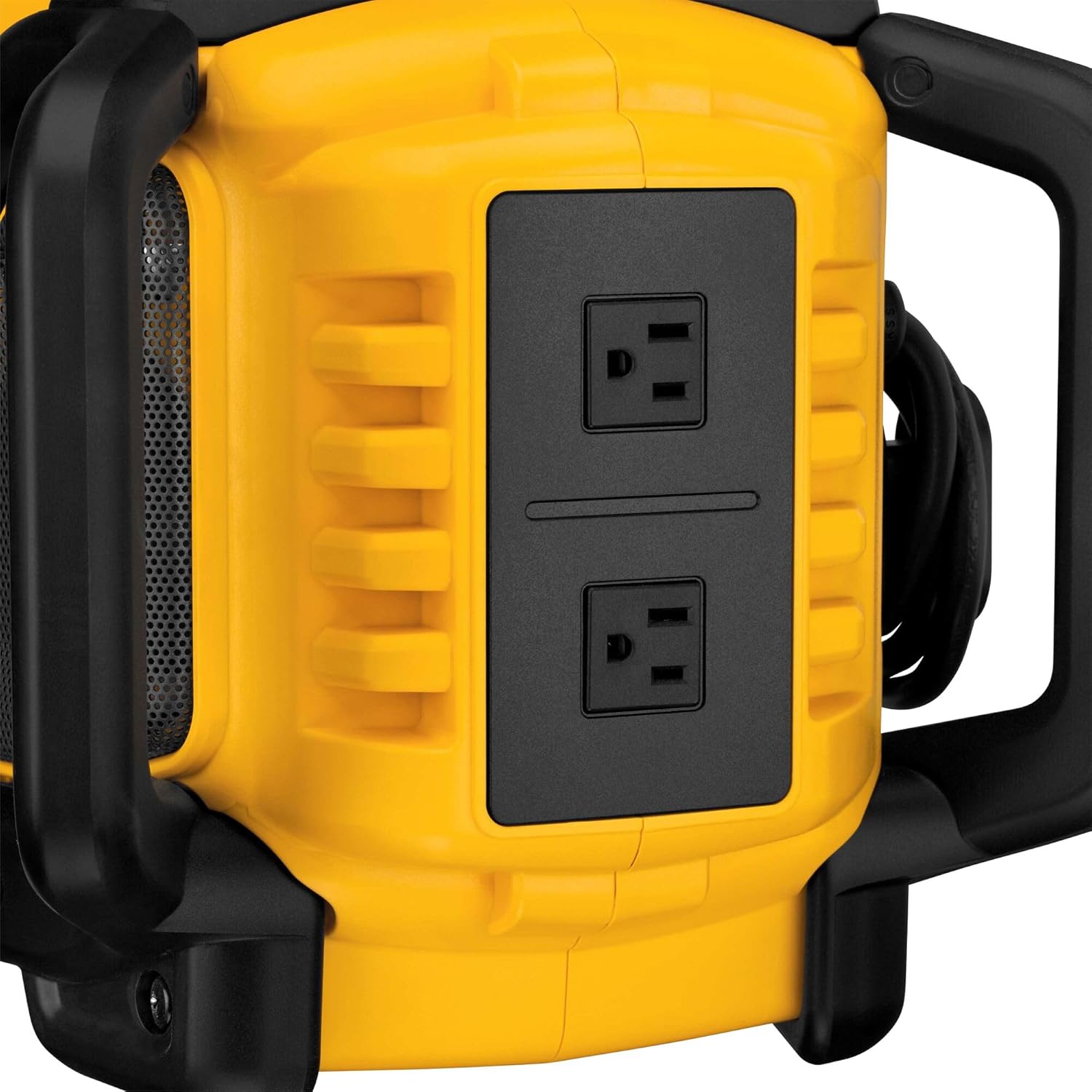
Figure 7: Two integrated AC power outlets on the side of the unit for additional power needs.
Device Control (AVRCP)
When a Bluetooth device is connected, the AVRCP (Audio Visual Remote Control Protocol) allows you to control playback functions (play, pause, skip track) directly from the radio's control panel.

Figure 8: The control panel, featuring power, mode, EQ, mute, and track control buttons.
Maintenance
Cleaning
- Wipe the exterior of the radio with a soft, damp cloth. Do not use harsh chemicals or abrasive cleaners.
- Keep the ventilation openings clear of dust and debris.
- Ensure the battery compartment and charging ports are free from dirt and moisture.
Storage
- Store the unit in a clean, dry place when not in use.
- If storing for extended periods, remove the battery pack.
Troubleshooting
Refer to the table below for common issues and their solutions.
| Problem | Possible Cause | Solution |
|---|---|---|
| Unit does not power on. | No power source; dead battery; AC cord not plugged in. | Ensure AC cord is securely plugged in or a charged battery is inserted. Charge battery if needed. |
| No audio from speakers. | Volume too low; incorrect source selected; device not paired (Bluetooth); AUX cable not connected. | Increase volume. Select correct mode (FM, AM, Bluetooth, AUX). Re-pair Bluetooth device. Check AUX cable connection. |
| Bluetooth device not pairing. | Radio not in pairing mode; device too far; device already paired to another unit. | Ensure radio is in Bluetooth pairing mode (flashing indicator). Move device closer. Disconnect from other Bluetooth devices. |
| Battery not charging. | Unit not connected to AC power; battery faulty; charging port obstructed. | Connect the radio to AC power. Ensure battery is properly seated. Check for obstructions in the charging port. |
| Poor radio reception. | Antenna not extended; interference; weak signal. | Extend the antenna fully. Reposition the radio to reduce interference. |
Specifications
The following are the technical specifications for the DEWALT DCR025 Jobsite Radio Charger:
| Feature | Specification |
|---|---|
| Model Number | DCR025 |
| Power Source | Corded/Cordless (AC or DEWALT 20V MAX/FLEXVOLT Batteries) |
| Voltage | 20 Volts (DC) |
| Battery Cell Type | Lithium Ion |
| Battery Charging Amperage | 3 AMP (when on AC power) |
| Bluetooth Range | Up to 100 feet |
| USB Charging Port | 2.1 AMP |
| Audio Output | 20 Watts Per Channel |
| Radio Bands Supported | FM, AM |
| Product Dimensions | 11 x 13.6 x 19 inches (L x W x H) |
| Item Weight | 15 pounds |
| Included Components | (1) DCR025 Bluetooth Charger Radio |
Warranty Information
The DEWALT DCR025 Bluetooth Jobsite Radio Charger comes with a 3-year limited warranty. For specific terms and conditions, please refer to the warranty card included with your product or visit the official DEWALT website. This warranty typically covers defects in materials and workmanship under normal use.
Support
For further assistance, technical support, or service inquiries, please contact DEWALT customer service. You can find contact information on the official DEWALT website or in the documentation provided with your product. Please have your model number (DCR025) and serial number ready when contacting support.
Online Resources: www.dewalt.com