
Introduction
Thank you for choosing the Kaiser MSA-6515BT Amplified Speaker System. This manual provides essential information for the safe and efficient operation of your device. Please read it thoroughly before use and retain it for future reference.
Safety Instructions
To ensure safe operation and prevent damage, please observe the following precautions:
- Do not expose the speaker to rain or moisture to prevent electric shock or fire.
- Do not block ventilation openings. Ensure adequate airflow around the unit.
- Place the speaker on a stable, flat surface to prevent it from falling.
- Disconnect the power cord during lightning storms or when unused for long periods.
- Do not attempt to service the unit yourself. Refer all servicing to qualified personnel.
- Keep the speaker away from heat sources such as radiators, heat registers, stoves, or other apparatus that produce heat.
- Use only attachments/accessories specified by the manufacturer.
- Avoid placing heavy objects on the power cord or speaker.
Package Contents
Verify that all items are present in the package:
- Kaiser MSA-6515BT Amplified Speaker
- Adjustable Speaker Stand
- Wired Microphone
- Remote Control
- Power Cable
- Battery Charging Cable
Product Overview
Front View

Figure 1: Front view of the Kaiser MSA-6515BT amplified speaker, featuring the main speaker grille and the KSR brand logo at the bottom.
Side View and Portability Features

Figure 2: Side view of the speaker, illustrating the robust side handle and the wheels located at the bottom for convenient portability.
Rear Panel and Controls
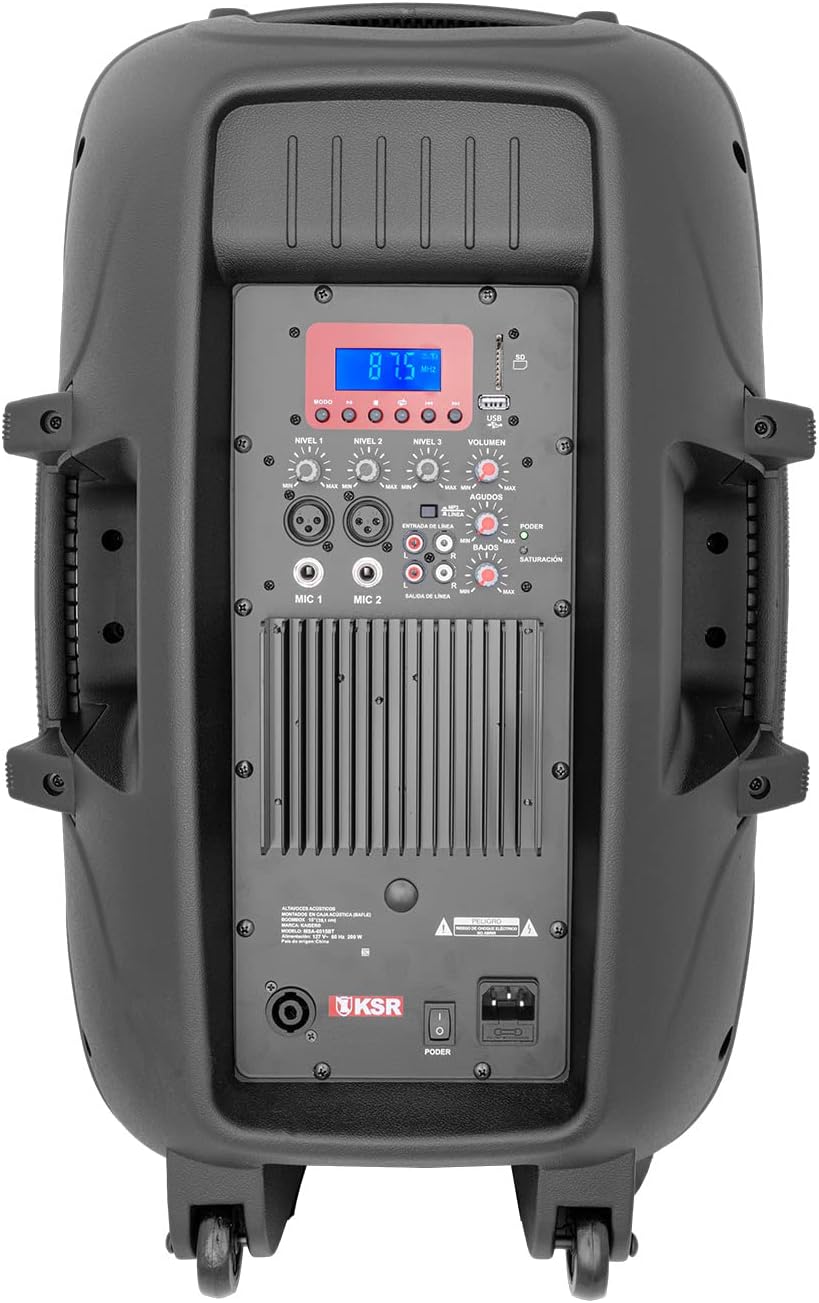
Figure 3: Detailed view of the rear control panel, including the digital display, various input/output jacks, and independent volume and tone controls.
The rear panel houses all essential controls and connection ports. Familiarize yourself with these components:
- Digital Display: Shows current mode, track information, or FM frequency.
- USB/SD Card Slots: For playing audio files from memory devices.
- Playback Controls: Play/Pause, Skip Forward/Backward, Mode selection.
- Microphone Inputs (MIC 1, MIC 2): XLR (Cannon) and 6.3mm (1/4 inch) jacks for connecting microphones.
- Line Input (RCA): For connecting external audio devices like CD players or mixers.
- Line Output (RCA): For connecting to another amplifier or speaker.
- Speakon Output: For connecting to a passive speaker.
- Volume Controls: Independent knobs for Master Volume, Microphone Volume, Line Input Volume, Bass, and Treble.
- Power Switch and AC Input: For connecting the power cable and turning the unit on/off.
Setup
Unpacking and Placement
- Carefully remove the speaker and all accessories from the packaging.
- Place the speaker on a stable, level surface. For optimal sound projection, use the included adjustable speaker stand.
- Ensure there is adequate space around the speaker for ventilation.
Connecting Power
- Ensure the speaker's power switch is in the OFF position.
- Connect the included power cable to the AC input on the rear panel of the speaker.
- Plug the other end of the power cable into a standard electrical outlet.
Operating Instructions
Powering On/Off
- To turn on the speaker, flip the power switch on the rear panel to the ON position. The digital display will illuminate.
- To turn off the speaker, flip the power switch to the OFF position.
Bluetooth Connectivity
- Turn on the speaker.
- Press the "Mode" button on the rear panel or remote control until "Bluetooth" appears on the display.
- On your Bluetooth-enabled device (smartphone, tablet, laptop), enable Bluetooth and search for available devices.
- Select "MSA-6515BT" from the list of devices. Once paired, a confirmation sound will be heard.
- You can now play audio from your device through the speaker. Optimal range is up to 2 meters.
FM Radio Operation
- Press the "Mode" button until "FM" appears on the display.
- Press the Play/Pause button to initiate an automatic scan for FM stations. The speaker will save all found stations.
- Use the Skip Forward/Backward buttons to navigate between saved stations.
USB/SD Card Playback
- Insert a USB flash drive or SD card (with audio files) into the corresponding slot on the rear panel.
- The speaker should automatically switch to USB/SD mode and begin playback. If not, press the "Mode" button to select USB/SD.
- Use the playback controls (Play/Pause, Skip Forward/Backward) to manage your audio.
Microphone and Line Inputs
- Microphone: Connect the wired microphone to either the XLR (Cannon) or 6.3mm (1/4 inch) MIC input. Adjust the "MIC Volume" knob to control the microphone's level.
- Line Input: Connect external audio sources (e.g., mixer, CD player) to the RCA Line Input. Adjust the "Line Volume" knob.
- Tone Control: Use the "Bass" and "Treble" knobs to adjust the overall sound characteristics.
- Master Volume: Adjust the "Master Volume" knob for the overall output level of the speaker.
Connecting Additional Speakers
- RCA Output: Use the RCA Line Output to send the audio signal to another amplified speaker or an external amplifier.
- Speakon Output: Connect a passive speaker to the Speakon output for expanded sound coverage. Ensure the passive speaker's impedance matches the MSA-6515BT's output requirements (8 ohms).
Maintenance
- Cleaning: Use a soft, dry cloth to clean the exterior of the speaker. Do not use abrasive cleaners or solvents.
- Storage: When not in use, store the speaker in a cool, dry place, away from direct sunlight and extreme temperatures.
- Ventilation: Regularly check that the ventilation grilles are free from dust and debris.
Troubleshooting
| Problem | Possible Cause | Solution |
|---|---|---|
| No power | Power cable not connected; Power switch off; Outlet malfunction. | Ensure power cable is securely connected. Turn power switch ON. Test outlet with another device. |
| No sound output | Volume too low; Incorrect input mode selected; Device not connected properly. | Increase Master Volume. Select correct input mode (Bluetooth, USB, FM, Line). Check all cable connections. |
| Bluetooth pairing failure | Device too far; Bluetooth not enabled on source device; Speaker not in pairing mode. | Move device closer to speaker. Ensure Bluetooth is enabled on your device. Select Bluetooth mode on speaker. |
| Microphone not working | Microphone volume low; Microphone not connected; Faulty microphone. | Increase MIC Volume. Ensure microphone is securely connected. Test with another microphone if available. |
| USB/SD playback issues | Unsupported file format; Corrupt files; USB/SD card not inserted correctly. | Ensure audio files are in a supported format (e.g., MP3). Reinsert USB/SD card. Try a different USB/SD card. |
Specifications
| Model Name | MSA-6515BT |
| Speaker Type | Professional Amplified Speaker |
| Speaker Size | 15 Inches |
| Audio Power Output | 33W PMPO / 2W RMS |
| Impedance | 8 ohms |
| Connectivity Technology | Bluetooth, RCA, USB, SD |
| Bluetooth Range | Up to 2 meters (optimal link) |
| Inputs | RCA (audio), 6.3mm (microphone), Cannon (microphone), USB, SD |
| Outputs | RCA (amplifier), Speakon (passive speaker) |
| Power Source | Electric Cable |
| Average Battery Duration | 5 Hours |
| Dimensions (D x W x H) | 40 cm x 49 cm x 75.5 cm |
| Weight | 21 Kilograms |
| Included Components | Amplified speaker, wired microphone, remote control, adjustable stand, power cable, battery charging cable. |

Figure 4: Dimensions of the Kaiser MSA-6515BT speaker.
Warranty and Support
This Kaiser MSA-6515BT Amplified Speaker System comes with a limited warranty. Please refer to the warranty card included in your package for specific terms and conditions.
For technical support, service, or warranty claims, please contact Kaiser customer service through their official channels. Keep your purchase receipt as proof of purchase.
