
1. Introduction
This manual provides essential instructions for the setup, operation, and maintenance of your Sagemcom D1110 DUO digital cordless telephone. Please read this manual carefully before using your phone to ensure proper functionality and to familiarize yourself with its features.
The Sagemcom D1110 DUO is designed for ease of use and reliable communication. It includes two handsets for convenience.
2. Package Contents
Ensure all items are present in your package:
- 1 x Base Unit
- 2 x Cordless Handsets
- 2 x Rechargeable Battery Packs (for handsets)
- 1 x Power Adapter (for base unit)
- 1 x Telephone Line Cord
- 1 x Charging Cradle (for second handset)
- 1 x Power Adapter (for charging cradle)
- 1 x User Manual (this document)
3. Setup and Installation
3.1. Installing the Handset Batteries
- Locate the battery compartment cover on the back of each handset.
- Slide the cover downwards to open it.
- Insert the rechargeable battery pack, ensuring the polarity (+/-) matches the markings inside the compartment.
- Replace the battery compartment cover.
3.2. Connecting the Base Unit
- Connect one end of the telephone line cord to the LINE port on the base unit.
- Connect the other end of the telephone line cord to your telephone wall socket.
- Connect the small end of the base unit power adapter to the POWER port on the base unit.
- Plug the large end of the power adapter into a standard electrical outlet.
3.3. Connecting the Charging Cradle
- Connect the small end of the charging cradle power adapter to the POWER port on the charging cradle.
- Plug the large end of the power adapter into a standard electrical outlet.
3.4. Initial Charging
Place each handset on its respective base unit or charging cradle. The handsets will begin charging. For optimal battery performance, allow the handsets to charge continuously for at least 16 hours before initial use, even if the display indicates a full charge sooner.
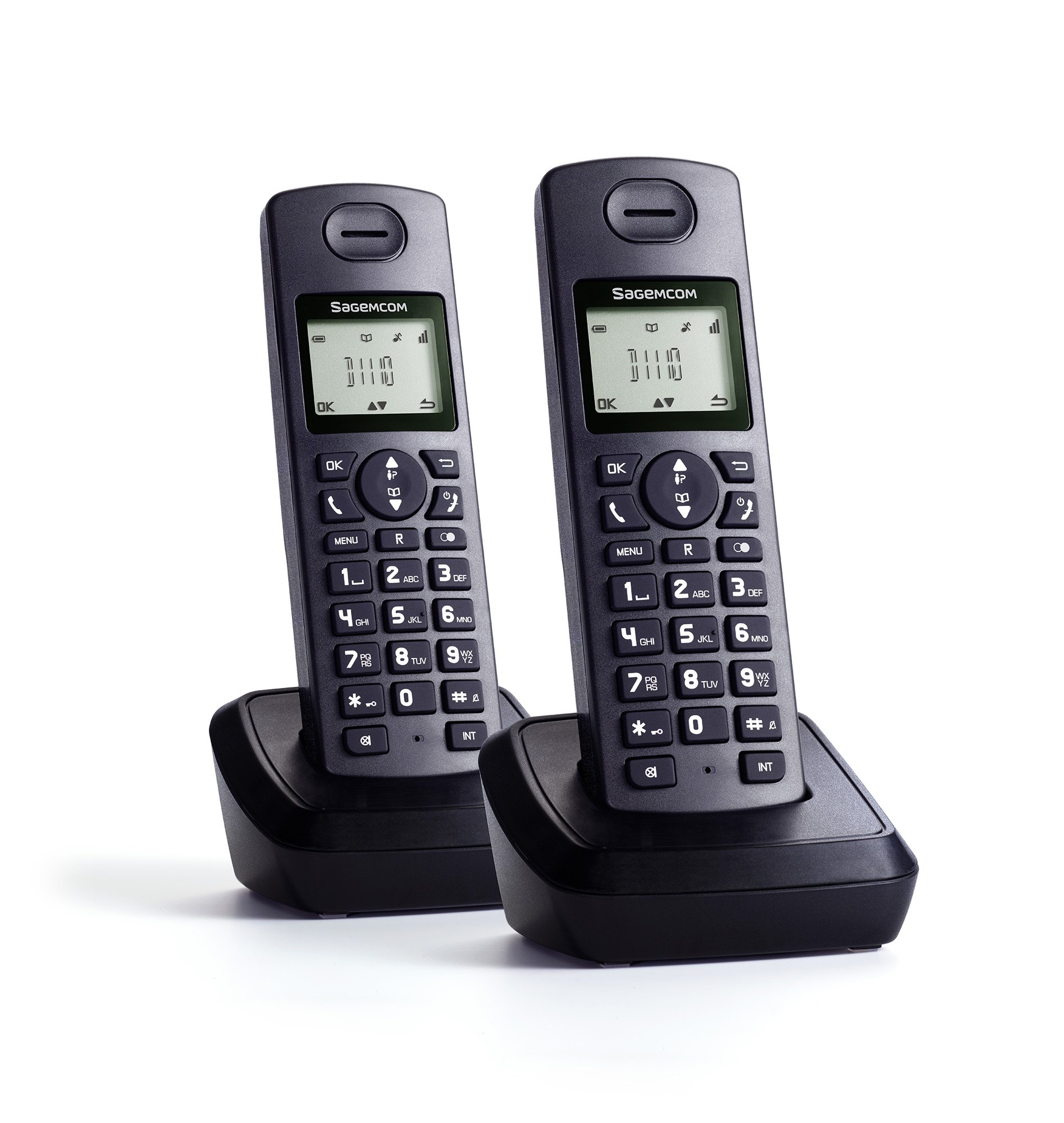
Image: Sagemcom D1110 DUO Cordless Phone. This image shows the base unit, two handsets, and charging cradle, illustrating the complete product setup.
4. Operating Instructions
4.1. Making a Call
- Pick up a handset from the base unit or charging cradle.
- Press the TALK button (often marked with a green phone icon).
- Dial the desired phone number using the keypad.
- To end the call, press the END button (often marked with a red phone icon) or place the handset back on the base unit/charging cradle.
4.2. Receiving a Call
- When the phone rings, pick up any handset.
- Press the TALK button to answer the call.
- To end the call, press the END button or place the handset back on the base unit/charging cradle.
4.3. Phonebook / Directory
Your Sagemcom D1110 DUO allows you to store frequently called numbers. Refer to the on-screen menu options for adding, editing, and deleting contacts. Typically, you will press a dedicated MENU or DIRECTORY button, navigate to the phonebook option, and follow the prompts.
4.4. Caller ID
If you subscribe to Caller ID service from your telephone provider, the caller's number (and name, if available) will be displayed on the handset screen before you answer the call. You can typically review a list of recent calls by pressing a CALL LOG or CID button.
4.5. Intercom Function
The D1110 DUO allows for internal calls between the two handsets. To use the intercom function, press the INT or INTERCOM button on one handset and select the other handset to call. This feature is useful for communicating within your home or office without using the external phone line.
5. Maintenance
- Cleaning: Clean the phone's surfaces with a soft, damp cloth. Do not use abrasive cleaners or solvents.
- Battery Care: Use only the specified rechargeable battery packs. If the phone will not be used for an extended period, remove the batteries to prevent leakage.
- Location: Avoid placing the base unit or charging cradle in direct sunlight, near heat sources, or in areas with high humidity.
- Water Exposure: This product is not waterproof. Do not expose it to water or other liquids.
6. Troubleshooting
| Problem | Possible Solution |
|---|---|
| No dial tone. |
|
| Handset not charging. |
|
| Poor call quality or static. |
|
| Handset display is blank. |
|
7. Specifications
| Feature | Detail |
|---|---|
| Brand | Sagemcom |
| Model Number | D1110DUO |
| Color | Black |
| Phone Type | Cordless |
| Material | Plastic |
| Power Source | Battery Powered |
| Dialer Type | Single Keypad |
| Item Dimensions (L x W x H) | 10 x 10 x 10 cm |
| Caller ID | Yes |
| Talk Time | 6 Hours |
8. Warranty and Support
For warranty information and technical support, please refer to the warranty card included in your product packaging or visit the official Sagemcom website. Keep your proof of purchase for warranty claims.
For further assistance, you may contact Sagemcom customer service through their official channels.


