
Introduction
This manual provides essential instructions for the safe and efficient use of your EUREKA Sweep n Groom Electric Powerbrush, models 1365 and 1383. This powerhead is designed for central vacuum systems and features a standard 1.25 inch neck for attachment. Please read this manual thoroughly before initial use and retain it for future reference.

Image 1: EUREKA Sweep n Groom Electric Powerbrush, showing the main unit with its cord and attachment point.
Important Safety Information
When using an electrical appliance, basic precautions should always be followed, including the following:
- Read all instructions before using this powerbrush.
- To reduce the risk of electric shock, do not use outdoors or on wet surfaces.
- Do not allow to be used as a toy. Close attention is necessary when used by or near children.
- Use only as described in this manual. Use only manufacturer's recommended attachments.
- Do not use with a damaged cord or plug. If appliance is not working as it should, has been dropped, damaged, left outdoors, or dropped into water, return it to a service center.
- Do not pull or carry by cord, use cord as a handle, close a door on cord, or pull cord around sharp edges or corners. Do not run appliance over cord. Keep cord away from heated surfaces.
- Do not unplug by pulling on cord. To unplug, grasp the plug, not the cord.
- Do not handle plug or appliance with wet hands.
- Do not put any object into openings. Do not use with any opening blocked; keep free of dust, lint, hair, and anything that may reduce airflow.
- Keep hair, loose clothing, fingers, and all parts of body away from openings and moving parts.
- Turn off all controls before unplugging.
- Use extra care when cleaning on stairs.
- Do not use to pick up flammable or combustible liquids, such as gasoline, or use in areas where they may be present.
- Do not pick up anything that is burning or smoking, such as cigarettes, matches, or hot ashes.
- Do not use without dust bag and/or filters in place.
Setup and Assembly
The EUREKA Sweep n Groom Electric Powerbrush is designed for easy integration with most central vacuum systems that utilize a standard 1.25 inch neck attachment.
- Connect to Wand: Insert the neck of the powerbrush firmly into the end of your central vacuum system's wand. Ensure a secure connection to prevent loss of suction and power.
- Power Connection: Connect the power cord from the powerbrush to the corresponding electrical outlet on your central vacuum hose or wall inlet. Ensure the connection is secure.
- Initial Inspection: Before first use, inspect the brushroll area for any packaging materials or debris that might obstruct its rotation.
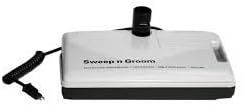
Image 2: Diagram showing the general connection point of a Sweep n Groom powerbrush to a vacuum wand.
Operating Instructions
Your Sweep n Groom Electric Powerbrush is engineered for effective cleaning on various floor types.
- Power On: Once connected to your central vacuum system, activate the powerbrush using the foot pedal on/off switch located on the powerhead. This switch controls the brushroll motor. The main vacuum suction is typically controlled by a switch on your vacuum hose handle or wall inlet.
- Carpet Cleaning: For carpets, the powerbrush features Automatic Carpet Height Adjustment. This system automatically adjusts the brushroll height to optimize cleaning performance across different carpet pile heights. The Vibra Groomer III brushroll agitates carpet fibers to lift embedded dirt.
- Bare Floor Cleaning: While primarily designed for carpets, the powerbrush can also be used on bare floors. For optimal bare floor cleaning, ensure the brushroll is engaged (if applicable) or consider using a separate bare floor attachment if available with your central vacuum system for delicate surfaces.
- Edge and Corner Cleaning: Utilize the Edge & Corner Kleener design to effectively clean along baseboards and into corners.
- Visibility: The Power View feature provides illumination to help you see dirt and debris in dimly lit areas.
- Foot Pedal: The foot pedal allows for convenient activation and deactivation of the brushroll without bending over.
Note: The product title mentions "WITH NO SWITCH". This refers to the absence of a main power switch on the powerhead itself for the entire vacuum system. The foot pedal switch specifically controls the brushroll motor.
Maintenance
Regular maintenance ensures optimal performance and extends the life of your powerbrush.
- Brushroll Cleaning: Periodically inspect the Metal Roller brush for tangled hair, threads, or debris. Use scissors to carefully cut away any obstructions. Ensure the brushroll spins freely.
- Belt Inspection: The powerbrush features a Belt Window. Regularly check the drive belt through this window for signs of wear, stretching, or damage. A worn belt can reduce cleaning effectiveness. Replace the belt if necessary.
- Nozzle Cleaning: Keep the nozzle opening clear of large debris.
- Exterior Cleaning: Wipe the exterior of the powerbrush with a damp cloth. Do not use harsh cleaners or solvents.
- Storage: Store the powerbrush in a clean, dry place when not in use.
Troubleshooting Guide
Refer to this guide for common issues and their solutions.
| Problem | Possible Cause | Solution |
|---|---|---|
| Brushroll does not spin. |
|
|
| Reduced cleaning performance. |
|
|
| Unusual noise or vibration. |
|
|
Product Specifications
- Brand: EUREKA
- Model Name: 1365, 1383 (Sweep n Groom)
- Product Type: Central Vacuum Electric Powerhead
- Neck Size: Standard 1.25 inch
- Power Source: Corded Electric
- Voltage: 230 volts
- Special Features: Metal Roller brush, Belt Window, Foot pedal on/off switch, Automatic Carpet Height Adjustment, Vibra Groomer III, Edge & Corner Kleener, Power View
- Recommended Uses: Carpet, Bare Floor
- Included Components: Brush
- Form Factor: Central (for central vacuum systems)
Warranty and Customer Support
For warranty information or technical assistance, please refer to the documentation provided with your original central vacuum system or contact EUREKA customer support directly. Keep your purchase receipt as proof of purchase.
EUREKA Customer Support: Please visit the official EUREKA website or refer to your product packaging for contact details.