1. Product Overview
The Samsung DC92-01527C is an authorized OEM (Original Equipment Manufacturer) main PCB (Printed Circuit Board) assembly designed as a replacement part for various Samsung brand models. This component serves as the central control unit for the appliance, managing its primary functions and operations. It is crucial for the proper functioning of compatible electronic devices.
2. Important Safety Information
WARNING: Installation of this component should only be performed by qualified service personnel. Improper installation can lead to electric shock, fire, or damage to the appliance.
- Disconnect Power: Always ensure the appliance is completely disconnected from the main power supply before attempting any installation or repair.
- Static Electricity: Electronic components are sensitive to static electricity. Use an anti-static wrist strap or discharge static electricity by touching a grounded metal object before handling the PCB.
- Handle with Care: Avoid touching the electronic components or connectors directly. Hold the board by its edges.
- Tools: Use appropriate insulated tools for installation.
- Ventilation: Ensure adequate ventilation during and after installation to prevent overheating.
3. Compatibility
The DC92-01527C main PCB assembly is compatible with various Samsung brand models. To ensure correct fit and function, it is essential to verify that the part number DC92-01527C matches the original part being replaced in your appliance. Refer to your appliance's service manual or the existing part for confirmation.
4. Installation Guide
This section provides a general overview of the installation process. Specific steps may vary depending on the appliance model. Always consult the appliance's service manual for detailed, model-specific instructions.
4.1. Preparation
- Power Disconnection: Unplug the appliance from the wall outlet or turn off the circuit breaker supplying power to the appliance.
- Access Panel: Locate and remove the access panel(s) that cover the main PCB assembly. This may involve removing screws or clips.
- Tools: Gather necessary tools, which may include screwdrivers, pliers, and an anti-static wrist strap.
4.2. Removal of Old PCB
- Document Connections: Before disconnecting any wires, take clear photographs or make detailed diagrams of all cable connections to the existing PCB. Note the color and position of each wire.
- Disconnect Cables: Carefully disconnect all ribbon cables, power connectors, and other wiring from the old PCB. Avoid pulling on the wires themselves; grasp the connectors.
- Remove Mounting Screws: Unscrew any mounting screws or release clips securing the old PCB in place.
- Extract Old PCB: Gently lift and remove the old PCB from its housing.
4.3. Installation of New PCB
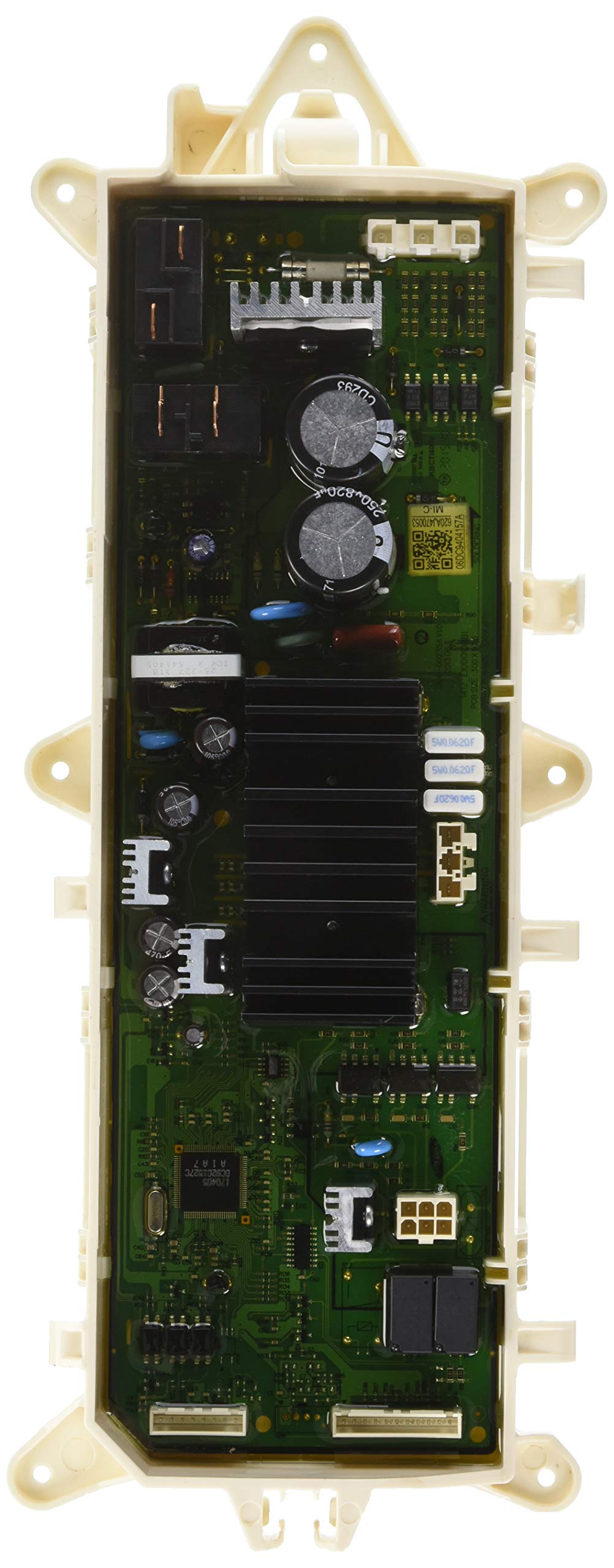
Image 1: Samsung DC92-01527C Main PCB Assembly. This image displays the main PCB with a size reference, indicating its approximate dimensions for visual confirmation.
- Position New PCB: Carefully place the new DC92-01527C PCB assembly into the designated slot, ensuring proper alignment with mounting points.
- Secure PCB: Fasten the new PCB with the mounting screws or clips removed earlier. Do not overtighten.
- Reconnect Cables: Using your photographs or diagrams, carefully reconnect all cables and connectors to their correct positions on the new PCB. Ensure all connections are secure and properly seated.
4.4. Post-Installation
- Reassemble: Replace any access panels or covers removed during the process.
- Restore Power: Plug the appliance back into the wall outlet or turn on the circuit breaker.
- Test Functionality: Power on the appliance and test its functions to ensure the new PCB is operating correctly.
5. Operation (Post-Installation Checks)
After successful installation of the DC92-01527C main PCB assembly, the appliance should resume normal operation. Observe the appliance for any unusual behavior, error codes, or malfunctions. If the appliance does not power on or function as expected, refer to the troubleshooting section.
6. Troubleshooting
If the appliance does not function correctly after replacing the main PCB, consider the following:
- No Power: Double-check that the appliance is securely plugged into a working power outlet and that the circuit breaker is on. Verify all power connections to the PCB are secure.
- Error Codes: If the appliance displays an error code, consult your appliance's user manual or service manual for the specific meaning of the code and recommended solutions.
- Incorrect Functionality: Review all cable connections to the PCB. Ensure they are correctly seated and match the original configuration. A loose or incorrect connection can cause various issues.
- Component Damage: Inspect the new PCB for any visible damage that might have occurred during shipping or installation.
- Professional Assistance: If issues persist after performing basic checks, it is recommended to contact a qualified service technician for further diagnosis and repair.
7. Maintenance
The Samsung DC92-01527C main PCB assembly requires minimal maintenance. To ensure its longevity and proper function:
- Keep Dry: Protect the appliance and its internal components from moisture and liquids.
- Cleanliness: Ensure the area around the PCB remains free from dust and debris, which can impede cooling and cause short circuits.
- Avoid Physical Damage: Prevent impacts or excessive vibrations to the appliance that could damage the PCB or its connections.
8. Specifications
| Feature | Detail |
|---|---|
| Brand Name | Samsung |
| Model Info | DC92-01527C |
| Part Number | DC92-01527C |
| Item Weight | 0.32 ounces (approximately 0.02 Pounds) |
| Product Dimensions | 1 x 1 x 1 inches (approximate) |
| Compatible Devices | Desktop, Laptop, Tablet, Smartphone, Printer, Router, Monitor (Note: This refers to general electronic device compatibility, not necessarily the appliance it controls.) |
| Hardware Interface | Internal with removable media |
| Included Components | appliance-replacement-parts |
| Batteries Required | No |
9. Warranty and Support
As an authorized OEM part, the Samsung DC92-01527C main PCB assembly is typically covered by a manufacturer's warranty. For specific warranty terms, conditions, and duration, please refer to the documentation provided with your purchase or contact the seller directly. For technical support or further assistance, you may also visit the official Samsung Store or their official support channels.