
1. Introduction
This manual provides comprehensive instructions for the safe and effective use of the FERVE F-1902 12V Battery, Alternator, and Starter Motor Analyzer. The F-1902 is designed to assess the condition of 12V automotive batteries, as well as the vehicle's starting and charging systems. Please read this manual thoroughly before operation and retain it for future reference.
2. Safety Information
- Always wear appropriate personal protective equipment, including eye protection, when working with vehicle batteries.
- Ensure the vehicle is in a well-ventilated area.
- Avoid contact with battery acid. If contact occurs, flush immediately with water and seek medical attention.
- Do not smoke or allow sparks or open flames near the battery. Batteries can produce explosive gases.
- Ensure correct polarity when connecting the analyzer to the battery. Incorrect connection can damage the device or the vehicle's electrical system. The F-1902 includes polarity error protection.
- Keep the analyzer away from moisture and extreme temperatures.
3. Product Overview
The FERVE F-1902 is a compact, microprocessor-controlled diagnostic tool for 12V vehicle electrical systems. It operates without internal batteries, drawing power directly from the battery being tested. Key features include:
- Battery Testing: Determines battery condition (good or bad) and cold cranking capacity (CCA).
- Alternator Testing: Checks the vehicle's charging system.
- Starter Motor Testing: Evaluates the vehicle's starting system.
- Operating Range: Suitable for batteries from 25 Ah to 200 Ah.
- High Resolution: Provides readings with 0.01V resolution.
- Automatic Temperature Compensation: Ensures accurate readings across varying temperatures.
- Polarity Error Protection: Prevents damage from incorrect connections.
- Durable Design: Protected by an external rubber casing for increased longevity.
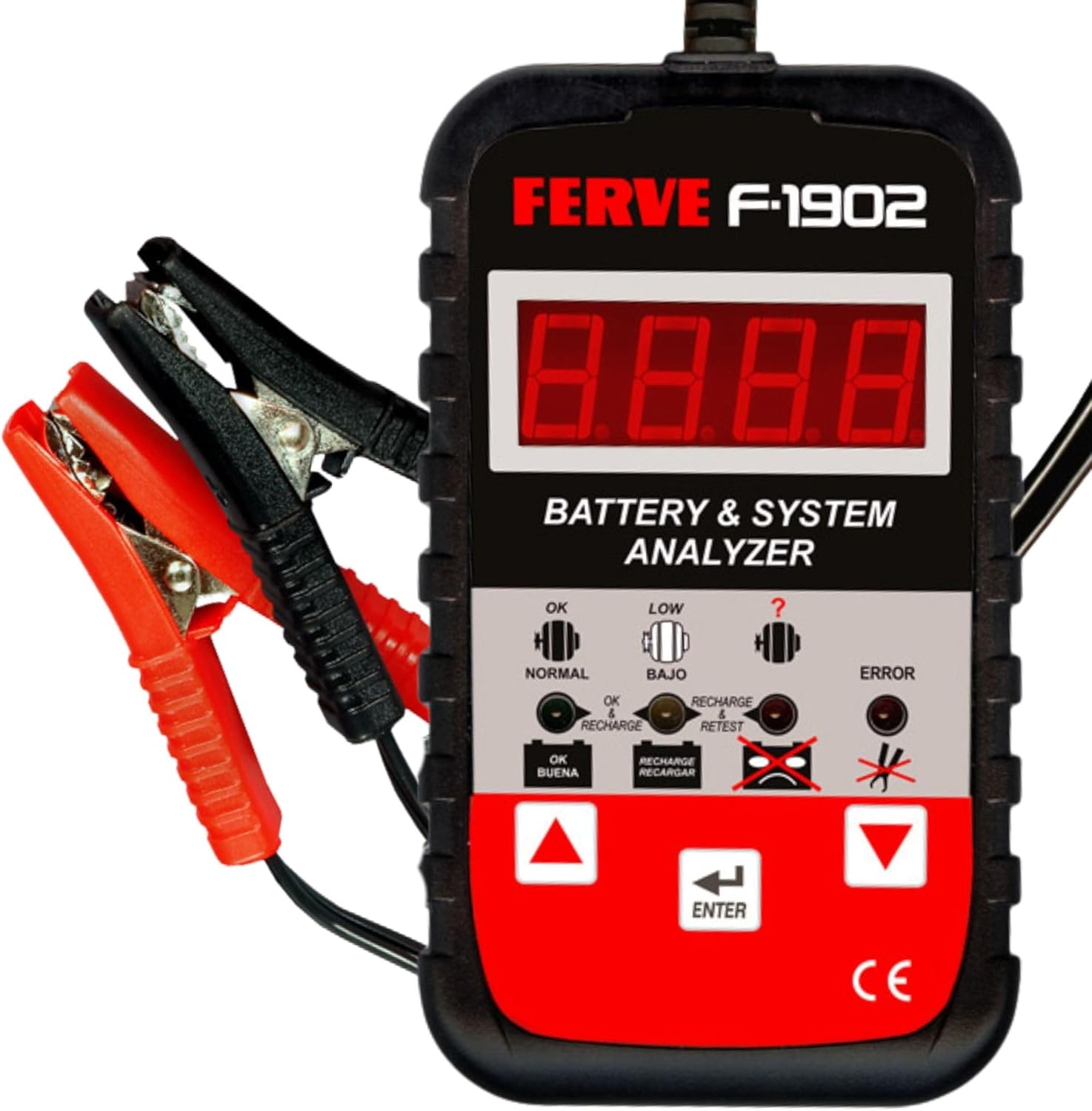

3.1. Compatibility
The F-1902 is compatible with 12V batteries found in a wide range of vehicles, including motorcycles, cars, vans, and trucks.

4. Setup
The FERVE F-1902 requires no internal batteries or external power source for operation. It draws power directly from the 12V battery being tested.
- Ensure the vehicle's ignition is off and all accessories are turned off.
- Locate the vehicle's 12V battery.
- Clean the battery terminals if they are corroded to ensure a good connection.
- Connect the red positive (+) clamp of the F-1902 to the positive (+) terminal of the battery.
- Connect the black negative (-) clamp of the F-1902 to the negative (-) terminal of the battery.
- The analyzer's display should illuminate, indicating it is powered on and ready for testing.
5. Operating Instructions
The F-1902 offers tests for the battery, alternator, and starter motor. Follow the on-screen prompts and use the arrow buttons and ENTER button to navigate the menu.

5.1. Battery Test
This test determines the overall health and cold cranking capacity of the battery.
- Ensure the analyzer is correctly connected to the battery (refer to Section 4).
- Select the 'Battery Test' option from the main menu using the arrow buttons and press 'ENTER'.
- The analyzer will prompt you to input the battery's Cold Cranking Amps (CCA) rating. This rating is usually found on a label on the battery itself. Use the arrow buttons to adjust the value and press 'ENTER' to confirm.
- The F-1902 will perform the test. This may take a few seconds.
- The display will show the test results, typically indicating the battery voltage, measured CCA, and a status such as 'OK', 'LOW', 'RECHARGE', or 'ERROR'.
- If the result is 'RECHARGE', the battery needs to be charged and retested. If 'ERROR', the battery may be faulty.

5.2. Alternator Test (Charging System Test)
This test evaluates the performance of the vehicle's charging system, including the alternator.
- Ensure the analyzer is correctly connected to the battery.
- Select the 'Alternator Test' or 'Charging System Test' option from the menu and press 'ENTER'.
- The analyzer will instruct you to start the vehicle's engine.
- Once the engine is running, the F-1902 will monitor the charging voltage.
- The display will show the charging voltage and a status indicating if the charging system is functioning correctly (e.g., 'OK', 'LOW CHARGE', 'OVERCHARGE').
- Turn off the engine after the test is complete.
5.3. Starter Motor Test (Starting System Test)
This test assesses the starter motor's ability to draw current and the battery's voltage drop during engine cranking.
- Ensure the analyzer is correctly connected to the battery.
- Select the 'Starter Motor Test' or 'Starting System Test' option from the menu and press 'ENTER'.
- The analyzer will instruct you to crank the engine. Do not start the engine; just crank it for a few seconds.
- The F-1902 will measure the minimum voltage during cranking.
- The display will show the cranking voltage and a status (e.g., 'OK', 'WEAK START', 'NO START').
6. Maintenance
- Cleaning: Wipe the analyzer with a soft, dry cloth. Do not use abrasive cleaners or solvents.
- Storage: Store the device in a cool, dry place, away from direct sunlight and extreme temperatures.
- Cable Care: Inspect the cables and clamps regularly for any signs of damage. Do not use the device if cables are frayed or clamps are broken.
7. Troubleshooting
| Problem | Possible Cause | Solution |
|---|---|---|
| Analyzer does not power on. | Incorrect connection; battery completely discharged; faulty clamps/cables. | Check clamp connections for correct polarity and secure contact. Ensure battery has at least 8V. Inspect cables for damage. |
| Inaccurate readings. | Poor connection to battery terminals; incorrect CCA input. | Clean battery terminals. Ensure clamps are securely attached. Verify correct CCA value entered for battery test. |
| 'ERROR' message displayed. | Battery fault; internal device error. | If battery is known good, retest. If error persists, battery may be faulty. If error occurs consistently across different batteries, contact support. |
8. Specifications

| Feature | Detail |
|---|---|
| Model | F-1902 |
| Voltage | 12V DC |
| Battery Capacity Range | 25 Ah to 200 Ah |
| Measurement Resolution | 0.01V |
| Dimensions (L x W x H) | 11.9 x 6.8 x 1.9 cm |
| Weight | 180 g |
| Power Source | Powered by battery under test |
| Compliance | CCA, IEC, SAE |
| Protection | Polarity error protection, external rubber casing |
9. Warranty and Support
The FERVE F-1902 comes with a 3-year warranty from the date of purchase, covering manufacturing defects. For technical assistance, troubleshooting, or warranty claims, please contact FERVE customer support through the official website or your local distributor. Please have your product model number (F-1902) and proof of purchase available when contacting support.
For more information about FERVE products, visit the official FERVE store: FERVE Store.

