
Introduction
This document provides essential information for the proper use and maintenance of your Panasonic PNLXP1005Y Handset. This handset is an authorized aftermarket replacement part designed to be compatible with various Panasonic brand telephone models. Please read this manual thoroughly before using your new handset.
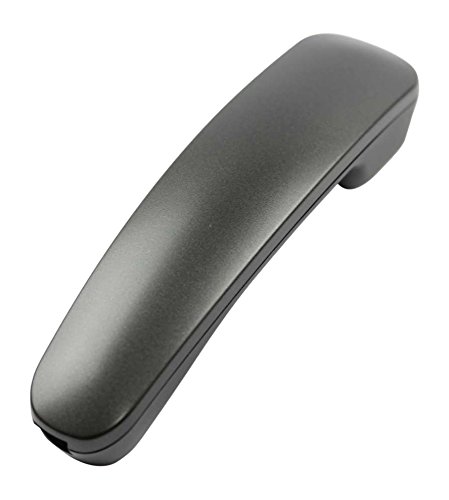
Image of the Panasonic PNLXP1005Y Handset, a replacement telephone part.
What's in the Box
The Panasonic PNLXP1005Y Handset package typically includes:
- One (1) Panasonic PNLXP1005Y Handset
Setup
The PNLXP1005Y is designed as a replacement handset. Ensure compatibility with your existing Panasonic base unit before proceeding with installation.
1. Compatibility Check
Verify that your current Panasonic telephone system is compatible with the PNLXP1005Y model. Refer to your base unit's user manual for a list of compatible handset models or contact Panasonic support if unsure.
2. Battery Installation (if applicable)
While the product specifications indicate 'Batteries Required? No' for the overall product, some handsets may use internal rechargeable batteries. If your specific PNLXP1005Y model requires user-installed batteries, open the battery compartment cover, insert the batteries according to the polarity markings, and close the cover securely. For cordless models, ensure the handset is placed on its charging cradle to charge its internal battery.
3. Connecting to the Base Unit
- For Corded Handsets: Connect the coiled cord from the handset to the designated handset port on your telephone base unit.
- For Cordless Handsets: Place the handset on the charging cradle of your compatible Panasonic base unit. Follow the base unit's instructions to register the new handset. This typically involves pressing a 'LOCATOR' or 'REGISTER' button on the base unit and then a corresponding button on the handset to establish a connection.
Operating the Handset
Making a Call
- Lift the handset or press the "TALK" button.
- Dial the desired phone number using the keypad.
- Wait for the call to connect.
Receiving a Call
When the phone rings, lift the handset or press the "TALK" button to answer the incoming call.
Ending a Call
Place the handset back on the cradle or press the "OFF" button to terminate the call.
Volume Adjustment
During a call, use the volume buttons (typically located on the side or front of the handset) to adjust the earpiece volume to a comfortable level.
Maintenance
Cleaning
Wipe the handset with a soft, dry cloth. Do not use liquid cleaners, abrasive materials, or aerosol sprays, as they may damage the device's finish or internal components.
Storage
Store the handset in a cool, dry place away from direct sunlight, excessive heat, and extreme cold. Avoid placing it near sources of moisture.
Battery Care (for cordless models)
If your handset uses rechargeable batteries, ensure it is regularly placed on the charging cradle when not in use to maintain optimal battery life. Avoid prolonged periods of complete discharge or overcharging.
Troubleshooting
If you encounter issues with your Panasonic PNLXP1005Y Handset, refer to the following common problems and solutions:
No Dial Tone
- Ensure the handset is properly connected to the base unit (for corded models) or correctly registered and charged (for cordless models).
- Check all cable connections between the base unit and the telephone line.
- Verify that your telephone service is active.
Cannot Make or Receive Calls
- Confirm that the telephone line is active and properly connected to the base unit.
- If it's a cordless handset, ensure it is within range of the base unit and fully charged.
- Try resetting your base unit by unplugging it from the power for a few minutes, then plugging it back in.
Poor Sound Quality
- Check for interference from other electronic devices (e.g., Wi-Fi routers, microwaves). Move the base unit or handset away from such devices.
- If it's a cordless handset, ensure it is not too far from the base unit.
- Clean the earpiece and microphone areas of the handset if necessary, as debris can affect sound clarity.
Specifications
The following specifications apply to the Panasonic PNLXP1005Y Handset:
| Feature | Detail |
|---|---|
| Brand | Panasonic |
| Model Number | PNLXP1005Y |
| Item Weight | 0.44 Pounds (approximately 7 ounces) |
| Product Dimensions (L x W x H) | 10 x 5 x 4 inches |
| Part Number | PNLXP1005Y |
| Batteries Required | No (for product operation, may have internal rechargeable battery) |
| Included Components | Handset (as an appliance-replacement-part) |
| ASIN | B01GSK3I7M |
| Date First Available | June 8, 2016 |
Warranty and Support
As an authorized aftermarket product, warranty terms for the Panasonic PNLXP1005Y Handset may vary. Please refer to your original purchase documentation or contact your retailer for specific warranty information and return policies.
For technical support or further assistance with your Panasonic product, please visit the official Panasonic website or contact their customer service department directly.