1. Introduction
This manual provides detailed instructions for the operation and maintenance of your Roadstar HIF-1993BT Retro HiFi System. Please read this manual thoroughly before using the device to ensure proper function and to maximize your listening experience. This versatile audio system combines classic aesthetics with modern functionality, offering multiple playback options including turntable, CD player, Bluetooth connectivity, FM radio, and cassette player, along with a USB recording feature.
2. Safety Instructions
- Power Source: Ensure the unit is connected to a power supply matching the voltage specified on the rating label.
- Ventilation: Do not block any ventilation openings. Allow adequate space around the unit for proper airflow.
- Water and Moisture: Do not expose the unit to rain, moisture, or dripping/splashing liquids. Do not place objects filled with liquids, such as vases, on the unit.
- Heat: Keep the unit away from heat sources such as radiators, heat registers, stoves, or other apparatus (including amplifiers) that produce heat.
- Cleaning: Clean only with a dry cloth. Do not use liquid cleaners or aerosol cleaners.
- Servicing: Do not attempt to service this product yourself. Refer all servicing to qualified service personnel.
- Placement: Place the unit on a stable, flat surface to prevent it from falling.
- Remote Control Battery: If applicable, ensure batteries are inserted correctly and dispose of used batteries responsibly.
3. Package Contents
Please check that all items listed below are included in your package:
- Roadstar HIF-1993BT HiFi System
- Remote Control
- User Manual (this document)
- Power Cable
4. Product Overview
The Roadstar HIF-1993BT is a multi-functional audio system designed to play various media formats. Below are images illustrating the main components and features of your device.
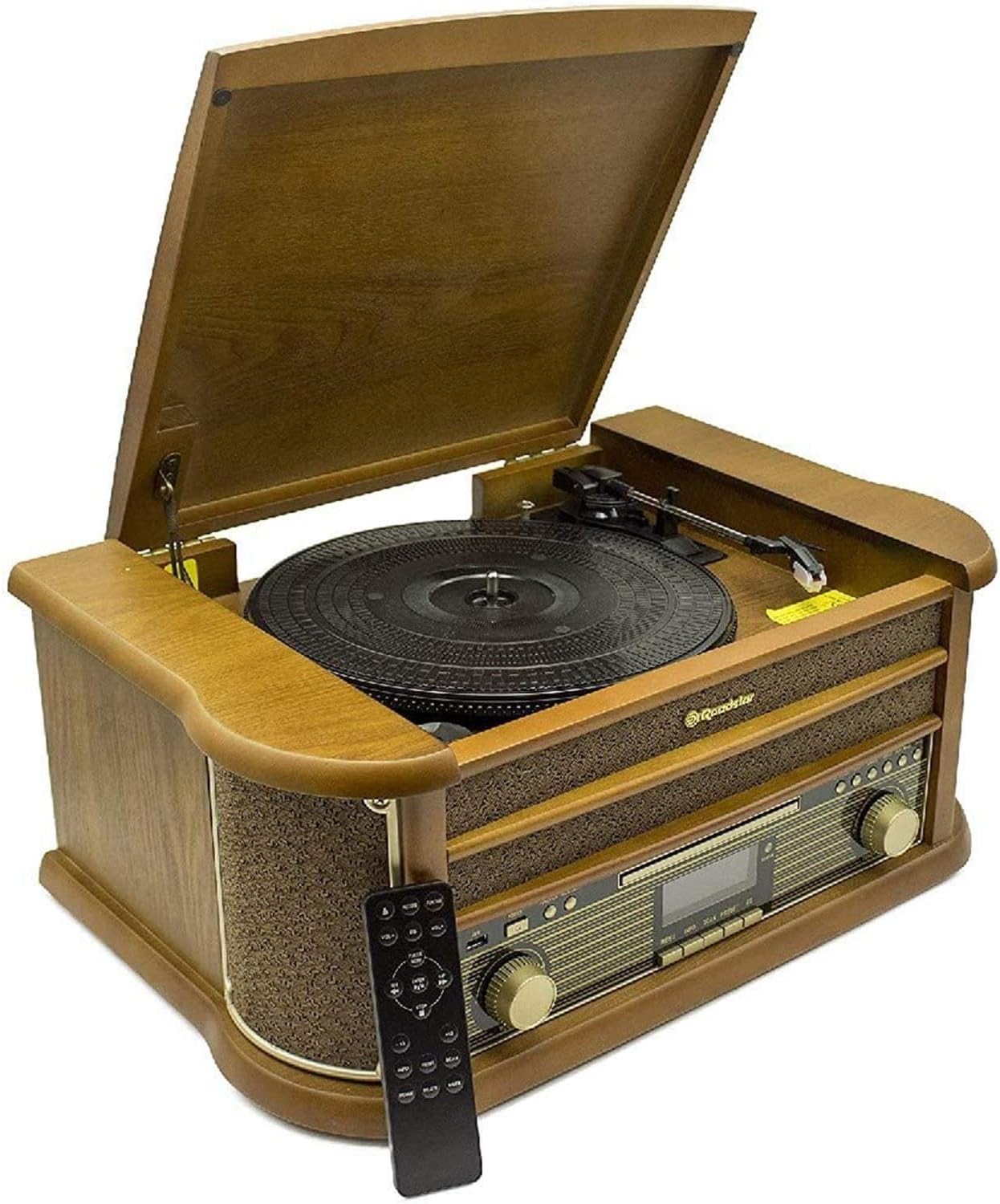
Figure 4.1: Overall view of the Roadstar HIF-1993BT HiFi system with the turntable lid open and remote control.

Figure 4.2: Key features of the Roadstar HIF-1993BT system, including FM Radio, Bluetooth, CD/CDR/CDRW player, MP3 playback, USB recording, Cassette player, USB, and AUX IN.
4.1 Front Panel Controls

Figure 4.3: Front view of the system, highlighting the central control panel and integrated speakers.
- POWER Button: Turns the unit on or off.
- FUNCTION/RECORD Button: Selects input source (CD, FM, Bluetooth, Phono, Cassette, USB) and initiates recording.
- VOLUME Knob: Adjusts the audio output level.
- TUNER/ENTER Knob: Tunes FM radio frequencies and confirms selections.
- CD Control Buttons: Play/Pause, Stop, Skip/Search (Forward/Backward), Play Mode, Open/Close.
- USB Port: For USB playback and recording.
- LED Display: Shows current function, track number, frequency, etc.
- Cassette Deck: For playing audio cassettes.
4.2 Turntable Section

Figure 4.4: Close-up view of the turntable platter and tonearm assembly.
- Turntable Platter: Where records are placed.
- Tonearm: Holds the stylus for playing records.
- Speed Selector: Switch to select 33, 45, or 78 RPM.
5. Setup
- Unpacking: Carefully remove the unit from its packaging. Retain the packaging for future transport or storage.
- Placement: Place the HiFi system on a stable, level surface, ensuring adequate ventilation around the unit.
- Power Connection: Connect the power cable to the AC inlet on the back of the unit and then to a wall outlet.
- Antenna (FM): Extend the FM wire antenna for optimal radio reception.
- Remote Control: Insert batteries into the remote control, observing correct polarity.
6. Operating Instructions
6.1 General Operation
- Press the POWER button to turn the unit on.
- Use the FUNCTION/RECORD button to cycle through input sources: CD, FM, Bluetooth, Phono (Turntable), Cassette, USB.
- Adjust the volume using the VOLUME knob.
6.2 Turntable Operation (Phono)
- Lift the turntable lid.
- Select the PHONO function using the FUNCTION/RECORD button.
- Place a record on the turntable platter.
- Set the speed selector (33, 45, or 78 RPM) to match your record. For 45 RPM records, use the included adapter if necessary.
- Gently lift the tonearm and position the stylus over the desired track on the record.
- Lower the tonearm slowly onto the record. Playback will begin.
- At the end of the record, the tonearm may automatically return to its rest position (depending on the model's auto-stop feature). Otherwise, manually lift and return the tonearm.
6.3 CD Player Operation

Figure 6.1: Close-up view of the CD player tray.
- Select the CD function using the FUNCTION/RECORD button.
- Press the OPEN/CLOSE button to open the CD tray.
- Place a CD (CD, CD-R, CD-RW) with the label side up into the tray.
- Press the OPEN/CLOSE button again to close the tray. The display will show the total number of tracks.
- Press the PLAY/PAUSE button to start playback.
- Use the SKIP/SEARCH buttons to navigate between tracks.
- Press the STOP button to end playback.
- Programming Playback: Refer to the detailed instructions in the full manual for programming specific track orders.
6.4 Bluetooth Operation

Figure 6.2: Control panel section indicating Bluetooth functionality.
- Select the Bluetooth function using the FUNCTION/RECORD button. The display will show "BT" or a similar indicator, and the unit will enter pairing mode.
- On your Bluetooth-enabled device (smartphone, tablet, etc.), enable Bluetooth and search for available devices.
- Select "HIF-1993BT" from the list of devices.
- Once paired, you can play audio from your device through the HiFi system.
6.5 FM Radio Operation
- Select the FM function using the FUNCTION/RECORD button.
- Extend the FM wire antenna for better reception.
- Rotate the TUNER/ENTER knob to manually tune to your desired FM station.
- For automatic scanning and saving of stations, refer to the detailed instructions in the full manual.
6.6 Cassette Player Operation

Figure 6.3: Close-up view of the cassette deck with auto-stop feature.
- Select the CASSETTE function using the FUNCTION/RECORD button.
- Insert an audio cassette into the cassette deck.
- Press the PLAY button on the cassette deck to start playback.
- Use the FAST FORWARD and REWIND buttons to navigate the tape.
- Press the STOP/EJECT button to stop playback and eject the cassette. The auto-stop system will automatically stop the tape at the end.
6.7 USB Recording (Encoding)
The Roadstar HIF-1993BT allows you to convert audio from vinyl records to digital format on a USB drive.
- Insert a USB drive into the USB port.
- Select the PHONO (Turntable) function.
- Start playing the vinyl record you wish to record.
- Press the RECORD button (often combined with the FUNCTION button, or a dedicated button). The recording indicator will light up.
- To stop recording, press the RECORD button again or the STOP button. The recorded audio will be saved as an MP3 file on your USB drive.
7. Maintenance
- Cleaning the Unit: Wipe the exterior of the unit with a soft, dry cloth. Do not use abrasive cleaners or solvents.
- Cleaning the Stylus: Periodically clean the turntable stylus with a soft brush designed for this purpose, brushing from back to front.
- CD/Cassette Care: Handle CDs by their edges and keep them clean. Store cassettes away from magnetic fields and direct sunlight.
- Dust Cover: Keep the turntable dust cover closed when not in use to prevent dust accumulation.
8. Troubleshooting
| Problem | Possible Cause | Solution |
|---|---|---|
| No power | Power cable not connected; Power outlet not active | Ensure power cable is securely connected; Try a different power outlet |
| No sound | Volume too low; Incorrect function selected; Speakers disconnected (if external) | Increase volume; Select correct input source; Check speaker connections |
| Turntable not spinning or playing | Speed selector incorrect; Tonearm not lowered; Drive belt issue | Set correct speed (33/45/78 RPM); Lower tonearm onto record; Contact service if drive belt is suspected |
| CD not playing | CD inserted incorrectly; CD dirty/scratched; CD format not supported | Insert CD label-side up; Clean CD with a soft cloth; Ensure CD is CD/CD-R/CD-RW format |
| Bluetooth pairing failed | Device too far; Bluetooth not enabled on device; Incorrect device selected | Move device closer; Enable Bluetooth on your device; Select "HIF-1993BT" from device list |
| Poor radio reception | Antenna not extended; Location interference | Fully extend FM antenna; Reposition the unit for better reception |
9. Specifications
- Brand: Roadstar
- Model Name: HIF-1993BT
- Color: Wood
- Material: Wood
- Dimensions (Approx.): Not specified in provided data.
- Item Weight: 7400 Grams
- Power Output: 2 x 2.0 W
- Turntable Speeds: 33, 45, 78 RPM
- CD Player: Programmable, supports CD, CD-R, CD-RW
- Bluetooth: Yes, for wireless audio streaming
- Radio Tuner: Analog FM
- Cassette Player: Yes, with auto-stop system
- USB Port: 1 (for playback and vinyl-to-digital encoding)
- Special Features: Vinyl-to-digital encoding, LED display, Remote control included
- Compatible Devices: Multiplatform
10. Warranty and Support
For warranty information and technical support, please refer to the warranty card included with your product or contact Roadstar customer service directly. Keep your purchase receipt as proof of purchase for any warranty claims.


