
1. Introduction
This manual provides detailed instructions for the installation, operation, and maintenance of the Balboa BP2000G1 Digital Spa Controller (Spa Pack), PN# 56377-02. The BP2000G1 is a high-end spa control system designed for hot tubs with multiple pumps, offering advanced features and configurations. Please read this manual thoroughly before attempting any installation or operation to ensure safe and correct usage.

Figure 1: Front view of the Balboa BP2000 Spa Heater Pack, showing the control panel interface.
2. Safety Information
Always observe the following safety precautions to reduce the risk of injury, fire, electric shock, or property damage:
- Installation and servicing must be performed by a qualified technician.
- Disconnect all power to the spa before performing any service or maintenance.
- Ensure all electrical connections comply with local and national electrical codes.
- Do not operate the spa pack if any part is damaged or appears to be malfunctioning.
- Keep the spa pack enclosure sealed to prevent water ingress.
3. Setup and Installation
3.1 Electrical Connections
The BP2000G1 spa pack is primarily designed for a 240-volt, 3-wire service (with neutral). It can also be used with a 2-wire, 240-volt service (without neutral) if all connected load devices are 240-volt. All receptacles, except the light, can be switched to supply either 120 Volts or 240 Volts when using a 3-wire service.
- Wiring: Refer to the internal wiring diagram located inside the spa pack cover for specific connection points.
- DIP Switches: If replacing an existing Balboa unit, ensure the DIP switch settings match the previous configuration. Adjustments may be necessary based on the number and type of pumps and other accessories.
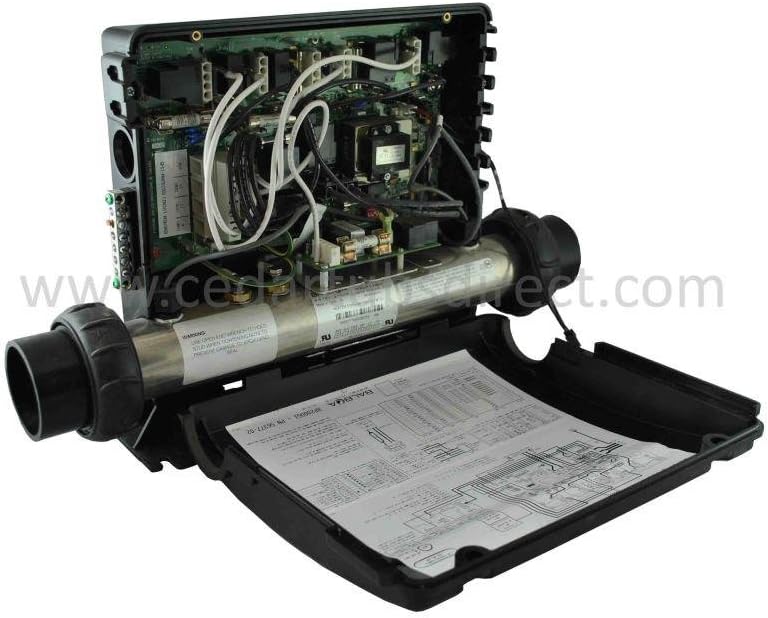
Figure 2: Internal view of the BP2000 spa pack, showing the circuit board and wiring connections. Consult this diagram for proper electrical hookup.
3.2 Plumbing Connections
The spa pack is designed for standard 2-inch piping. Adapters can be installed for use with 1-1/2 inch piping. Ensure all plumbing connections are watertight to prevent leaks.
- The unit comes with two 2-inch heater tail pieces for connection.

Figure 3: Rear view of the BP2000 spa pack, illustrating the plumbing connections for water intake and output.
3.3 Topside Controller and Accessories
The BP2000G1 requires a 4-pin TP or SpaTouch series topside controller for operation. It can also utilize 6-pin AX series auxiliary panels and supports optional Wi-Fi capability with a BWA Wi-Fi transceiver.
4. Operating Instructions
The BP2000G1 offers various operating modes and programmable features:
- Heating Modes: The unit features 'Ready' and 'Rest' heating modes. In 'Ready' mode, the spa maintains the set temperature. In 'Rest' mode, the heater only activates during filter cycles.
- Temperature Ranges: Two temperature ranges (High and Low) are available, allowing for precise temperature control.
- Filter Cycles: The real-time clock with battery backup allows for programming of filter cycles by time of day, optimizing energy usage.
- Optional Wi-Fi: With the addition of a BWA Wi-Fi transceiver, the spa can be controlled remotely via a compatible application.
Refer to your specific topside controller's manual for detailed instructions on navigating menus and adjusting settings.
5. Maintenance
Regular maintenance ensures the longevity and optimal performance of your Balboa BP2000G1 spa pack:
- Visual Inspection: Periodically inspect all wiring and plumbing connections for signs of wear, corrosion, or leaks.
- Freeze Protection: The unit includes built-in freeze protection, which automatically activates pumps and/or the heater to prevent freezing in cold conditions. Ensure the spa pack is always powered during cold weather.
- Enclosure Integrity: Keep the spa pack enclosure clean and sealed to protect internal components from moisture and debris.
6. Troubleshooting
The BP2000G1 features self-diagnostics to assist in identifying potential issues. Error codes will typically display on your topside controller. Consult your topside controller manual for a list of specific error codes and their meanings.
Common Issues:
- No Power: Check the circuit breaker and ensure all electrical connections are secure.
- Heater Not Functioning: Verify water flow through the heater. Low water flow can prevent the heater from activating. Check for air locks in the plumbing.
- Heater Overheating/Sticking: If the heater contact is sticking, causing overheating, professional service is required. This may indicate a need for circuit board replacement.
- Pump Malfunction: Ensure pumps are properly primed and receiving power. Check for blockages in pump impellers.
For complex issues or if self-diagnostics do not resolve the problem, contact a qualified spa technician.
7. Specifications
| Feature | Specification |
|---|---|
| Model | BP2000G1 (PN# 56377-02) |
| Heater Element | 5.5 kW (Incoloy 800) |
| Voltage Compatibility | 240V (3-wire with neutral or 2-wire without neutral) |
| Pump Support | Up to three 2-speed pumps |
| Piping Compatibility | 2-inch standard (1-1/2 inch with adapters) |
| Topside Controller | Requires 4-pin TP or SpaTouch series |
| Auxiliary Panels | Supports 6-pin AX series |
| Wi-Fi Capability | Optional (with BWA Wi-Fi transceiver) |
| Item Weight | 12 pounds |
Dimensions:

Figure 4: Dimensional drawing of the Balboa BP2000 Spa Heater Pack, including length, width, and height measurements.
8. Warranty Information
The Balboa BP2000G1 Spa Heater Pack comes with a 2-year manufacturer's warranty. This warranty covers defects in materials and workmanship under normal use. Please retain your proof of purchase for warranty claims. For full warranty terms and conditions, refer to the documentation provided with your product or contact Balboa Water Group directly.
9. Support
For technical assistance, troubleshooting guidance beyond this manual, or to inquire about replacement parts, please contact your authorized Balboa Water Group dealer or visit the official Balboa Water Group website for support resources.


