
1. Introduction
The PIXEL TW-283/E3 is a multi-functional wireless shutter release and timer remote control designed for compatible Canon cameras. This device allows photographers to trigger their camera's shutter wirelessly, set various timer functions, and avoid camera shake, making it ideal for long exposures, macro photography, and self-portraits. This manual provides detailed instructions for its setup, operation, and maintenance.
2. Product Overview
The TW-283/E3 system consists of two main components: a transmitter and a receiver. Both units feature an LCD screen for easy setting adjustments and channel synchronization.
2.1 Transmitter (TW-283)
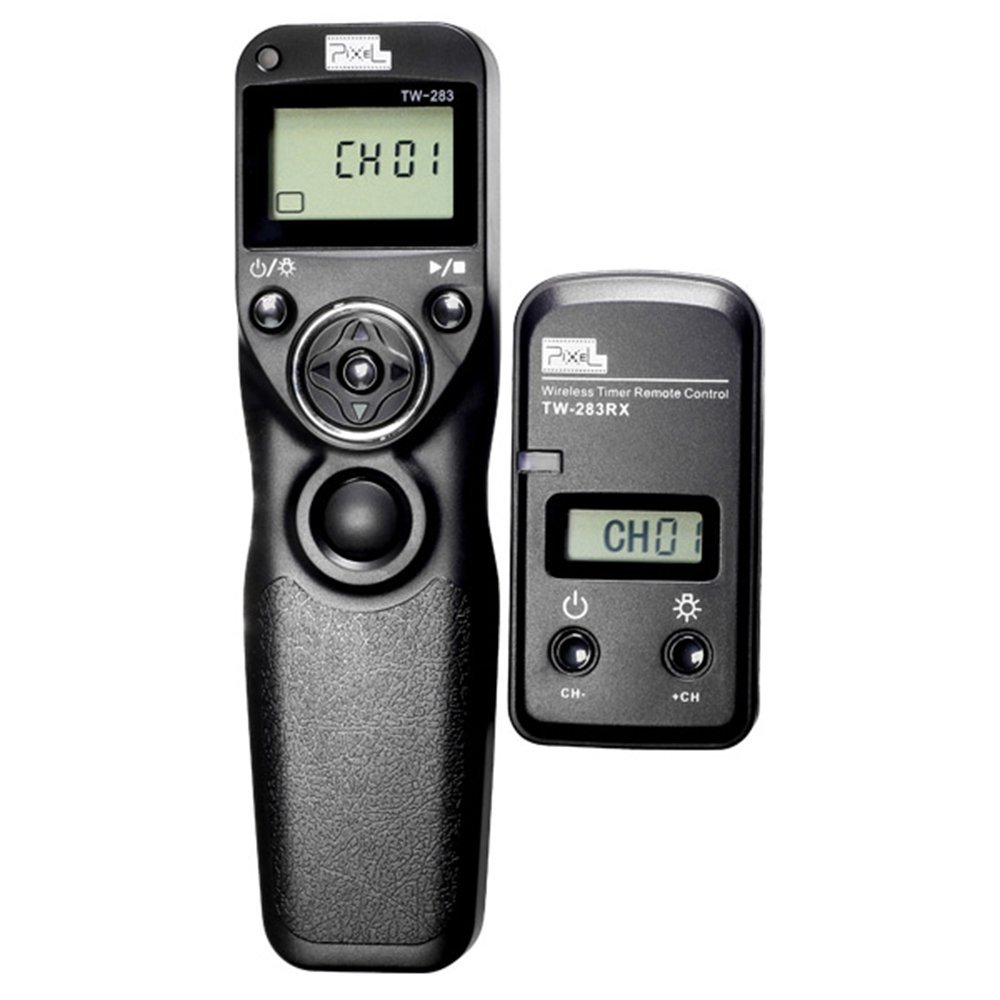
The transmitter is the handheld unit used to control the camera. It features an LCD display, a multi-function button for focus and shutter release, and buttons for navigating menus and setting timer functions.
2.2 Receiver (TW-283RX)

The receiver connects directly to your camera's remote control port. It receives signals from the transmitter and triggers the camera's shutter. It also features an LCD display for channel synchronization.
2.3 Compatibility

The TW-283/E3 is compatible with various Canon cameras, including but not limited to:
- Canon Rebel: Digital Rebel, XT, XSi, T1i, T2i, T3, T3i, T4i, T5, T5i, T6i, T6s, SL1
- Canon EOS: 60D, 60Da, 70D
- Canon PowerShot: G10, G11, G12, G15, G16, G1X, G1X Mark II, SX50 HS, SX60 HS
- Also compatible with select Pentax, Samsung, Contax, Sigma, and Hasselblad models.
3. Setup
3.1 Battery Installation
Both the transmitter and receiver require batteries for operation. Please use four new AAA batteries in total (two for the transmitter, two for the receiver).
- Locate the battery compartment on the back of both the transmitter and receiver.
- Open the compartment cover.
- Insert two AAA batteries into each unit, ensuring correct polarity (+ and - terminals) as indicated inside the compartment.
- Close the battery compartment cover securely.
3.2 Connecting the Receiver to Your Camera

The receiver connects to your camera via the provided E3 connection cable.
- Locate the remote control socket on your Canon camera. This is typically a small port on the side of the camera body.
- Connect one end of the E3 cable to the receiver's port.
- Connect the other end of the E3 cable to your camera's remote control socket. Ensure the cable is inserted completely and securely for proper contact.

The receiver can be mounted on the camera's hot shoe or attached to a strap for convenience.
3.3 Setting the Channel
For the transmitter and receiver to communicate, they must be set to the same channel. The default channel is CH01.
- Power on both the transmitter and receiver.
- On each unit, use the channel selection buttons (e.g., 'CH-' and 'CH+') to select the desired channel.
- Verify that the channel displayed on both the transmitter and receiver LCD screens matches.
4. Operating Instructions
The PIXEL TW-283/E3 offers various modes of operation, including single shot, continuous shooting, bulb mode, and timer functions.
4.1 Basic Shutter Release
- Ensure both units are powered on and set to the same channel.
- Gently press the main shutter button on the transmitter halfway down to activate your camera's autofocus.
- Press the button fully down to trigger the camera's shutter.
4.2 Timer Functions
The TW-283/E3 features an LCD timer remote control, allowing for precise control over your shots. Refer to the on-screen menu of the transmitter to set:
- Delay Timer: Set a delay before the first shot.
- Long Exposure Timer: Control the duration of bulb exposures.
- Interval Timer: Set the time between consecutive shots for time-lapse photography.
- Number of Shots: Specify how many photos to take.
Use the directional buttons around the main shutter button on the transmitter to navigate the menu and adjust values. Confirm settings by pressing the appropriate button as indicated on the screen.
5. Maintenance
- Cleaning: Use a soft, dry cloth to clean the exterior of the transmitter and receiver. Avoid using liquid cleaners or solvents.
- Battery Replacement: Replace batteries when the low battery indicator appears on the LCD screen or if the units fail to power on. Remove batteries if the device will not be used for an extended period to prevent leakage.
- Storage: Store the device in a cool, dry place away from direct sunlight and extreme temperatures.
6. Troubleshooting
- Device not powering on: Check battery installation and ensure batteries are new and correctly inserted.
- Camera not firing:
- Ensure the receiver's connection cable is fully inserted into the correct remote socket on the camera.
- Verify that both the transmitter and receiver are set to the same channel.
- Check camera settings to ensure it is ready to receive remote commands.
- Intermittent connection: Ensure there are no significant obstructions between the transmitter and receiver. Check battery levels in both units.
7. Specifications
| Feature | Detail |
|---|---|
| Model Number | TW-283/E3 (Internal: QW015) |
| Brand | PIXEL |
| Product Dimensions | 6.6 x 4.3 x 1.2 inches |
| Item Weight | 4 ounces |
| Batteries Required | 4 AAA batteries (2 for transmitter, 2 for receiver) |
| Compatible Devices | Canon Cameras (E3 type connector) and other listed models |
| Special Feature | Ergonomic design, LCD Timer Remote Control |
8. Warranty and Support
For warranty information or technical support, please refer to the documentation included with your purchase or contact PIXEL customer service directly. Keep your proof of purchase for any warranty claims.


