
1. Introduction
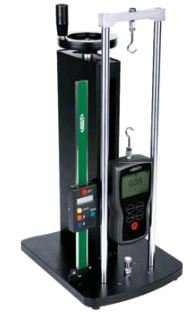
This manual provides essential information for the proper setup, operation, and maintenance of your INSIZE ISF-MT1K-SCALE Digital Scale. This digital scale is designed for precise measurement applications, offering an 8-inch range. It is intended to be used as an accessory, specifically pairing with the INSIZE ISF-MT1K testing stand for integrated measurement solutions.
2. Setup
The INSIZE ISF-MT1K-SCALE is designed to integrate with the INSIZE ISF-MT1K testing stand. Follow these general guidelines for initial setup:
- Unpacking: Carefully remove the digital scale from its packaging. Inspect for any visible damage.
- Mounting: Position the digital scale onto the designated mounting area of the INSIZE ISF-MT1K testing stand. Ensure it is securely fastened according to the testing stand's instructions. The scale typically attaches to the vertical column of the stand.
- Power Source: If the scale requires external power or batteries, ensure they are correctly installed or connected. (Specific power requirements are not detailed in the product information, refer to the device itself or the ISF-MT1K stand manual for details).
- Initial Check: After mounting, perform a basic power-on test to ensure the display functions correctly.
3. Operating Instructions
Once the digital scale is properly set up with the INSIZE ISF-MT1K testing stand, follow these general steps for operation:
- Power On: Press the ON/OFF button to power on the digital scale. The display should illuminate and show a reading, typically "0.00" or a previous measurement.
- Zeroing/Tare: Before taking a measurement, ensure the scale is at its zero point. If not, press the ZERO or TARE button to reset the display to zero. This is crucial for accurate measurements.
- Measurement: Operate the testing stand to move the measurement probe or fixture. The digital scale will display the displacement or force measurement in real-time.
- Unit Conversion: If available, press the UNIT button to switch between different units of measurement (e.g., inches, millimeters).
- Reading Hold: Some models may feature a HOLD function to freeze the current reading on the display.
- Power Off: After use, press and hold the ON/OFF button to power off the device to conserve battery life.
Note: Specific button functions and display indicators may vary. Refer to the markings on your device for precise controls.
4. Maintenance
Proper maintenance ensures the longevity and accuracy of your INSIZE ISF-MT1K-SCALE Digital Scale:
- Cleaning: Regularly clean the scale's surface and display with a soft, dry, lint-free cloth. Avoid using abrasive cleaners, solvents, or harsh chemicals, as these can damage the finish or electronic components.
- Storage: When not in use, store the digital scale in a clean, dry environment, away from direct sunlight, extreme temperatures, and high humidity. Keep it protected from dust and physical impact.
- Battery Replacement: If the scale operates on batteries and the display indicates low power, replace the batteries promptly with the specified type. Ensure correct polarity during installation.
- Calibration: While digital scales are generally factory-calibrated, periodic checks against known standards are recommended for critical applications to ensure continued accuracy. Consult a qualified technician if recalibration is required.
- Avoid Impact: Protect the scale from drops or impacts, as this can affect its internal mechanisms and measurement accuracy.
5. Troubleshooting
This section addresses common issues you might encounter with your digital scale. If the problem persists, contact customer support.
| Problem | Possible Cause | Solution |
|---|---|---|
| Display is blank or not turning on. | Low or dead batteries; power connection issue. | Replace batteries with new ones. Ensure power cable (if applicable) is securely connected. |
| Inaccurate or inconsistent readings. | Scale not zeroed; environmental factors (vibration, temperature); physical damage; calibration required. | Press the ZERO button before measurement. Ensure stable operating environment. Inspect for damage. Consider professional recalibration. |
| Buttons are unresponsive. | Software glitch; physical damage; low battery. | Try turning the scale off and on again. Replace batteries. If problem persists, contact support. |
6. Specifications
Key technical specifications for the INSIZE ISF-MT1K-SCALE Digital Scale:
- Model Number: ISF-MT1K-SCALE
- Brand: INSIZE
- Measurement Range: 8 inches
- Compatibility: Designed to pair with INSIZE ISF-MT1K testing stand
- Package Dimensions: 15.35 x 2.36 x 1.38 inches
- Item Weight: Approximately 15.52 ounces
- Unit Count: 1.0 Count
- Country of Origin: China
- ASIN: B01GL7UMP8
7. Warranty & Support
Information regarding the specific warranty terms for the INSIZE ISF-MT1K-SCALE Digital Scale was not provided in the available product data. For warranty details, please refer to the documentation included with your purchase or contact INSIZE customer service directly.
For technical support, service, or inquiries, please contact the manufacturer, INSIZE, through their official website or the contact information provided with your product.


