Introduction
Thank you for choosing the Esperanza ECN002 ZEPHYR Inhaler. This device is designed to deliver medication in mist form for respiratory therapy. Please read this manual thoroughly before use to ensure safe and effective operation. Keep this manual for future reference.
Important Safety Information
- Always consult your physician or pharmacist to determine the appropriate medication, dosage, and treatment regimen.
- Do not use the device in the presence of flammable anesthetics or oxygen.
- Keep the device out of reach of children and pets.
- Ensure the power cord is not damaged and is properly connected to a suitable power outlet.
- Do not immerse the compressor unit in water or any other liquid.
- Unplug the device from the power outlet before cleaning or maintenance.
- Use only accessories and parts recommended by the manufacturer.
Product Components
The Esperanza ECN002 ZEPHYR Inhaler typically includes the following components:
- Compressor Unit
- Nebulizer Cup
- Air Tube
- Mouthpiece
- Adult Mask
- Child Mask
- Air Filters (spare)

Image 1: The Esperanza ECN002 ZEPHYR Inhaler compressor unit with the nebulizer cup, air tube, and mask assembled, ready for use. The blue lid of the compressor is open, revealing the power switch.
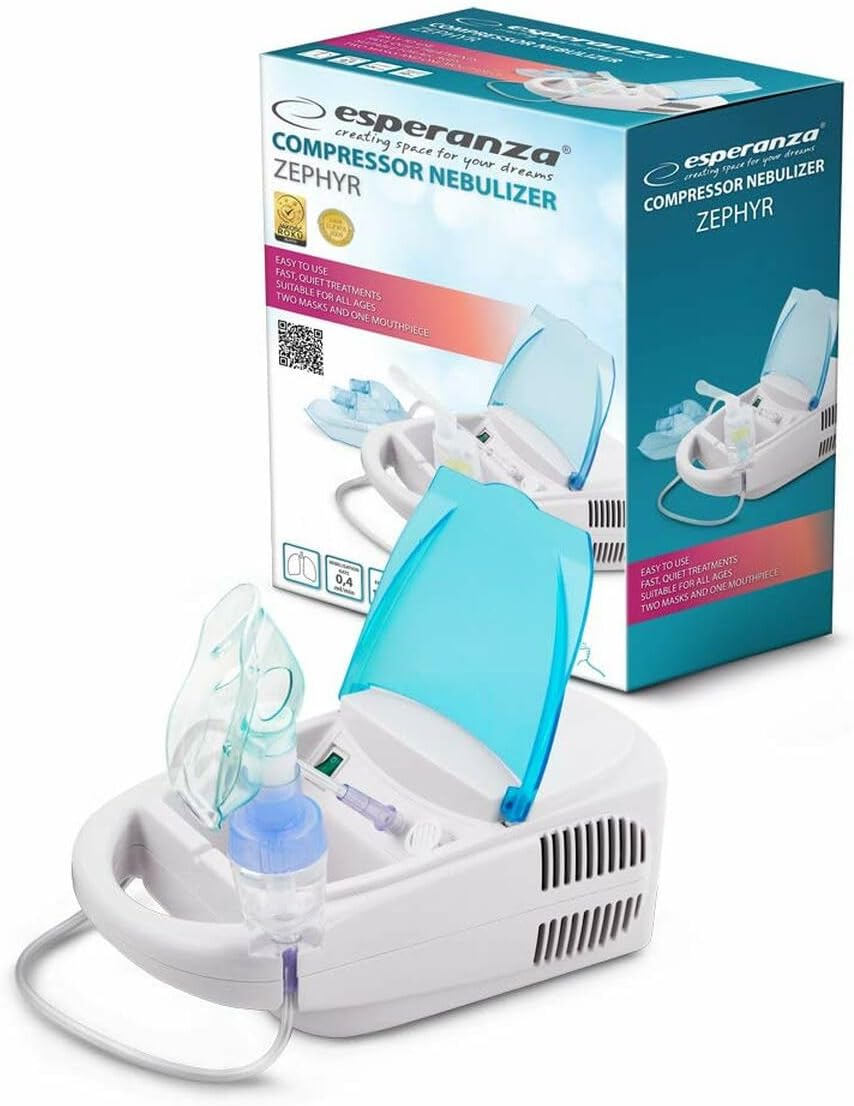
Image 2: The Esperanza ECN002 ZEPHYR Inhaler shown alongside its retail packaging box. The box highlights features such as "easy to use" and "fast, quiet treatments."
Setup and Assembly
- Unpack: Carefully remove all components from the packaging. Inspect for any damage.
- Clean: Before first use, clean the nebulizer cup, mouthpiece, and masks as described in the "Maintenance" section.
- Connect Air Tube: Attach one end of the air tube to the air outlet on the compressor unit.
- Attach Nebulizer Cup: Connect the other end of the air tube to the bottom inlet of the nebulizer cup.
- Add Medication: Open the nebulizer cup and pour the prescribed amount of medication into the medication chamber. Do not overfill.
- Attach Mouthpiece/Mask: Securely attach either the mouthpiece or the appropriate mask (adult or child) to the top of the nebulizer cup.
- Power Connection: Plug the power cord into a suitable electrical outlet.
Operating Instructions
- Ensure the device is properly assembled and medication is loaded into the nebulizer cup.
- Sit upright in a comfortable position.
- Turn on the compressor unit by pressing the power switch. The compressor will begin to produce a fine mist.
- If using the mouthpiece, place it between your teeth and seal your lips around it. Breathe slowly and deeply through your mouth.
- If using a mask, place it over your nose and mouth, ensuring a snug fit. Breathe normally.
- Continue the treatment until the medication chamber is empty or the mist stops forming. This typically takes 5-10 minutes for 5ml of medication.
- Once the treatment is complete, turn off the compressor unit and unplug it from the power outlet.
Note: The device may become warm during operation. This is normal. If it becomes excessively hot or emits unusual odors, discontinue use immediately and contact customer support.
Cleaning and Maintenance
Daily Cleaning (After Each Use):
- Disconnect the nebulizer cup, mouthpiece/mask, and air tube from the compressor unit.
- Disassemble the nebulizer cup into its individual parts.
- Wash all parts (except the air tube and compressor unit) in warm soapy water. Rinse thoroughly with clean water.
- Air dry the parts completely on a clean paper towel or cloth.
Disinfection (Once a Week or as Recommended):
- After daily cleaning, soak the nebulizer cup parts, mouthpiece, and mask in a solution of one part white vinegar to two parts distilled water for 30 minutes.
- Alternatively, use a medical disinfectant solution as recommended by your physician or the manufacturer.
- Rinse all parts thoroughly with sterile water and air dry completely.
Compressor Unit Cleaning:
- Wipe the exterior of the compressor unit with a clean, damp cloth. Do not use abrasive cleaners or immerse in water.
Air Filter Replacement:
- Check the air filter regularly (e.g., every 10-12 treatments or monthly).
- Replace the filter when it appears discolored or clogged. Do not wash or reuse old filters.
- Refer to the filter compartment on your compressor unit for replacement instructions.
Storage:
- Store the clean, dry device and accessories in a cool, dry place, away from direct sunlight and extreme temperatures.
Troubleshooting
| Problem | Possible Cause | Solution |
|---|---|---|
| Device does not turn on. | Power cord not plugged in; power switch off; no power from outlet. | Ensure power cord is securely plugged in. Turn power switch to ON. Check outlet with another appliance. |
| No mist or very little mist produced. | Nebulizer cup empty; medication chamber overfilled; air tube kinked or disconnected; nebulizer cup clogged; air filter dirty. | Add medication. Do not overfill. Check air tube for kinks or disconnections. Clean nebulizer cup. Replace air filter. |
| Device is unusually loud or vibrates excessively. | Air filter clogged; device on an uneven surface; internal issue. | Replace air filter. Place device on a flat, stable surface. If problem persists, contact customer support. |
| Device becomes very hot. | Prolonged use; poor ventilation. | Allow device to cool down between uses. Ensure adequate ventilation around the compressor unit. If overheating persists, discontinue use and contact support. |
Technical Specifications
- Model Number: ECN002
- Brand: Esperanza
- Dimensions (L x W x H): 2.79 x 24.64 x 16.51 cm (approximately 1.1 x 9.7 x 6.5 inches)
- Weight: 1.87 kg (approximately 4.12 lbs)
- Power Source: AC (standard electrical outlet) - Specific voltage/frequency not provided, refer to device label.
- Nebulization Rate: Not specified in provided data.
- Particle Size: Not specified in provided data.
- Operating Temperature: Not specified in provided data.
- Storage Temperature: Not specified in provided data.
Specifications are subject to change without notice for product improvement.
Warranty and Support
For warranty information, please refer to the warranty card included with your product or contact your point of purchase. Esperanza provides customer support for product inquiries, troubleshooting, and spare parts.
Please retain your proof of purchase for warranty claims.


