
1. Introduction
This manual provides essential information for the safe and effective operation, maintenance, and care of your Hercules HRK-100 5-Speed Electric Rotary Cutter. Please read all instructions carefully before use and retain this manual for future reference.
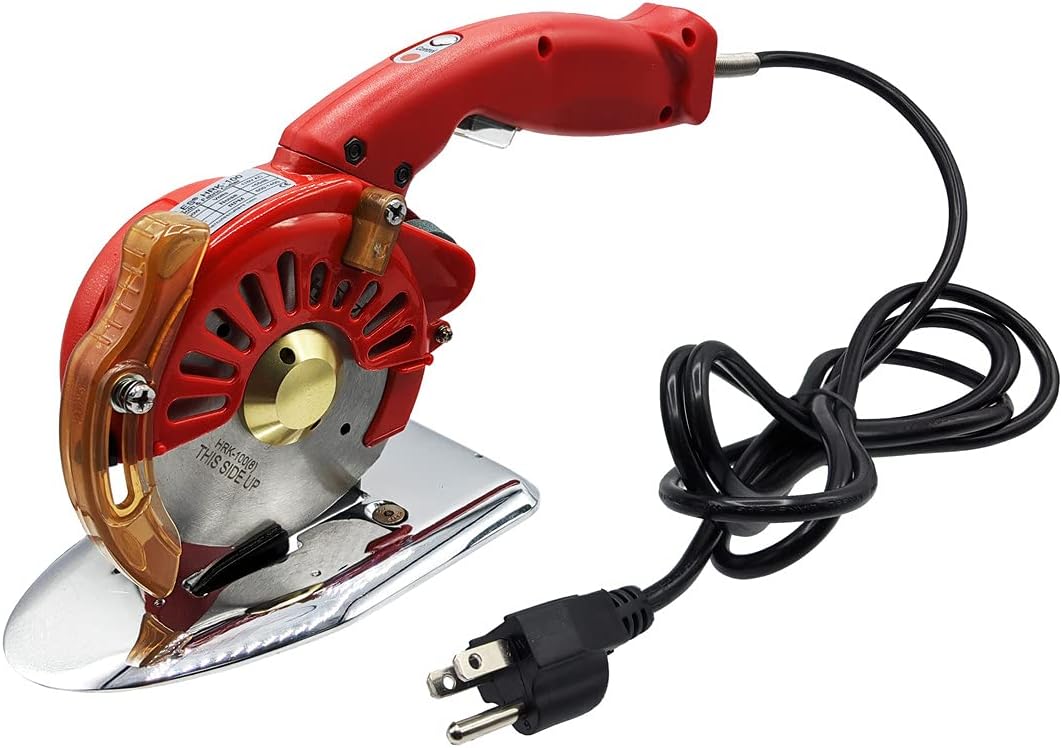
Figure 1: Hercules HRK-100 5-Speed Electric Rotary Cutter.
2. Safety Instructions
Always observe basic safety precautions when using electrical appliances to reduce the risk of fire, electric shock, and personal injury.
- Keep work area clean and well-lit. Cluttered or dark areas invite accidents.
- Do not operate power tools in explosive atmospheres, such as in the presence of flammable liquids, gases, or dust.
- Keep children and bystanders away while operating a power tool. Distractions can cause you to lose control.
- Avoid accidental starting. Ensure the switch is in the off-position before plugging in.
- Dress properly. Do not wear loose clothing or jewelry. Keep your hair and clothing away from moving parts.
- Always use appropriate safety equipment, such as safety glasses and gloves.
- Maintain the tool with care. Keep cutting tools sharp and clean.
- Disconnect the plug from the power source before making any adjustments, changing accessories, or storing power tools.
3. Package Contents
Verify that all items listed below are included in your package. If any items are missing or damaged, please contact customer support.
- Hercules HRK-100 Electric Rotary Cutter
- Power Cord (110 Volt AC)
- Spare Blade (Octagonal)
- Sharpening Stone
- Lubricating Oil
- Hex Wrench
- Blade Removal Tool
- Instruction Manual

Figure 2: The Hercules HRK-100 Electric Rotary Cutter and its included accessories.
4. Product Overview
The Hercules HRK-100 is a versatile 5-speed electric rotary cutter designed for efficient cutting of various fabrics, including cloth, leather, natural, and synthetic materials. It features a 4-inch high-speed octagonal blade and a built-in sharpening stone for continuous performance.
Key Components:
- Octagonal Blade: 4-inch high-speed blade for precise cuts.
- Blade Guard: Provides protection during operation.
- Built-in Sharpening Stone: For convenient blade maintenance.
- Speed Control: 5 adjustable speed settings for different materials.
- Power Switch: To turn the unit on and off.
- Base Plate: Ensures smooth gliding over materials.
- Worklight: Illuminates the cutting area for improved visibility.

Figure 3: Side view of the Hercules HRK-100, highlighting its ergonomic design.

Figure 4: Detail of the blade guard, designed for user safety.
5. Setup
5.1 Unpacking
- Carefully remove the rotary cutter and all accessories from the packaging.
- Inspect the unit for any signs of damage. Do not use if damaged.
- Ensure all listed package contents are present.
5.2 Power Connection
Connect the power cord to the rotary cutter and then plug it into a standard 110 Volt AC electrical outlet. Ensure the power switch is in the OFF position before plugging in.
5.3 Blade Check
Before each use, ensure the octagonal blade is securely fastened and free from any obstructions. The carbide-tipped, spring-loaded lower blade works in conjunction with the octagonal blade to prevent fabric jamming.
6. Operation
6.1 Powering On/Off
To turn the unit ON, press the power switch located on the handle. To turn it OFF, release the switch. Some models may feature a safety lock button that needs to be engaged before the power switch can be activated.
6.2 Speed Selection
The Hercules HRK-100 features 5 adjustable speeds. Select the appropriate speed based on the material thickness and type. Lower speeds are generally suitable for delicate or single-layer fabrics, while higher speeds are effective for thicker or multiple layers.
6.3 Cutting Techniques
Place the material flat on a stable cutting surface. Guide the rotary cutter along your desired cutting line with steady pressure. The tool is designed to cut through single and multiple layers of light to medium-weight fabrics, including cotton, silk, synthetic fiber, and leather.
Video 1: Demonstration of the Hercules HRK-100 cutting various fabrics effortlessly.
6.4 Using the Blade Guard
The blade guard should always be in place during operation to prevent accidental contact with the blade. Ensure it moves freely and does not obstruct the cutting path.
6.5 Using the Worklight
The integrated worklight illuminates the cutting area, enhancing visibility and precision, especially in dimly lit environments. Activate it as needed during operation.

Figure 5: The worklight feature on the Hercules HRK-100 for improved visibility.
7. Maintenance
7.1 Blade Sharpening
The HRK-100 features a built-in sharpening stone. To sharpen the blade, activate the sharpening mechanism (refer to the specific instructions on the device or packaging for exact procedure). Regular sharpening ensures clean and efficient cuts.

Figure 6: The integrated sharpening stone for maintaining blade sharpness.
7.2 Cleaning the Unit
After each use, disconnect the power and carefully clean any fabric debris or dust from the blade and surrounding areas. Use a soft, dry cloth. Do not use harsh chemicals or abrasive cleaners.
7.3 Blade Replacement
When the blade becomes dull or damaged beyond sharpening, it should be replaced. Refer to the included blade removal tool and follow the instructions provided with your replacement blade for safe installation. Always ensure the unit is unplugged before attempting blade replacement.
8. Troubleshooting
- Cutter not turning on: Ensure the power cord is securely plugged into a live 110V AC outlet. Check the power switch and any safety lock buttons.
- Poor cutting performance: The blade may be dull. Use the built-in sharpening stone or replace the blade if necessary. Ensure the material is laid flat and the blade guard is not obstructing the cut.
- Fabric jamming: Ensure the blade is clean and free of debris. The spring-loaded lower blade is designed to prevent jamming, but excessive material thickness or improper technique can still cause issues. Reduce the number of layers being cut.
- Overheating: If the unit feels excessively hot, discontinue use immediately and allow it to cool down. Ensure proper ventilation and avoid continuous heavy-duty operation without breaks.
9. Specifications
| Feature | Specification |
|---|---|
| Brand | Hercules |
| Model Number | HRK100 |
| Power Source | 110 Volt AC |
| Speed Settings | 5-Speed |
| Blade Type | 4-inch Octagonal |
| Blade Material | Stainless Steel or High Carbon Steel |
| Handle Material | Plastic |
| Item Weight | 3.57 Pounds |
| Product Dimensions | 10"L x 4"W |
| UPC | 855170001018 |
10. Warranty and Support
For warranty information or technical support, please refer to the documentation included with your purchase or contact Hercules customer service directly. Keep your purchase receipt as proof of purchase for any warranty claims.